• Welcome to Photrio!
    Registration is fast and free. Join today to unlock search, see fewer ads, and access all forum features.
    Click here to sign up

Should I be using a contrast filter?

Recent Classifieds

Forum statistics

Threads
201,201
Messages
2,820,355
Members
100,581
Latest member
bountsy
Recent bookmarks
0

powasky

Member
Allowing Ads
Joined
Jan 2, 2013
Messages
128
Location
Delaplane, V
Format
35mm
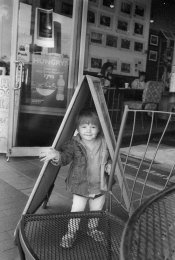
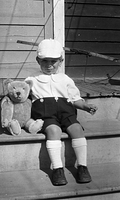
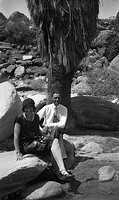
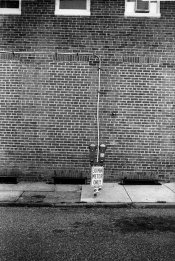
Recently, I've been shooting a lot of B&W recently with no filter. Results are attached.

I scan them (Nikon 4000ED) and do my dodge/burn in Lightroom. Should I be shooting them with more contrast (a light or mid yellow filter) or should I keep shooting them pretty flat, and giving them the business in LR? Is this entirely personal preference? For a short time, I had access to a darkroom where I could wet print, but I am only scanning now. My gut tells me that I should be shooting flat and dealing with it in post, but I'm not certain that's the best way to achieve a balanced final image.
 

Attachments

  • Scan-130506-0004.jpg
    Scan-130506-0004.jpg
    651.9 KB · Views: 214
  • Scan-130506-0007.jpg
    Scan-130506-0007.jpg
    431.4 KB · Views: 217
  • Scan-130506-0003.jpg
    Scan-130506-0003.jpg
    570.3 KB · Views: 246

Truzi

Member
Joined
Mar 18, 2012
Messages
2,676
Format
Multi Format
I'm not qualified to answer your question since I've only recently gotten into B&W with any seriousness and have barely used filters. However, I have recently tested a few MF backs I acquired. So I took two of each picture - one with and one without a yellow filter.

I really like how the filter seems to separate objects and textures by how it affects contrast.

Some feel a contrast filter is "mandatory" for B&W. I think it would be based on the scene, composition, lighting, and desired effect (and I'm only beginning to learn this). I definitely see how contrast filters can improve a negative and will probably use them a lot.

However, it all comes down to what you like. On the other hand, if a filter makes it easier for you to get the desired final image, I'd think the answer would be to use one.
 
OP
OP

powasky

Member
Allowing Ads
Joined
Jan 2, 2013
Messages
128
Location
Delaplane, V
Format
35mm
Truzi-

Do you have any pictures that can demonstrate what you're describing? What do you mainly shoot?

Part of me is of the thinking that you described - a contrast filter is generally necessary, based on inherent contrast, lighting, etc etc. Unfortunately, I usually shoot photographs that don't allow me the time to meter the scene correctly and choose a filter. I suppose what I'm asking is if I would be better off throwing a light yellow on there for all the time shooting, rather than shooting with no filter at all.
 

Dr Croubie

Member
Allowing Ads
Joined
Mar 21, 2013
Messages
1,986
Location
rAdelaide
Format
Multi Format
I'd always shoot with a yellow, but then that's me and I always do shoot with a yellow. Except when I shoot with a different colour, red filters really really make the sky black and stand out (I've got one of a red lighthouse against a blue sky shot with a red filter, the lighthouse is very bright and the sky very dark, i'd share but I'm at work and it's at home). Most portraits I use an Orange, just to give a bit stronger effect than Yellow.
I haven't used blues and greens much, but i will one day (when i shoot landscapes where i want bright green foliage and dark red autumn-leaves, or something). My GAS bought a whole colour-set cheap and one day they'll be there waiting when I want them.

I also shoot B+W negs and scan. But I hate PPing in photoshop (well, I use GIMP, can't afford PS or the Windows to run it on), so i'd prefer to get it right in camera. If you hate taking longer in the field and love sitting staring at a screen to get it right, then by all means don't use a filter, but i'm definitely the opposite. Also, one day if/when I ever wet-print them, then they'll already have the effect that I'm after.
 

Dr Croubie

Member
Allowing Ads
Joined
Mar 21, 2013
Messages
1,986
Location
rAdelaide
Format
Multi Format
ps, as for using a filter vs not, I hope that didn't sound like "I use one and therefore you should". There's definitely some situations where you don't need (or can't use) one. I had to shoot indoors on Sunday, 180/2.8 Sonnar and Delta 3200 at EI3200 and 1/30s, I couldn't afford even half a stop of light loss with a yellow filter (let alone the 2-3 stop loss of green, all the lights on stage were green for some reason), so i shot bare-lens.
But if you're already doing the darkening/lightening in PS, you should really figure out if you want to either always darken and lighten every colour the same using a filter on the lens, or would you prefer the extra control (but increased time) of dodging/burning every shot manually?
 

Simon Howers

Member
Allowing Ads
Joined
May 21, 2011
Messages
124
Location
West Yorkshi
Format
Large Format
The short answer to the question is "Yes". In most situations monochrome film will achieve a better result with the appropriate filter. The software salesmen will tell you that you can do anything with their product, which amounts to hubris. The various coloured filters for monochrome work will allow you to vary contrast in camera, which is by far the best place to do it. "Mending" a poor neg in some computer programme is always second best and a last resort.
 

wilfbiffherb

Member
Allowing Ads
Joined
Nov 3, 2010
Messages
331
Format
Medium Format
and youve got to think about your subject. filters lighten the colour that they are eg a red filter will lighten any reds etc. so if youre shooting some autumn leaves and youve got green, red, yellow in there you need to choose which filter you want because it will lighten certain leaves and darken others.
 

pentaxuser

Member
Joined
May 9, 2005
Messages
20,252
Location
Daventry, No
Format
35mm
Look in any B&W book. There is always a section on filters and 3-5 examples of the same scene shot in yellow, yellow/green, green, orange and red. These will tell you a lot. Alternatively obtain the kind of filter books that the likes of Hoya gave away as part of its marketing where the same shots as in the B&W books are shown

pentaxuser
 

Mainecoonmaniac

Member
Allowing Ads
Joined
Dec 10, 2009
Messages
6,297
Format
Multi Format
If your images need contrast, just add developing time by 10-15%.
 

L Gebhardt

Member
Joined
Jun 27, 2003
Messages
2,364
Location
NH
Format
Large Format
It's hard to tell for sure from the scanned images, but to me it looks like you are slightly underexposing. You don't seem to have a lot of detail in the shadows. I think this prevents you from printing any areas with a true black, and will keep your contrast looking low/muddy.

As far as filters go, others have given you good advice. I don't see that they would make much difference in the three images you presented. But for images where a contrast filter will give you a strong effect it's very hard to reproduce the effect in post (either scanning or printing). So you should certainly learn to use filters and use them where appropriate.
 

tkamiya

Member
Allowing Ads
Joined
Oct 3, 2009
Messages
4,284
Location
Central Flor
Format
Multi Format
Yellow, orange, or red filter does NOT give you more contrast.... perhaps it is sometimes called that but all it does is to change the relationship between different natural colors - which might or might not result in increase in contrast. If you are shooting a scene that includes cloud, yes it does because the blue sky gets darker in comparison to the white cloud.

Looking at the photographs you gave as examples, I'd say no, don't use filters. Also, when one uses filter, he/she has a goal. I want THIS color to be darker, so I pick THIS filter. Putting one on neither (always) increase your contrast, nor improve your photograph.

If you use RED filter on your photograph with bricks, it will do funny things. Red will cause your brick (which is usually reddish) to be lighter because it will pass more red light which in turn will make that portion of your negative darker. Which in turn make your prints lighter, which in comparison with white sign and grout within the brick wall, it will be LESS contrast.
 

Gerald C Koch

Member
Allowing Ads
Joined
Jul 12, 2010
Messages
8,131
Location
Southern USA
Format
Multi Format
Yellow, orange, or red filter does NOT give you more contrast....

YES, there isn't a contrast filter per se only ones that darken the rendition of a particular color.

Now if I could only find my wire filter. Really useful for eliminating those overhead telephone and power lines. :smile:
 

Jeff Kubach

Member
Allowing Ads
Joined
Sep 29, 2007
Messages
6,912
Location
Richmond VA.
Format
Multi Format
I usually use yellow but sometimes I use orange and red. You could use red and a polerizer to really darken the sky.

Jeff
 
Joined
Jan 21, 2003
Messages
15,710
Location
Switzerland
Format
Multi Format
It depends on what you want to accentuate. Color filters merely change how the film sees the colors that are reflected from the scene.

Orange filter makes orange hues lighter, and to a lesser degree yellows and reds.

The complimentary (opposite) color of orange is blue, which means that less of that color will be let through to the film, rendering them darker. To a lesser extent this applies to purple and green.

So, color filters will increase contrast between the color of the filter itself and its complimentary color. But it does not directly alter the contrast of the negative. It just moves tonality around with some colors lighter and others darker than they would appear without the filter.

Film development alters negative contrast directly, regardless of what colors were recorded at exposure. Longer film development = more contrast, less film development = less contrast.
To some extent you can say that film exposure also alters contrast. If you don't give enough exposure some shadow values will be lost, which means that you lose contrast in the shadows, and it also means you have to over-develop which gives more contrast, so it's an indirect effect.

Don't confuse color rendition with overall negative contrast. A green leaf correctly exposed and processed with a green filter will look very light in tone, while one exposed with a red filter will appear almost black.
http://fashionbombdaily.com/wp-content/uploads/2010/04/ColorWheel1.jpg
Look at the link above to see a picture of the color wheel, which further helps explain the reasoning with color filtration.
 

M Stat

Member
Allowing Ads
Joined
Oct 29, 2010
Messages
110
Location
Columbia Riv
Format
8x10 Format
The choice of film is at issue as well. TMax has a truer color rendition than, say, Tri-X. Tri-X is more sensitive to blue light, therefore a yellow filter would be appropriate for darkening the sky value, bringing the scene more in line to how the human eye percieves it. That having been said (written), I still prefer TriX film for almost all of my photography. And yes, I use filters of all types, depending upon how I want the scene to appear in my photograph (aka "previsualization").
 

MattKing

Moderator
Moderator
Allowing Ads
Joined
Apr 24, 2005
Messages
54,712
Location
Delta, BC Canada
Format
Medium Format
As others have said, there is no such thing as a "contrast" filter for black and white.

There are, however, filters that help you differentiate different parts of certain scenes from other parts - e.g. a yellow filter can help clouds stand out from a blue sky.

And filters that reduce the effect of UV light can also make a difference. The information above about the difference between Tri-X and T-Max when using a yellow filter is most likely due to Tri-X's greater sensitivity to UV light (which a yellow filter will tend to block).
 

nworth

Member
Allowing Ads
Joined
Aug 27, 2005
Messages
2,228
Location
Los Alamos,
Format
Multi Format
From the examples you gave, a filter would probably not make a difference. Except when there are sharp color differences, a filter does not affect contrast. Development does affect contrast, and slightly longer development would give you more. You can also compensate in Lightroom.

A medium yellow filter is usually considered to be a correction filter rather than a contrast filter - it renders the light values in a daylight shot more closely to what the eye sees. It is generally a good idea to use one for general shooting. Contrast filters - red, orange, green, blue, etc. - lighten the appearance of colors similar to them and darken their complements. With a red filter, for instance, the bricks in your red brick building shot would appear light gray. They are quite useful in many black and white situations.
 

kevs

Member
Allowing Ads
Joined
Aug 21, 2006
Messages
711
Location
North of Pangolin
Format
Multi Format
Yes. No. Maybe. It all depends what look you want.

Cheers,
kevs
 

Sirius Glass

Subscriber
Joined
Jan 18, 2007
Messages
50,717
Location
Southern California
Format
Multi Format
Yellow, orange, or red filter does NOT give you more contrast.... perhaps it is sometimes called that but all it does is to change the relationship between different natural colors - which might or might not result in increase in contrast. If you are shooting a scene that includes cloud, yes it does because the blue sky gets darker in comparison to the white cloud.

Looking at the photographs you gave as examples, I'd say no, don't use filters. Also, when one uses filter, he/she has a goal. I want THIS color to be darker, so I pick THIS filter. Putting one on neither (always) increase your contrast, nor improve your photograph.

If you use RED filter on your photograph with bricks, it will do funny things. Red will cause your brick (which is usually reddish) to be lighter because it will pass more red light which in turn will make that portion of your negative darker. Which in turn make your prints lighter, which in comparison with white sign and grout within the brick wall, it will be LESS contrast.

What he said. The photographs that you posted would not benefit from filters.

Do not trust what you get from scans; try developing and printing first.
 

250swb

Member
Allowing Ads
Joined
Apr 22, 2012
Messages
1,595
Location
Peak District
Format
Multi Format
My gut tells me that I should be shooting flat and dealing with it in post, but I'm not certain that's the best way to achieve a balanced final image.

You don't necessarily need to aim for flat negatives, that may mean you can't print them properly another time in a darkroom, but if you are scanning the contrast should really be adjusted in post processing. So when scanning you should aim for a flat tone image, where you get all the tones and there is no clipping of either highlights or shadows. It will look horrible, and nothing like the end result. You then adjust it all in Lightroom or Photoshop to achieve the contrast and range you want. It is a big waste of time trying to get anywhere near the finished image at the scanning stage because scanning software is too crude. Additionally a flat 'master' image is open to further options being explored because it maintains as much information as the scanner can give, so you can start again and try the picture a different way, a bit like trying a different paper grade.

In relation to your question the negatives contrast is achieved by exposure and development, what you are doing with say a yellow filter is adjusting the tone of areas within the picture. So a blue sky maintains the separation of tonal values when otherwise it would render nearly as pale as the clouds etc.

Steve
 

cliveh

Subscriber
Allowing Ads
Joined
Oct 9, 2010
Messages
7,705
Format
35mm RF
A scan of your negatives may give us better information to help answer your original question.
 

Truzi

Member
Joined
Mar 18, 2012
Messages
2,676
Format
Multi Format
Sorry, I don't have a scanner at the moment, so I can't give examples. I think I'm going to jot down some of the information in the posts here for my own experimenting.
 

fostergregd

Member
Allowing Ads
Joined
Feb 17, 2013
Messages
2
Location
Busan, Korea
Format
35mm
I'm very much a noob to film photography and black and white.

I have been using a UV or Skylight filter (which is UV with a pink tint, right?) anytime I'm shooting outdoors under sunlight. I was told it cuts down on "haze".

Anyone more experienced want to weigh in on the need for UV protection?
 
Joined
Jan 21, 2003
Messages
15,710
Location
Switzerland
Format
Multi Format
I'm very much a noob to film photography and black and white.

I have been using a UV or Skylight filter (which is UV with a pink tint, right?) anytime I'm shooting outdoors under sunlight. I was told it cuts down on "haze".

Anyone more experienced want to weigh in on the need for UV protection?

The only way you're going to be satisfied is to take the filter off once in a while and see for yourself. I doubt it will make much difference, especially with black and white film.

A UV filter may be handy especially when you use older lenses. But your best friend is always going to be a good quality lens hood to shade your lens from direct sunlight. Your lens works best when it looks at reflected light.
 

Chris Lange

Member
Allowing Ads
Joined
Aug 17, 2009
Messages
770
Location
NY
Format
Multi Format
When I use my Nikon F3 on the street, I almost always use Tri-X or HP5+, almost always with a 35/1.4 Ai-S, and almost always use a deep red25 filter. I almost always push it, too. Not a big fan of midtones when I'm using that setup...

Conversely, when I use my Leica, I use a Summicron DR, and the same films, but rarely use a filter, and err on the side of over exposure for smoothness.

Diff'rint strokez.
 
Photrio.com contains affiliate links to products. We may receive a commission for purchases made through these links.
To read our full affiliate disclosure statement please click Here.

PHOTRIO PARTNERS EQUALLY FUNDING OUR COMMUNITY:


Ilford ADOX Freestyle Photographic Stearman Press Weldon Color Lab Blue Moon Camera & Machine
Top Bottom