
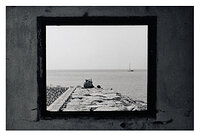


I have bought a few days ago CanoScan 9000f and already have some problems (not that I wasn't expecting them).
The first thing is that all of my photos are coming out somewhat darker than expected so I am wondering if it can be resolved during the scan rather than in the post process? And while at it, how can I get the most of the negative, in terms of getting the highlights and shadows? While printing the same negative in the darkroom I am getting better results with some fresh chemicals and pretty outdated papers...
Also, the scanner is cutting away portions of the negative and I (of course) have no idea why. I bought this scanner because I was not satisfied with DSLR scanning, I sure hope that it doesn't come out to be my mistake for doing so...
Scanned with Canon software from the box, Canon MP Navigator EX 3.1.
The first thing is that all of my photos are coming out somewhat darker than expected so I am wondering if it can be resolved during the scan rather than in the post process? And while at it, how can I get the most of the negative, in terms of getting the highlights and shadows? While printing the same negative in the darkroom I am getting better results with some fresh chemicals and pretty outdated papers...
Also, the scanner is cutting away portions of the negative and I (of course) have no idea why. I bought this scanner because I was not satisfied with DSLR scanning, I sure hope that it doesn't come out to be my mistake for doing so...
Scanned with Canon software from the box, Canon MP Navigator EX 3.1.

