• Welcome to Photrio!
    Registration is fast and free. Join today to unlock search, see fewer ads, and access all forum features.
    Click here to sign up

Scanner or camera problem?

Finis Lineae

H
Finis Lineae

  • 0
  • 0
  • 11
Angular building 6

A
Angular building 6

  • 3
  • 0
  • 37

Recent Classifieds

Forum statistics

Threads
202,555
Messages
2,842,261
Members
101,379
Latest member
deckeda
Recent bookmarks
0

fotom

Member
Allowing Ads
Joined
May 17, 2018
Messages
8
Location
Poland
Format
35mm
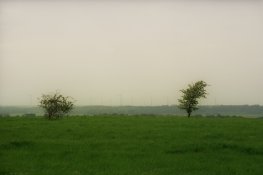
Hello! I just picked up my test photo's from the lab. On some of them i see something what reminds me a some kind of haze or fogg (see attachment). Scanner is d-lab2/3 made by AgfaPhoto GmbH. This is a problem with scanner, camera, lens (it has UV Marumi filter attached) or what? Please help me :smile: Thank You.
__5_0020.jpg
 
It does look to me like the sort of response one gets when there is a lot of UV sensitive haze in the distance.
 
It does look to me like the sort of response one gets when there is a lot of UV sensitive haze in the distance.
And what dou You think about that dark and green haze around trees? It is also because UV haze?
 
How long a lens were you using, on what format?
I ask because if this was shot from a long distance, UV haze effects are greatly emphasized.
 
How long a lens were you using, on what format?
I ask because if this was shot from a long distance, UV haze effects are greatly emphasized.
I use Tamron 70-300 3.5-5.6 @ 200mm @ f8 or f16 on 35mm Kodak Color 200 film.
 
What camera or meter and metering method was used? Is the camera's meter known to be reliable?
Given the vast amounts of sky, I think your camera meter made everything darker. This is the case when the large majority of the scene is brightest, that then becomes "middle gray" and therefore everything else becomes darker relative to that reference.
 
What camera or meter and metering method was used? Is the camera's meter known to be reliable?
Given the vast amounts of sky, I think your camera meter made everything darker. This is the case when the large majority of the scene is brightest, that then becomes "middle gray" and therefore everything else becomes darker relative to that reference.
Probably this is it. Photo is underexposed. I can't remember what camera metring method i use.
 
It looks like you can use a UV filter or Skylight filter.


Welcome to APUG Photrio


.
 
Probably this is it. Photo is underexposed. I can't remember what camera metring method i use.
With very little post work, it is very easy to adjust underexposure.
If you are good with reading a color negative, you might be able to tell if the frame of film itself was underexposed or perhaps it was the scanner's autoexposure that underexposed for the same reason.
 
Hello! I just picked up my test photo's from the lab. On some of them i see something what reminds me a some kind of haze or fogg (see attachment). Scanner is d-lab2/3 made by AgfaPhoto GmbH. This is a problem with scanner, camera, lens (it has UV Marumi filter attached) or what? Please help me :smile: Thank You.
View attachment 200759
dirty or fogged up filter?
 
I looked at other frames and each of them has a delicate fog that disappears when I raise up the exposure.
 
Photrio.com contains affiliate links to products. We may receive a commission for purchases made through these links.
To read our full affiliate disclosure statement please click Here.

PHOTRIO PARTNERS EQUALLY FUNDING OUR COMMUNITY:


Ilford ADOX Freestyle Photographic Stearman Press Weldon Color Lab Blue Moon Camera & Machine
Top Bottom