• Welcome to Photrio!
    Registration is fast and free. Join today to unlock search, see fewer ads, and access all forum features.
    Click here to sign up

questions on developing...

Recent Classifieds

Forum statistics

Threads
201,742
Messages
2,829,420
Members
100,923
Latest member
GB-A2
Recent bookmarks
0

lft

Member
Allowing Ads
Joined
Jan 12, 2009
Messages
27
Format
35mm
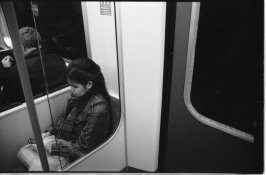
i've just started developing at home, and i am getting some pretty bad results here. all my negatives are getting a lot unfocused and frankly weird, speckly spots when being printed (scanned). i know it isnt the scanner because i scanned some rite aid color negs and they came out perfectly fine, so it has to be the developing process. see attached photo for what i am talking about.

also, all of my negs are getting weird black blobs on the edges about every inch, where the holes are. is this a problem, and what causes this?

thanks a lot in advance
 

Attachments

  • scan0016.jpg
    scan0016.jpg
    171.4 KB · Views: 167

JRJacobs

Member
Allowing Ads
Joined
Feb 28, 2008
Messages
238
Format
Medium Format
Looks like alot of clipping to me. You need to learn your scanner software and figure out how to better scan the negs.
 

pcooklin

Member
Allowing Ads
Joined
Feb 17, 2009
Messages
52
Location
UK
Format
Medium Format
I dont see what you mean from your photo - are you talking about dust spots? That's normal when scanning.
The blobs could be light leak?
sorry I cant be of more help but thats what springs to mind from seeing the attached photo, not doubt someone else will offer their view.
Paul.
www.paulcooklin.com
 

pcooklin

Member
Allowing Ads
Joined
Feb 17, 2009
Messages
52
Location
UK
Format
Medium Format
Oh wait, I see what you mean..theyre air bubbles..you need to bang the canister when developing after agitation to esnure the bubbles dont sit on the film.
 

removed account4

Subscriber
Allowing Ads
Joined
Jun 21, 2003
Messages
29,832
Format
Hybrid
can you tell us how you are processing your film?

we aren't really allowed to chat about scanner-stuff,
but it looks like your glass is dirty,
do your negatives look speckled when you look at them
with a loupe under light ?
 
OP
OP

lft

Member
Allowing Ads
Joined
Jan 12, 2009
Messages
27
Format
35mm
i used hc-110, 10 mins at about 72 degrees...hp5+ 400 film. and no they do not look speckled, but if the scanner was dirty, the color film that i got developed by a lab would be speckled too?
 

drazak

Member
Allowing Ads
Joined
Apr 10, 2008
Messages
65
Location
Buffalo, NY
Format
35mm
Ift: it seems as if your camera wasn't focused on the lady when you took the shot, or you didn't have enough depth of field to get her in focus, any apparently bluriness of negatives is not caused by the developer, but by the camera that took the shot. That being said, certain development methods may be used to get an apparently sharper negative, however, that is definitely not your problem here, I'd suggest you look at the shot under a loupe and all that, it's not a development problem(other then where there may be airbubbles).

Ben
 
OP
OP

lft

Member
Allowing Ads
Joined
Jan 12, 2009
Messages
27
Format
35mm
will using a wetting agent at least prevent the air bubbles from making a mark on the negatives?
 

nickandre

Member
Allowing Ads
Joined
Oct 22, 2007
Messages
1,918
Location
Seattle WA
Format
Medium Format
I would say that if you can't scan them it's most likely an issue with either dust/scratch removal software (which works with color negatives but not with b+w because of the structure) or some sort of levels issue. Most likely the former. You'll have to disable it (if that's possible) or find a darkroom to make good prints which you can scan (generally easier, honestly.)
 

JRJacobs

Member
Allowing Ads
Joined
Feb 28, 2008
Messages
238
Format
Medium Format
Again, it is the way you scanned your negs - they are severely clipped and posterized. Learn the scanner software - that is your problem.
 

Chuck_P

Member
Allowing Ads
Joined
Feb 2, 2004
Messages
2,369
Location
Kentucky
Format
4x5 Format
Did you tweek the unsharp masking, looks like too much, IDK------ok, ok, no more scanning talk
 

wogster

Member
Allowing Ads
Joined
Nov 10, 2008
Messages
1,272
Location
Bruce Penins
Format
35mm
i've just started developing at home, and i am getting some pretty bad results here. all my negatives are getting a lot unfocused and frankly weird, speckly spots when being printed (scanned). i know it isnt the scanner because i scanned some rite aid color negs and they came out perfectly fine, so it has to be the developing process. see attached photo for what i am talking about.

also, all of my negs are getting weird black blobs on the edges about every inch, where the holes are. is this a problem, and what causes this?

thanks a lot in advance

What you need to do is get a good analogue print done of some of the negatives, preferably an 8x10 and see if there are any marks on the print, if the print has the same marks in the same place, then you have a film processing issue. Otherwise you have a scanning issue.

If it is a processing issue, then spots tend to be caused by a few things, dirt on the film, dirt in the water used to mix the developer, incomplete mixing of a powdered chemistry, air bubbles on the film during either development or fixing.

Dirt on the film is unlikely, unless your camera is very dirty, you can check the inside of the camera when there is no film in it, and see if there is anything inside the camera, although this is unlikely.

You should use distilled water for mixing chemicals, you can also use a water filter like a Brita filter to get water for mixing chemicals, pour it through a paper coffee filter though before using as the carbon filter sometimes leave carbon dust in the water.

All chemical containers should be well washed between batches, brown glass bottles are best in that you can see if there is any particles floating in the chemical. If you use a powdered chemistry, then make sure nothing is floating in the chemical, pour through a paper coffee filter to make sure any particles in the chemistry are filtered out. While some chemistries do not mind it cool, none like to freeze, and some will come out of solution when they get too cold.

After pouring in the developer or fixer, rap the tank on the table to dislodge any bubbles, you actually want to rap it fairly hard, not hard enough to crack a plastic tank, but hard enough to dislodge air bubbles.

 

JBrunner

Moderator
Moderator
Allowing Ads
Joined
Dec 14, 2005
Messages
7,429
Location
PNdub
Format
Medium Format
Negatives don't come out like that, for good or bad. It is a scanning issue, most likely a sharpening or un-sharp mask issue. I suggest you post them at Hybridphoto.com
 
Photrio.com contains affiliate links to products. We may receive a commission for purchases made through these links.
To read our full affiliate disclosure statement please click Here.

PHOTRIO PARTNERS EQUALLY FUNDING OUR COMMUNITY:


Ilford ADOX Freestyle Photographic Stearman Press Weldon Color Lab Blue Moon Camera & Machine
Top Bottom