• Welcome to Photrio!
    Registration is fast and free. Join today to unlock search, see fewer ads, and access all forum features.
    Click here to sign up

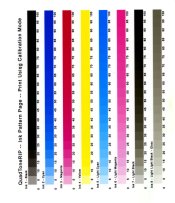
QTR Ink Pattern Page abomination

ptloboscarmelEIR3.jpg

A
ptloboscarmelEIR3.jpg

  • jhw
  • Dec 15, 2025
  • 0
  • 0
  • 12
Tree Farm

H
Tree Farm

  • 1
  • 0
  • 39

Forum statistics

Threads
201,212
Messages
2,820,523
Members
100,589
Latest member
rando
Recent bookmarks
0

davido

Member
Allowing Ads
Joined
Dec 15, 2005
Messages
575
Location
Toronto, Ontario, Canada
Format
4x5 Format
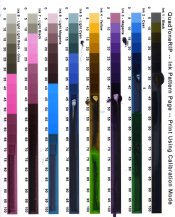
I've just printed an ink pattern page to discover the UV transmission of the
various inks with my process using the calibration mode in QTR.
I'm just a little stumped by the wild assortment of colors which don't really
make sense. The light blacks turn magenta. The light magenta turns cyan after
35. The yellow turns green after 65.

I am concerned because of the color management issues with CS4. I have been
using 'photoshop manages colors' as you are not able to use 'no color management'

I am using Mac 10.5 with CS4 and 3800 printer
The settings are: photoshop manages color, printer profile - sRGB (same as file).
perceptual & black point compensation.
Mode: QTR calibration.
I have attached a copy of this abomination.
Help!

thanks
david
 

Attachments

  • qtr ink pattern test.jpg
    qtr ink pattern test.jpg
    175.8 KB · Views: 199

R Shaffer

Member
Allowing Ads
Joined
May 9, 2007
Messages
436
Location
Santa Cruz,
Format
Multi Format
This is an excerpt from the Alt-photo-process-list which was posted in regards to the No Color Management issue with CS4 & CS5. I have NO clue as to whether this will help as I use CS3, windows and I print directly from QTR. Printing from photoshop has ALWAYS been so cumbersome that I just gave up on it a long time ago and use Qimage & QTR for printing. Your calibration page sure looks ugly.

> Dear All,
> This perhaps is an answer to the dreaded CS5/Snow Leopard/Epson driver
> problem.
>
> I contacted Epson with my query: no ability to turn off color management,
> colors came out easter egg colors not the normal dense ones with my 3880.
>
> Here is the response from Epson:
>
> Thank you for contacting Epson regarding your Epson Stylus Pro 3880. It is
> my pleasure to respond to your inquiry.
> If you are running the correct driver for the printer then you would have
> the option to disable color management in the Epson driver. Once you click
> on print and select Printer Setting and then under Layout do you see Print
> Features or Print Setting. If you see Print Feature then you are not
> issuing the correct driver that is Apple driver an not Epson. To correct
> that please do the following.
> Turn the printer OFF
> Go into Print and FAX
> Remove the SP3880 ( an any other Epson printer)
> Open the Hard Drive>Library>Printer
> Delete the whole Epson folder
> Restart you MAC and empty the trash
> Reinstall the latest driver that you downloaded from our site.
> Epson13579.dmg and Epson13884.dmg. Install the Epson13579.dmg first and
> then Epson13884.dmg.
> After the Reinstall restart the MAC again
> Once back on the desktop and if you are connecting USB by turning the
> printer back on it will automatically set the printer up on your MAC. If
> you are connecting Ethernet go into Print and Fax, click on plus button to
> add the printer. Make sure that you are on the Default button and then
> under Kind select EPSON TCP/IP.
> If you do see Print Setting under Layout then under Color Mode is where
> you would disable the color management in the Epson Driver.
>
>
 

Ben Altman

Member
Allowing Ads
Joined
Jan 19, 2007
Messages
205
Location
Ithaca, NY a
Format
Large Format
Hi David,

The QTR instructions say that the calibration sheet must be printed Untagged - ie NO embedded profile. I use CS2 and CS3 so I don't know about the CS4 part, but any embedded profile will screw things up. The QTR calibration routine uses a fixed value in one channel to identify the ink to be printed, and those values are only a couple of levels apart for the different inks. If you open the calibration sheet without an embedded profile - Untagged - and run your cursor over it while watching the Info palette you will see how it works. So if you have an embedded profile and that is changing the values in the file it will change the ink it calls. That's my guess about what is going on.
There's also a CS5 patch for Windows QTR, but I think that's a different problem - the sheet comes out all gray.

Best, Ben
 
OP
OP
davido

davido

Member
Allowing Ads
Joined
Dec 15, 2005
Messages
575
Location
Toronto, Ontario, Canada
Format
4x5 Format
Thanks Ben. I looked again the the InkSeparations8 file and it is untagged. I thought I had changed the profile but no.
I have printed this a few times now and the first time I didn't touch the color profile. I also used "printer manages colors" .
I had read somewhere that , when you are unable to use 'no color management' one should use "photoshop manages color" and to set the profile to sRGB (along with the printer profile).
Printing this both ways made no difference though; still looked like hell both times.
What you say here make total sense though. Perhaps the file is being inadvertently color managed?

Rob, thanks also. I'm not using Snow Leopard though (OS 10.6 I think?). I have heard of the problems with that set up.
I'm also not using a 3880.
Part of the reason it looks so ugly is that way too much ink was being laid down and it never actually dried.

thanks guys,
david
 
OP
OP
davido

davido

Member
Allowing Ads
Joined
Dec 15, 2005
Messages
575
Location
Toronto, Ontario, Canada
Format
4x5 Format
Just to back up what you're saying Ben, I found this quote by Jeff Schewe in the Adobe Forums:

"...yes, printing in OS X 10.5.8/10.6.2 and Photoshop CS4 with certain driver
(notably the recent Epson drivers) is problematic. The reason is that Apple, in
their infinite wisdom (NOT) has decided there is no such thing as an
"intentionally untagged file". So, unless the print driver reports CORRECTLY
under both the application _AND_ ColorSync what the correct ICC profile is,
ColorSync will "helpfully" to a transform from untagged to "Generic RGB"...which
in the case of printing intentionally untagged targets, will totally screw up up
the process...

If you can, print out with an earlier version of Photoshop (before CS4) or,
alternatively in CS4 take the target and actually "assign" and arbitrary color
space profile such as Adobe RGB. Then in the CS4 Photoshop Print dlog, be sure
to select the ICC profile "Adobe RGB" as the color space and then inside the
printer dlog be sure to select "No Color Management". What this does is "fools"
ColorSync to avoid an unwanted (and unwarranted) arbitrary color space transform
of the printer target..."

(Adobe Forums: No Color Management will activate...)

Unfortunately, the problem with this solution is that you can't select 'No Color
Management" with the QTR driver.
So it looks like my only avenue is purchasing CS3.

david
 

Ben Altman

Member
Allowing Ads
Joined
Jan 19, 2007
Messages
205
Location
Ithaca, NY a
Format
Large Format
So it looks like my only avenue is purchasing CS3.

david

CS2 works fine for QTR printing too - I find it easier to use, but that's just cuz I'm used to it.

Have you searched/posted your question on the QTR Yahoo Tech Group list?

Best, Ben
 
OP
OP
davido

davido

Member
Allowing Ads
Joined
Dec 15, 2005
Messages
575
Location
Toronto, Ontario, Canada
Format
4x5 Format
cs3 to the rescue (crossing my fingers)

Ben,

yep, I've posted on the yahoo qtr site as well (and got some replies). the best information was on Adobe forums though.
I decided to purchase cs3 on the bay (got a pretty good deal I hope) and I'll load that up and hopefully (cross my fingers) it will all come together.

david
 
OP
OP
davido

davido

Member
Allowing Ads
Joined
Dec 15, 2005
Messages
575
Location
Toronto, Ontario, Canada
Format
4x5 Format
Resolution at last!

Well . . . managed to purchase CS3 (at a very decent price I might add). I set the color handling to "NO COLOR MANAGEMENT" and crossed my fingers and printed out the QTR ink pattern page. It came out just beautiful!! Halelujah!
It is getting hard to find photoshop cs3 and I feel for those people in the future who are getting involved with QTR with mac.
I'm finally back on the QTR path. . .

david
 

Attachments

  • QTR-ink pattern page copy.jpg
    QTR-ink pattern page copy.jpg
    151.2 KB · Views: 164

clay

Member
Allowing Ads
Joined
Nov 21, 2002
Messages
1,335
Location
Asheville, N
Format
Multi Format
I just finally had a chance to test for this issue with CS5. First, you need to download a QTR update that is on Roy Hamrick's site that corrects some of the misbehavior between OSX 10.6 and CS5. But most importantly, you must check the box that says "Printer manages color", not "photoshop manages color". Finally, make absolutely sure you choose "Calibration Mode" in the QTR dialog box in print setup. When you do this, the calibration prints just as it should. I think the problem you saw was because photoshop got in the middle of things and caused a little mischief.

[video]www.clayharmon.com/video/QTR_Movie.mov[/video]
 
Last edited by a moderator:
Photrio.com contains affiliate links to products. We may receive a commission for purchases made through these links.
To read our full affiliate disclosure statement please click Here.

PHOTRIO PARTNERS EQUALLY FUNDING OUR COMMUNITY:


Ilford ADOX Freestyle Photographic Stearman Press Weldon Color Lab Blue Moon Camera & Machine
Top Bottom