• Welcome to Photrio!
    Registration is fast and free. Join today to unlock search, see fewer ads, and access all forum features.
    Click here to sign up

Problem with low contrast negatives

Recent Classifieds

Forum statistics

Threads
201,909
Messages
2,831,989
Members
101,015
Latest member
Craig S.....
Recent bookmarks
0

FujiLove

Member
Allowing Ads
Joined
Jun 13, 2014
Messages
543
Location
UK
Format
Multi Format
I processed a roll of Tri-X 400 yesterday and the negatives have come out with very low contrast. The highlights are noticeably grey and there is especially low contrast in the lighter areas of the images.

I used this method for metering (in summary, rate at half box speed and meter for the shadows):

http://www.johnnypatience.com/metering-for-film/

...which should over expose the film by two or three stops. I can't imagine this would produce low contrast negatives.

I developed the film with one shot Ilfosol 3 and reduced the development time by 15% (6m 20s, rather than the listed 7m30s). I did this as per lots of advice around the web that suggests that overexposing brings out the shadow detail and under development helps to stop the highlights blowing out. Clearly that's a contrast reducing process, but I didn't expect it to result in such poor negatives. (I'll post an example when I'm back at my desk later, but they are basically murky grey, low contrast and have a definite cut off before the white point is reached).

I have a few more rolls to process that have been shot using this metering technique and I'm wondering how to proceed. Should I develop the roll for the full 7m 30s to bring the contrast back, or has the damage been done with the over exposure?

On the up-side, this has been an excellent learning experience. Fascinating to see what you can do with the development to control the image. Just wish I wasn't experimenting with my precious holiday photos!
 

Rick A

Subscriber
Allowing Ads
Joined
Mar 31, 2009
Messages
10,032
Location
Laurel Highlands
Format
8x10 Format
Was the lighting situation low contrast to begin with? That old chestnut doesn't always fly, it was meant to compress contrast in high contrast scenes and not usable any other time. If you are shooting the entire roll in one lighting situation then label it and develop accordingly. If low contrast, you may want to extend development, normal even light, then normal developing, etc. This was designed for sheet film users where it is convenient to be selective. I think you just need to develop normally and not be concerned with what others say. Before you develop any more rolls, you may want to do a test series and shoot one scene at whatever ISO you chose, then clip into 5 strips. Develop each strip at -15%, -10%, -5%, normal, +5%, then choose the one you like and use that for the rest of your films.
 
OP
OP

FujiLove

Member
Allowing Ads
Joined
Jun 13, 2014
Messages
543
Location
UK
Format
Multi Format
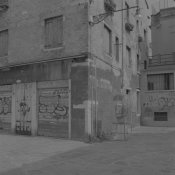
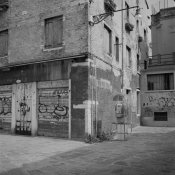
Thanks Rick - the images were of mixed contrast, but I think some were high to very high (shooting down dimly lit canals in Venice with very bright sun at the other end). I've attached a couple of example images. The first is straight out of the scanner. The second has come out of Lightroom and required +100 of contrast, +33 highlights boost to achieve the look. Notice that the sky at the top right is still very grey, almost the same tone as the wall next to it.

I'll definitely try a test roll when I have time. I also think I've been reading advice intended for sheet film, so I'll process it fully next time. It's C41 day today, so that will have to wait :smile:

TriX400-Ilfosol3-original.jpg TriX400-Ilfosol3-fixed.jpg
 

Athiril

Subscriber
Allowing Ads
Joined
Feb 6, 2009
Messages
3,062
Location
Tokyo
Format
Medium Format
I wouldn't over expose the film so much.

There's mostly one way I meter my film. That's incident metering pointed towards the source of the main light hitting my subject. Rate Tri-X at box speed, or a third to half a stop over to account for error if you wish.

Just get the film scanned, and set the levels, if their your precious holiday photos, no need to particular about how you save them.


There is one way you can get your contrast back in developing without having overdeveloped negatives.

You need to add some potassium bromide to some working solution developer, and process at normal processing time, or even longer. It'll get your contrast back without having overly dense negatives.

You'll need to do a test roll obviously if you want to do anything like that. Shoot a -new- test roll, and hold off developing of the precious photos.


The last thing I did like this was Rodinal 1+100 1 hour stand with FP4+, two strips with varying exposure, one in regular 1+100 stand, and one in 1+100 stand with 5g/L of potassium bromide added.

Frames from the first strip were identical to the ones from the second strip that had +3 stops of exposure.


With Ilfosol, if it's like Xtol you'll want to add 5-10g/L of potassium bromide to working solution and use a time that's equivalent to a 2 stop push for 2 to 3 stops of film speed loss. That'd be the starting point I'd use. I'd probably go in the middle and use 7.5g/L and 2 stop push time (that's an increase in regular time, not a shortening) with a test roll of varying exposures so you can see which exposure looks right in that time and modification, you can probably get 5 tests out of one roll if you can cut it up and store it in the dark.

IE: An EI of 250 in the first strip looked about the density and contrast I liked, an EI of 32 from the second lot looked the same in density and contrast.
 

Athiril

Subscriber
Allowing Ads
Joined
Feb 6, 2009
Messages
3,062
Location
Tokyo
Format
Medium Format
This is my adjustment to your first flat image -
szfsx4.jpg
 

bernard_L

Member
Allowing Ads
Joined
Feb 17, 2008
Messages
2,133
Format
Multi Format
this has been an excellent learning experience
... to take advice found on the web with a grain of salt. The link you give contains a mixture of good and bad advice. Not saying the guy does not know what he's doing, just that his explanations are misleading.
- Rating at half-speed. Yes, gives you a margin of safety, ensuring that even Zone I shadows are lifted above the toe.
- But... "Exposing for the shadows" is too vague.
Instead of zone “V” you assign zone “II” to “IV” by literally holding your meter into the shadow (the darkest part of the picture).
No! The darkest part of the picture might be a small hole into a dark cave; someting that should fall into zone minus four or whatever.
zone “II” to “IV” Why and when z.II rather than z.IV?? Open shadows in an outdoor scene with average metering normally fall in z.II. Metering on these results in placing effectively them on z.V, i.e. +3 stops. Combined with setting your meter at 200 ISO is +4 stops w.r. to default metering; clearly overkill. You might as well set you meter on ISO 25 and happily do average metering.

Confused about all these zone numbers? Do a little reading about the zone system; Forget the stuff about contraction and expansion. But pay attention to placement. Look at the scene. There is no such thing as a unique shadow value; ask yourself: which ones are significant? Visualize the print; do I want that as just-a-little-dark grey? real dark grey? solid black? Then place it accordingly, z.IV, z.II, z.0.

The second half of "expose for shadows" is often "and let highlights care for themselves". Yes, but... Some film/dev combinations have a shoulder that starts early, i.e; they compress highlights; the more you over-expose, the worse. For examples, browse through the curves in the recent post:
(there was a url link here which no longer exists)
I don't know about your combination (TX-400, Ilfosol t-15%) but it's a possibility. In which case you pics will definitely look murky (dull highlights).
 

ic-racer

Member
Joined
Feb 25, 2007
Messages
16,735
Location
USA
Format
Multi Format
Have you tried printing the negatives? Development time and printing paper contrast are intimately linked. Also, when looking at negatives (could we see them please), realize that negatives have about six or seventh-tenths the contrast of the original scene. Do you have any way to measure the density of the highlights? Do you know how to determine development time for the paper you are using (Zone VIII test)?
 
OP
OP

FujiLove

Member
Allowing Ads
Joined
Jun 13, 2014
Messages
543
Location
UK
Format
Multi Format
The negative looks underdeveloped for sure

It would be helpful if you could post:
  • Dilution used
  • Temperature
  • How you agitated the film
Bests,

David.
www.dsallen.de

The ilfosol 3 was standard 1+9 dilution, processed at 20 degrees C and agitated as per Ilford's data sheet: 10 seconds initially, then 10 seconds each minute. The concentrate is about 2 months old and has been kept at room temperature in the dark (half full bottle). It was mixed fresh and discarded.
 
OP
OP

FujiLove

Member
Allowing Ads
Joined
Jun 13, 2014
Messages
543
Location
UK
Format
Multi Format
Have you tried printing the negatives? Development time and printing paper contrast are intimately linked. Also, when looking at negatives (could we see them please), realize that negatives have about six or seventh-tenths the contrast of the original scene. Do you have any way to measure the density of the highlights? Do you know how to determine development time for the paper you are using (Zone VIII test)?

No, my darkroom isn't set up. I'm only able to dev and scan right now.
 
OP
OP

FujiLove

Member
Allowing Ads
Joined
Jun 13, 2014
Messages
543
Location
UK
Format
Multi Format
This is my adjustment to your first flat image -
szfsx4.jpg

That's much better and much closer to how I'd expect the negative to come out, and indeed what's I've got in the past.

Is that a curve adjustment in PS?
 
OP
OP

FujiLove

Member
Allowing Ads
Joined
Jun 13, 2014
Messages
543
Location
UK
Format
Multi Format
... to take advice found on the web with a grain of salt. The link you give contains a mixture of good and bad advice. Not saying the guy does not know what he's doing, just that his explanations are misleading.
- Rating at half-speed. Yes, gives you a margin of safety, ensuring that even Zone I shadows are lifted above the toe.
- But... "Exposing for the shadows" is too vague.

No! The darkest part of the picture might be a small hole into a dark cave; someting that should fall into zone minus four or whatever.
zone “II” to “IV” Why and when z.II rather than z.IV?? Open shadows in an outdoor scene with average metering normally fall in z.II. Metering on these results in placing effectively them on z.V, i.e. +3 stops. Combined with setting your meter at 200 ISO is +4 stops w.r. to default metering; clearly overkill. You might as well set you meter on ISO 25 and happily do average metering.

Confused about all these zone numbers? Do a little reading about the zone system; Forget the stuff about contraction and expansion. But pay attention to placement. Look at the scene. There is no such thing as a unique shadow value; ask yourself: which ones are significant? Visualize the print; do I want that as just-a-little-dark grey? real dark grey? solid black? Then place it accordingly, z.IV, z.II, z.0.

The second half of "expose for shadows" is often "and let highlights care for themselves". Yes, but... Some film/dev combinations have a shoulder that starts early, i.e; they compress highlights; the more you over-expose, the worse. For examples, browse through the curves in the recent post:
(there was a url link here which no longer exists)
I don't know about your combination (TX-400, Ilfosol t-15%) but it's a possibility. In which case you pics will definitely look murky (dull highlights).

Yes, I see what you mean. Somewhere in the post he talks about creating a shadow by shading the bulb, so I guess he means a lightly shaded area, rather than a black hole. Great point about the shoulder compression.
 

bernard_L

Member
Allowing Ads
Joined
Feb 17, 2008
Messages
2,133
Format
Multi Format
I would normally use box speed and exposure for the shadows at "zone 3" unless dealing with a very high contrast scene.
I recently had good results (prints now drying, fully convey my impressions of the scene and fulfill my expectation) with fuji Neopan 400, meter set at 250 ISO, shadows placed Z.IV, which is effectively the same as you propose. "Shadows" not being the deepest shadows ("the darkest part of the picture" in http://www.johnnypatience.com/metering-for-film/) which is not well-defined, but an average reading of an open-shadow area, with the scene including also sunlit areas.
 

Jim Noel

Member
Allowing Ads
Joined
Mar 6, 2005
Messages
2,261
Format
Large Format
You like many others have fallen victim to the generally unfounded advice of others.
There is only one way to establish methods which will produce the negatives and prints to suit your taste, and not that of others, TEST!!!
Doubling the box speed works for some with some films, but not all. Reducing development is the most common mistake made by students. When I taught photography in a local college for more than 20 years the most common mistake was under-development of film even though students were given reasonable times with which to start.
Test and find your own EI (exposure index) and then determine the best development time for you using your chemistry and procedures. No one else can do this successfully for you.
 

ParkerSmithPhoto

Member
Allowing Ads
Joined
Jan 16, 2010
Messages
1,685
Location
Atlanta, GA
Format
Medium Format
No, my darkroom isn't set up. I'm only able to dev and scan right now.

Fuji,

I've gone back and forth over the last five years between the darkroom and scan to print, and had great success with Diafine developer. It gives you a long straight line and keeps the highlights from getting too dense, which is perfect for scanning and surprisingly good for silver printing as well, generally with a higher contrast filter.

With Diafine, I shoot the film at box speed for most scenes and add 1/2 to 1 stop for bright, contrasty light. Your metering, exposure and development pretty much guaranteed a dense, flat negative. For scans, thinner is better.

All scans tend to look like mush at first. Just capture in greyscale 16bit and hit the curves/contrast. It doesn't matter how much you have to apply as long as you arrive where you need to be.

With the negs that need a bit of extra contrast for silver, you can intensify on selenium toner 1:2 for about ten minutes.
 

Athiril

Subscriber
Allowing Ads
Joined
Feb 6, 2009
Messages
3,062
Location
Tokyo
Format
Medium Format
I could list the problems with both thin and dense negs for scanning but certain speech isn't allowed here.

The best begs for scanning have good separation between dmin and dmax with a low base density. Generally speaking negatives for general purpose printing are good negatives for scanning.


That's much better and much closer to how I'd expect the negative to come out, and indeed what's I've got in the past.

Is that a curve adjustment in PS?

I'll send you a pm. It only took a few seconds.
 

Bill Burk

Subscriber
Allowing Ads
Joined
Feb 9, 2010
Messages
9,473
Format
4x5 Format
It is hard to tell without knowing the density reading of your highlights, but perhaps what looks flat and thin to you is really a perfect negative.

If your gut tells you it's thin and flat, then develop for the normal time next time. Overexposure doesn't alter contrast, it merely moves you up and down the scale. Developing longer gives you more contrast. So you probably want normal development.
 

MartinP

Member
Allowing Ads
Joined
Jun 23, 2007
Messages
1,569
Location
Netherlands
Format
Medium Format
If you are asking questions about negatives it is very helpful to see the negs. An easy way to do this is tape a piece of paper to a window with bright sky behind, hold the neg up in front of the paper so that the paper is out of focus and the neg in focus (so there is no paper texture involved), then snap a picture using a phone or other sort of digital camera.

Perhaps you might also have a look for how to use a contact-print to assess the negative exposure and development, as that could give you a clearer idea of what you are seeing on your negs and suggest what - if anything - you might want to modify and why. Also, if in doubt, it is sensible follow the manufacturers instructions. Try to find a book called "Perfect Exposure" by Roger Hicks, at your local library. It gives a practical view of exposure metering.

I note that the blog page you linked does not mention anything about the value differences between incident and reflected light metering and talks only of scanning film, not printing it. All (except one) of the pictures illustrating the blog are easy sunlit or open-shade exposures, on colour neg film. He also conflates a few of his own rules-of-thumb which works out to give a consistent over-exposure of between two and four stops. According to the site, he does not develop, print or scan any of his own film at all, even the black-and-white.
 
Last edited by a moderator:

zanxion72

Member
Allowing Ads
Joined
Oct 18, 2013
Messages
658
Location
Athens
Format
Multi Format
Generally the "expose for the shadows and develop for the highlights" applies mostly to sheet films where you can expose and develop each frame individually. With 135 and 120 formats, things are a bit different. Depending on the amount of the desired detail and level of contrast one should start thinking for each frame like "what would I like to get to the final print here". Expose all frames according to what you would like to get in your print but always average it to what you expect to shoot and/or have shot in that roll. Latter in your darkroom you will have to compensate at the printing stage for each frame individually but not much to get the desired picture.
Try to shoot all frames of each roll under the same lightning conditions as much possible. I suppose that the developer has already been used enough to know what you will get over varying the development time. I have also noticed that Ilford gives for Ilfosol 3 development times that produce very thin negatives.
 

Ghostman

Member
Allowing Ads
Joined
Dec 5, 2011
Messages
504
Location
Switzerland
Format
Multi Format
I struggle to understand why people try and troubleshoot problems that are so variable in the first place. You can't establish any kind of baseline when you're doing what you did in your metering then fiddling around with the developing times. I think it's good to push things to see where the limits are, but then understand that's just about finding extremes.

I would shoot at box speed and develop at box times. Establish that I have consistent results and then print something from that negative. You have to know what flavour cake you want before you start baking and so if you are going to fiddle with standards, it shouldn't just be for the sake of it or because Johnny Patience says so; it should be because you can imagine and anticipate the result. The good people at Kodak know a lot more about their film than Johnny P does.

Learn what normal is and be able to anticipate it before trying to redefine it.
 
Photrio.com contains affiliate links to products. We may receive a commission for purchases made through these links.
To read our full affiliate disclosure statement please click Here.

PHOTRIO PARTNERS EQUALLY FUNDING OUR COMMUNITY:


Ilford ADOX Freestyle Photographic Stearman Press Weldon Color Lab Blue Moon Camera & Machine
Top Bottom