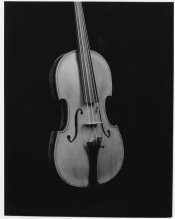
• Welcome to Photrio!
    Registration is fast and free. Join today to unlock search, see fewer ads, and access all forum features.
    Click here to sign up

Problem scan my print???

Iriana

H
Iriana

  • 2
  • 0
  • 28
Puddle

Puddle

  • 4
  • 2
  • 85

Forum statistics

Threads
202,731
Messages
2,844,740
Members
101,487
Latest member
Bmattei
Recent bookmarks
0

stradibarrius

Member
Allowing Ads
Joined
Jan 17, 2009
Messages
1,452
Location
Monroe, GA
Format
Medium Format
I don't want to get to far into a digital thing but I do want to be able to scan my wet prints to post.
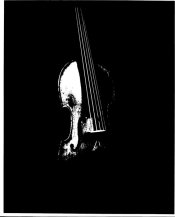
The print is a violn that is set in a somber dark setting. The print came out ok, but when I tried to scan it, the scan was solarized????
I asked for help at the Hybrid Forum but didn't get much help.

I would appreciate some guidance. Epson V500 scanner.
 

Attachments

  • Dawkins-front-solarized600x400.jpg
    Dawkins-front-solarized600x400.jpg
    22.4 KB · Views: 184
Scanning prints is an art in itself. It is not "push the button and we do the rest" type of thing giving you incredibly wonderful results auto-magically. Generally speaking (sorry about that), you want your scan to be fairly flat and then the image contrast is adjusted in your image editing program. From the appearance of your scan, it looks like you have "over exposed" your scan.

If you are serious about this (and there is no reason you should not be serious), it would be wise to invest in a copy of "Real World Scanning" or some other third party text which explains the arcane lore of scanning prints.
 
I only see extreme black and extreme white in your scan.

You might have your scanning software set to render in a mode it will either register black or white, and no gray tones. In mine, it's called "Black and White." If I choose this setting I'd get similar result to yours. What you want is gray tone. Wording in your software may be different.
 
Last edited by a moderator:
I too think it is just a settings issue. Read the manual to find all the scan settings. That looks like an Ortho film type scan output. My scanner has macro adjustments like, landscapes, skin tones, etc. so I am always varying the settings even under the Grayscale setting. Good luck!
 
This is posterization. See how it looks bitmapped? As if there are only two tones? So increase bit depth. Always use maximum bit depth in your scans, you can go back to 8 bit later on if you wish, but you can't afford to throw away any tonality at the scan step.

Also look for the auto-tone button, it will help the software deteremine the right levels adjustment.

Also, try scanning in colour. B&w prints do have a fair amount of subtle colour and you'll usually do better to record that, rather than telling the scan software to interpret them as straight b&w. I scan b&w negs as straight b&w but prints, I usually scan them in colour. Mind that if the print isn't *perfectly* flat, though, the scanner will do some nutty colour shifting due to stray light coming in from the sides.
 
I only see extreme black and extreme white in your scan.

You might have your scanning software set to render in a mode it will either register black or white, and no gray tones. In mine, it's called "Black and White." If I choose this setting I'd get similar result to yours. What you want is gray tone. Wording in your software may be different.
That was it!!! I the scanner set for image, opposed to document, but I had the type set the B&W rather than "gray scale".

Here is the image withe Gray scale as image type.

I am staring to work in my enlarging skills or should I say develop some enlarging skills. When I scanned this photos for posting to the enlarging forum I found I didn't know what I was doing.

Now I can go back to the enlarging forum and see if they can help me.

Thanks for the help like always!!!
 

Attachments

  • Dawkins-front-B&W-600x480.jpg
    Dawkins-front-B&W-600x480.jpg
    23.8 KB · Views: 188
Gradation (Input/Output)?

Scan specifications for a Canon MP520:
Gradation (Input/Output) -- Gray: 16bit/8bit

I know about bits and bit depth but have not
found any explanation of Input/Output. What
does that mean to me and my scanning?

Color is stated at 48 and 24 In and Out. Dan
 
Input bit depth is how many bits the scanner records. Output bit depth is how much of that gets saved to the file. You always want 16/48 bit input. It's a good idea to save your raw scan data as the full 16 bits (probably a TIF, DNG or PNG), but then you must process it down to 8 bits (generally, by applying curves and setting white/black points, possibly dodging and burning - do all of that to the 16 bit data then export) for the purpose of posting on the web or printing (JPG). Printers and monitors don't have more than 8 bits of dynamic range, so sending a 16 bit TIF to a printing service will just annoy them.

Calibrate your monitor properly! This is important.
 
A contradiction?

Input bit depth is how many bits the scanner records.
Output bit depth is how much of that gets saved to the file.
You always want 16/48 bit input. It's a good idea to save your
raw scan data as the full 16 bits (probably a TIF, DNG or PNG),

That I have; 16/48 bit input, gray/color. I've gray with 8 bits
out. So how am I to save "raw scan data as the full 16 bits"

The copy function, scan - print, works beautifully. On screen
scans though look bad. Such a difference! I've been using only
Apple's included Image Capture. Perhaps as with the OP I've
not pressed the right button. Perhaps I should scan as color?

One of these days I'll delve into Cannon's many mega bytes
of installed soft ware. Dan
 
You probably want to use some different scanning software. Get something that supports saving 16-bit files.

(and this discussion is liable to be locked shortly as it's scanning-centric, we'll all get told to bugger off to hybridphoto - go search their archives and google because the answers you seek are all out there)
 
This Thread Has Already Been Moved

Moved to this forum from the Enlarging forum. Dan
 
I recently purchased this scanner FS-C1-VP to print pictures from old negatives and slides. Users manual states 'supports Windows XP and USB 2.0 only' which I have. It comes with Arcsoft Software Suite and PhotoImpression 6 on the same disk. The software works fine but its only copying a larger image of the negative, not producing a picture. I have removed, unistalled and installed but still get a negative when I hit 'acquire'. I could also choose 'copy' from the scanner itself with same results.
..........
 
Photrio.com contains affiliate links to products. We may receive a commission for purchases made through these links.
To read our full affiliate disclosure statement please click Here.

PHOTRIO PARTNERS EQUALLY FUNDING OUR COMMUNITY:


Ilford ADOX Freestyle Photographic Stearman Press Weldon Color Lab Blue Moon Camera & Machine
Top Bottom