• Welcome to Photrio!
    Registration is fast and free. Join today to unlock search, see fewer ads, and access all forum features.
    Click here to sign up

Problem print - help please

Recent Classifieds

Forum statistics

Threads
202,670
Messages
2,843,838
Members
101,452
Latest member
LookThroughTheLens
Recent bookmarks
0

Akki14

Member
Allowing Ads
Joined
Feb 2, 2007
Messages
1,874
Location
London, UK
Format
4x5 Format
Hello all,

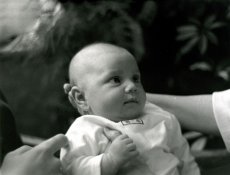
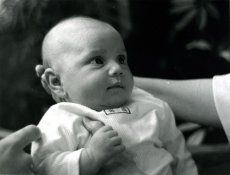
I'm having problems liking this photograph and I don't know why. I can't retake it because the baby in the picture is now about 5 or 6 years old (it's my niece/niece-in-law - I'm a bad auntie for not remembering exactly how old she is now :rolleyes: )
So I have a scan of a print i did of this image about 5 years ago. I probably wasn't so good at printing then. However I do like the lighter baby head in the older print because then you don't get the icky baby rash showing up on her head.
So basically what I did for this recent print is print a grade darker (grade 3 on ilford multigrade VC RC) and burn in that top left corner because I thought it was too distractingly bright (and I'm kind of surprised there's that much information in the film from the burning in too, I thought that was what's known as a blown highlight).
I keep flipping between them and trying to decide if I like the darker print I did today or not.

PS yes I know there's a white dot on the arm i don't know what it is, I'm just going to use my spotone to carefully spot it out. I'm more concentrating on the printing bit at the moment.
 

Attachments

  • abby.jpg
    abby.jpg
    48.4 KB · Views: 259
  • abby-fixedcorner1.jpg
    abby-fixedcorner1.jpg
    74.9 KB · Views: 278
You could try completely removing the distracting highlight in the top corner by using a snoot on the end of a pen torch. This would allow you to play the torchlight on this area to take it completely black.
The lighter version seems better to me, but have you tried to print it a little lighter but use a G2 or 2.5? But ensure you keep a full black somewhere.
Regards,
John.
 
I prefer the darker version, and the rash doesn't bother me (but then again, I don't have the rash.

If you wanted to keep the baby light, you print it lighter and go up half a grade to keep the blacks where they are.

I'm not a big fan of diffusion under the enlarging lens, but if the rash really bothers you (not that I'm implying that you have the rash), you could try a slight amount of diffusion to smooth that out.

About that top corner, you could also crop it out. I think it would look good with a tighter crop, maybe as a square, as long as the image can tolerate it at whatever enlargement factor you have planned.
 
Here's a suggestion you would only find on Apug. It may work pretty well with this negative, so if you are up for a bit of an adventure, read on.

Print a full sheet striped by 1/2 stop increment test exposure using your Grade 5 filter, and a piece of opaque mat board. Never mind the lack of highlights, just find the exposure that puts your blackest blacks where you want them..

Expose a full sheet at that exposure. Then without moving the paper make another striped test print using your 00. Somewhere in this print the baby will be perfect.

Make a print, exposing the paper with the exposures you have determined using both filter grades.
(you will be exposing the paper twice, once with the 5 and once with the 00). Burn in the corner when you print the soft exposure. Dry it down, check it out, and alter future exposures to taste.
 
Last edited by a moderator:
I prefer the darker version, and the rash doesn't bother me (but then again, I don't have the rash.

If you wanted to keep the baby light, you print it lighter and go up half a grade to keep the blacks where they are.

I'm not a big fan of diffusion under the enlarging lens, but if the rash really bothers you (not that I'm implying that you have the rash), you could try a slight amount of diffusion to smooth that out.

About that top corner, you could also crop it out. I think it would look good with a tighter crop, maybe as a square, as long as the image can tolerate it at whatever enlargement factor you have planned.

I love APUG, one reply says they like the lighter one, the other the dark and the third says something I don't understand :confused: :wink:

I was considering cropping or *gasp* vignetting (black) (oh no! babies and vignetting! I'll be doing Sears portrait studio photography next!) but then someone's hand is in the left bottom corner which makes cropping a little difficult without having a strange, mysterious finger in shot :rolleyes: I might play with cropping a bit more before I go the coward's route of vignetting. I think the babyheadrash is more visible in the actual print but I guess that's probably something parents would go Aw cute at (and the kid would go EW!).
I might try fresher developer too, I think my working solution might be finally going off after umpteen prints and a few sheet films :tongue:

Thanks for the ideas. Back to the darkroom...
 
Lots of good suggestions already. I think you do need crop out most of the area above the head. About 3/4ths of that area cropped out makes for a much stonger composition IMHO.
 
Why not crop the left side, removing both the hand and the white light. That would improve the composition and make printing easier. :wink:

Steve
 
I was considering cropping or *gasp* vignetting (black) (oh no! babies and vignetting! I'll be doing Sears portrait studio photography next!)

I like the composition, the coochie coochie hand says allot. I think it would be a shame to crop it.

Nothing wrong with a good vignette. It is B&W after all, I don't think it will scream portrait mill.
 
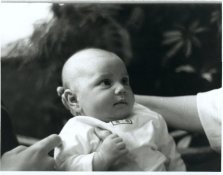
New crop, took longer to wait for it to dry than to make it. Fresh chemicals, just raised the enlarger head a bit and got husband to give opinion and shifted it around until it was more "rule of thirds" and all. And still kept the hand.
 

Attachments

  • abby-newcrop1.jpg
    abby-newcrop1.jpg
    82.7 KB · Views: 220
Well done !
I think we all assumed, probably wrongly, that you were using fresh materials.
Keep at it.
Regards,
John.
 
Good job, I like it and my first thought was crop. I'm never opposed to cropping if you can.
 
As far as the rash, what do you think about using a different paper? I have some Ilford warm-tone fiber and it makes any skin I've ever printed on it look really smooth and beautiful.
 
Bit a moot point at this stage, I already printed it, got it framed and gave it to the intended recipient who seemed quite impressed by it and didn't recognise her own baby :D
 
Photrio.com contains affiliate links to products. We may receive a commission for purchases made through these links.
To read our full affiliate disclosure statement please click Here.

PHOTRIO PARTNERS EQUALLY FUNDING OUR COMMUNITY:


Ilford ADOX Freestyle Photographic Stearman Press Weldon Color Lab Blue Moon Camera & Machine
Top Bottom