• Welcome to Photrio!
    Registration is fast and free. Join today to unlock search, see fewer ads, and access all forum features.
    Click here to sign up

Print Technique

Recent Classifieds

Forum statistics

Threads
203,199
Messages
2,851,169
Members
101,718
Latest member
ClassyJ
Recent bookmarks
4

Gaslight123

Member
Allowing Ads
Joined
Apr 3, 2021
Messages
9
Location
Spain
Format
Medium Format
Hi everyone!

I'm a newbie in printing at the moment.
& I have a question..
I'm using Durst 707 color head and a RCP 20 for dev.

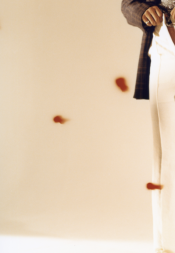
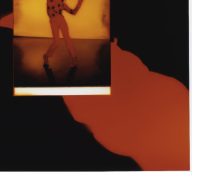
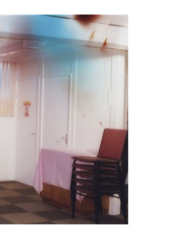
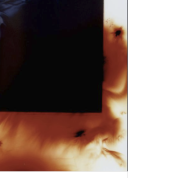
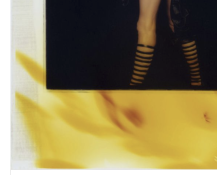
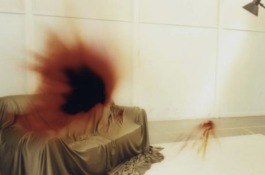
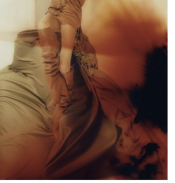
I would like to know how to do that kind effect. I don't if is with the enlarger or the chemistry.
If someone knows...

Thank you !

Paul

Capture d’écran 2021-04-03 à 22.25.13.png Capture d’écran 2021-04-03 à 22.23.20.pngCapture d’écran 2021-04-03 à 22.22.13.png Capture d’écran 2021-04-03 à 22.19.31.png Capture d’écran 2021-04-03 à 22.19.22.png Capture d’écran 2021-04-03 à 22.19.08.png Capture d’écran 2021-04-03 à 22.18.59.png
 
Yes I have been looking around but I didn't find nothing about it..
 
I would like to know how to do that kind effect. I don't if is with the enlarger or the chemistry.
If someone knows...
There are multiple ways to skin a cat, but the images you show could be reproduced by fogging the paper with appropriate light sources. Laser pointers come to mind. Keep in mind that the color you'll get will be the opposite in the color wheel from the light that's used for fogging. So yellow light will give blue fog, cyan light will give you red, etc. Light of very high intensity may fog all color layers and not just the color you're targeting; so e.g. in those final two images, a green light source may have been used and targeted at a small area which then became overexposed across all color 'layers', with the edges bleeding out into the complementary color of the light source used. Cut-out masks can be used to get the kind of shapes as shown in image #2.

Additional special effects can be obtained by chemical staining; e.g. small and very dilute drops of blix (let's say 1+20 or so) dropped onto the paper before it goes into the developer. You'll basically mess up your developer as well this way as it gets contaminated, so you'll have to resort to using it one-shot, or at least keep a separate batch of developer at hand for normal color printing.

 
There are multiple ways to skin a cat, but the images you show could be reproduced by fogging the paper with appropriate light sources. Laser pointers come to mind. Keep in mind that the color you'll get will be the opposite in the color wheel from the light that's used for fogging. So yellow light will give blue fog, cyan light will give you red, etc. Light of very high intensity may fog all color layers and not just the color you're targeting; so e.g. in those final two images, a green light source may have been used and targeted at a small area which then became overexposed across all color 'layers', with the edges bleeding out into the complementary color of the light source used. Cut-out masks can be used to get the kind of shapes as shown in image #2.

Additional special effects can be obtained by chemical staining; e.g. small and very dilute drops of blix (let's say 1+20 or so) dropped onto the paper before it goes into the developer. You'll basically mess up your developer as well this way as it gets contaminated, so you'll have to resort to using it one-shot, or at least keep a separate batch of developer at hand for normal color printing.


Hi Koraks,
Thank you for all that information !
Laser pointers are a great idea to start. Also those effect looks pretty fluide, that why I was thinking about mix of chemistry.
 
Wi
There are multiple ways to skin a cat, but the images you show could be reproduced by fogging the paper with appropriate light sources. Laser pointers come to mind. Keep in mind that the color you'll get will be the opposite in the color wheel from the light that's used for fogging. So yellow light will give blue fog, cyan light will give you red, etc. Light of very high intensity may fog all color layers and not just the color you're targeting; so e.g. in those final two images, a green light source may have been used and targeted at a small area which then became overexposed across all color 'layers', with the edges bleeding out into the complementary color of the light source used. Cut-out masks can be used to get the kind of shapes as shown in image #2.

Additional special effects can be obtained by chemical staining; e.g. small and very dilute drops of blix (let's say 1+20 or so) dropped onto the paper before it goes into the developer. You'll basically mess up your developer as well this way as it gets contaminated, so you'll have to resort to using it one-shot, or at least keep a separate batch of developer at hand for normal color printing.

Do you fog the paper before or after enlarging the image?
 
Photrio.com contains affiliate links to products. We may receive a commission for purchases made through these links.
To read our full affiliate disclosure statement please click Here.

PHOTRIO PARTNERS EQUALLY FUNDING OUR COMMUNITY:


Ilford ADOX Freestyle Photographic Stearman Press Weldon Color Lab Blue Moon Camera & Machine
Top Bottom