

• Welcome to Photrio!
    Registration is fast and free. Join today to unlock search, see fewer ads, and access all forum features.
    Click here to sign up

Post Processing Noise Reduction

Untitled

A
Untitled

  • 7
  • 2
  • 48

Recent Classifieds

Forum statistics

Threads
202,687
Messages
2,844,146
Members
101,467
Latest member
VladimirNik
Recent bookmarks
0

Trail Images

Member
Allowing Ads
Joined
Apr 7, 2010
Messages
3,271
Location
Corona CA.
Format
Multi Format
Any positive input on noise reduction programs that actually work? I have used PS5 and NIK for years with mediocre success. Usually not an issue with exposures, but I have one or two direct into the sun starburst scenes where the dark areas are really trashed with noise. I have a revisit to the site on Tuesday for some retakes, but still curious of any users with real solutions. Thank you in advance for a product or ideas that work.
 
This is posted in Hybrid, so does this mean you're dealing with noise in scans? Or are we talking about digital captures?
Scanned images. I've used both PS5 and NIK noise reductions with little success. Looking for those that have used other standalone or PS plugin software that are up to date and powerful.
 
Last edited:
I found the scanner has very little noise as it has sufficient light for the exposure. If the OP said noise means grain then usually the scanner software does a better job.
 
I found the scanner has very little noise as it has sufficient light for the exposure. If the OP said noise means grain then usually the scanner software does a better job.
The noise is from usually underexposed area in the image. It is an item to be treated in post processing with various noise reduction software such as Topaz & DXO and others. Just looking for someone who has used a program they can recommend that works better than just basic inclusion programs.
 
The noise is from usually underexposed area in the image. It is an item to be treated in post processing with various noise reduction software such as Topaz & DXO and others. Just looking for someone who has used a program they can recommend that works better than just basic inclusion programs.

If you scan from a negative then the underexposure part would have less noise from the scanner but more grain from the film.
 
I don't use it often but I do use the Grain Dissolver feature of the Minolta Dimag Dual Scan software. It works OK.
 
Scanned images. I've used both PS5 and NIK noise reductions with little success. Looking for those that have used other standalone or PS plugin software that are up to date and powerful.

The problem is that itā€˜s nearly impossible to eliminate scanner noise without affecting the grain texture.
If reducing/removing both is desired, NeatImage and Topaz AI both can do an amazing job.

Personally I really like the texture that film grain provides to an image, but dislike noise or other scanning artifacts, so in this case a clean scan is really the only option.
 
Can you post an example picture?
 
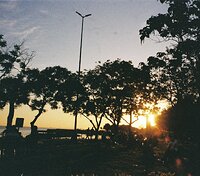
This image is scaled down quite a bit. But you might see the noise in the FG grass area as it was very dark in the exposure and required lifting the shadow a lot. Typically I photograph in non contrast light and use ND's or Reverse ND's when needed knowing the film latitude. But this was an image from years ago that I cannot take over again.
 

Attachments

  • Lwin0168_A_16.jpg
    Lwin0168_A_16.jpg
    653 KB · Views: 66
Yeah, that's some heavy noise.

As you say, you can't retake that image, but you can rescan it on a better scanner. Maybe that would be a better option than trying to get rid of sensor noise?
 
Usually not an issue with exposures, but I have one or two direct into the sun starburst scenes where the dark areas are really trashed with noise.
Just to be clear, you are seeing this noise when viewing the negative with a loupe on a light table, right?

Or to ask the question another way, is your scanner faithfully capturing noise/grain as it appears on the negative -- or is your scanning process introducing noise?

What I can see in the grassy area of your posted example looks like noise introduced by the scanning process. If so, I would be looking for ways to prevent the noise up front rather than trying to eliminate it later.

EDIT: It may take a little bit of both prevention and reduction to get where you want to be?
 
Last edited:
That's a really remarkable noise pattern. How did you digitize this film?
Yeah, that's some heavy noise.

As you say, you can't retake that image, but you can rescan it on a better scanner. Maybe that would be a better option than trying to get rid of sensor noise?

I'll see about doing a re-scan at some point. Having life events crop up recently that will delay things. Thank you each for your thoughts overall. Much appreciated. šŸ˜Ž
 
Just to be clear, you are seeing this noise when viewing the negative with a loupe on a light table, right?

Or to ask the question another way, is your scanner faithfully capturing noise/grain as it appears on the negative -- or is your scanning process introducing noise?

What I can see in the grassy area of your posted example looks like noise introduced by the scanning process. If so, I would be looking for ways to prevent the noise up front rather than trying to eliminate it later.

Agreed. I'll need to take another look see.....thank you.
 
Photrio.com contains affiliate links to products. We may receive a commission for purchases made through these links.
To read our full affiliate disclosure statement please click Here.

PHOTRIO PARTNERS EQUALLY FUNDING OUR COMMUNITY:


Ilford ADOX Freestyle Photographic Stearman Press Weldon Color Lab Blue Moon Camera & Machine
Top Bottom
