


• Welcome to Photrio!
    Registration is fast and free. Join today to unlock search, see fewer ads, and access all forum features.
    Click here to sign up

Polaroid EE100 - Help to start, please

Recent Classifieds

Forum statistics

Threads
202,669
Messages
2,843,828
Members
101,449
Latest member
ChrisRL008
Recent bookmarks
0

chrobry

Member
Allowing Ads
Joined
Apr 24, 2006
Messages
48
Format
4x5 Format
Hi,
I just received Polaroid EE100 Special which I bought on e-bay. I have never used Polaroid cameras before and I feel I need some information to start using it. I am more into LF gear, but I have a project which needs Polaroid or ideally handheld 4x5, which I could not afford so I decided on Polaroid.
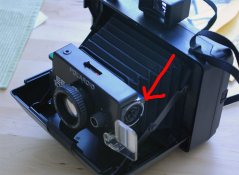
First question I have is what are those buttons and knobs I mared with arrows to?
Also, it seems that my camera is missing one knob (shown on the second picture). Can I live without it?
I am also not sure which type of film I need.
Any help highly appreciated,

regards,

Jan
 

Attachments

  • polaroid1.jpg
    polaroid1.jpg
    79.8 KB · Views: 337
  • polaroid2.jpg
    polaroid2.jpg
    98.1 KB · Views: 257
Hi,
I just received Polaroid EE100 Special which I bought on e-bay. I have never used Polaroid cameras before and I feel I need some information to start using it. I am more into LF gear, but I have a project which needs Polaroid or ideally handheld 4x5, which I could not afford so I decided on Polaroid.
First question I have is what are those buttons and knobs I mared with arrows to?
Also, it seems that my camera is missing one knob (shown on the second picture). Can I live without it?
I am also not sure which type of film I need.
Any help highly appreciated,

regards,

Jan
Hi Jan,

"EE" stands for Electric Eye, if I remember correctly. Your first picture shows a "lighten/darken" adjustment knob. If you look into the middle of the knob you'll see that there's a lens recessed in there for the measuring cell. It simple. Take a picture. If it's too light, turn the knob toward the "dark" icon (I think it's the solid dot). Or vice-versa. At the end of seven test shots, you'll have a perfectly exposed photo (joke!). I believe there's also a switch on top of the lens panel letting you adjust for ASA 80 (color) or ASA 3000 (b&w).

Your other photo shows the socket for the now defunkt (I think) flashcube. Originally there was also a dedicated electronic flash unit available for your camera. Perhaps you could locate one (or flashcubes) on He-Boy, or whatever it's called.

Have fun, "Jimmy Olsen" (in case you don't know who that is, just google it)!

Best,

Christopher

.
 
Last edited by a moderator:
I think you are going to be surprised by the quality of the results you get with that simple camera. The lens is plastic, but IIRC remember blowing up some b/w shots made with one which were really pretty good. Was there a 3 1/4 x 4 1/4 pos neg film made? I think that is what I used.

As stated, the knob is for lighten and darken. You set the film speed on the top with that sliding switch.

I sold that camera for about 40 bucks retail in the earkly 1970s.
Anscojohn, Mount Vernon, Virginia USA
 
Thanks a lot, but what is this clear plastic lever for?

regards,

Jan

*****
It's a diffusion disk to soften the light of the flash cube; also served to protect the person being photographed if a flash cube let go
 
Photrio.com contains affiliate links to products. We may receive a commission for purchases made through these links.
To read our full affiliate disclosure statement please click Here.

PHOTRIO PARTNERS EQUALLY FUNDING OUR COMMUNITY:


Ilford ADOX Freestyle Photographic Stearman Press Weldon Color Lab Blue Moon Camera & Machine
Top Bottom
