
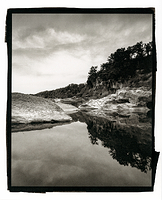

Hello all. The other day, I tried using PMK for the first time (Efke 25 in 120 exposed at 12 EI, 7min @ 70F, with a post-fixer bath in the used developer for 2 minutes as recommended on the instructions that came with my box of PMK), and last night I tried printing one of the negatives in the darkroom on Adox MCP310 VC RC paper.
No matter how much exposure I used, I found I couldn't get really deep shadows, even when I used a grade 5 filter. Areas of the negative that were just film base + fog would only print to a mid-gray. The only effect of adding more exposure was to depress the highlight values.
I understand that the green-yellow stain on the PMK negative is meant to reduce contrast in the highlight values, but only when the stain is proportional to density. My negative had more of an overall stain, which I understand is due in part to the post-fixer bath in used developer.
Does anyone else have this issue when using VC papers and PMK? And if so, is there any way to get around this? Thanks!
No matter how much exposure I used, I found I couldn't get really deep shadows, even when I used a grade 5 filter. Areas of the negative that were just film base + fog would only print to a mid-gray. The only effect of adding more exposure was to depress the highlight values.
I understand that the green-yellow stain on the PMK negative is meant to reduce contrast in the highlight values, but only when the stain is proportional to density. My negative had more of an overall stain, which I understand is due in part to the post-fixer bath in used developer.
Does anyone else have this issue when using VC papers and PMK? And if so, is there any way to get around this? Thanks!


