• Welcome to Photrio!
    Registration is fast and free. Join today to unlock search, see fewer ads, and access all forum features.
    Click here to sign up

Pictorico Ultra Premium OHP vs. White Film for Silver-Gelatin DN's

Recent Classifieds

Forum statistics

Threads
201,108
Messages
2,819,275
Members
100,529
Latest member
VicSpectralstarSP-I
Recent bookmarks
0

Take2

Member
Allowing Ads
Joined
Dec 22, 2010
Messages
31
Format
35mm
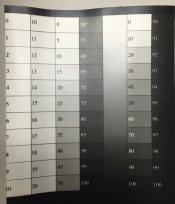
I've been playing around with DN's for some years now with marginal results. I have an Epson 3800 with K3 inks, mainly using the Photoshop curves method. Last spring I had some fairly promising results printing digital negatives on Inkpress White Film. Sadly I lost most of my configuration and curves so I'm back to the drawing board. The "paper guy" at B&H told me that OHP is the way to go for DN's. I've gone through about 10 step-tablet iterations or so and I'm at the "tweaking stage" (well within 10% of linear tones) but the prints look like crap! I'm wondering if OHP is no good for SG (all the talk is about platinum/palladium & OHP). Any insights would be helpful.

I'm linearizing my tones using a densitometer.
 
OP
OP
Take2

Take2

Member
Allowing Ads
Joined
Dec 22, 2010
Messages
31
Format
35mm
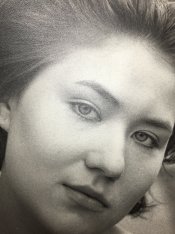
Like I said, the tablet tonal scale is mostly linear (within 10%) but the tones in the image appear blotchy and uneven (see attached).

Given the relatively scarcity of [concise and usable] information out there on digital negatives, I'm not holding out much hope for troubleshoot this issue. I'm gonna go back to known quantities, and re-do the curve for Pictorico White Film. I remember seeing curves for this medium on Dan Burkholder's site for use with silver gelatin.
 

Attachments

  • sample-dn.JPG
    sample-dn.JPG
    156.7 KB · Views: 179
  • step-tablet.JPG
    step-tablet.JPG
    168.3 KB · Views: 162

pschwart

Subscriber
Joined
Jul 15, 2005
Messages
1,147
Location
San Francisco, CA
Format
Multi Format
It would be helpful to see the positive digital image so we can better evaluate the negative, but this doesn't look like a curve problem -- more like a reflection or uneven lighting across the negative. The negative is out of focus at the hairline above the right eye, so I suspect the negative popped and that is part of the problem.
What exactly is the Photoshop curves method? I don't know of any method that doesn't need a correction curve, and these are often made using Photoshop. Are you making colorized negatives using the Epson driver? Black & white negatives using Epson ABW? Are you using matte black (MK) or photo black (PK)?
 
Photrio.com contains affiliate links to products. We may receive a commission for purchases made through these links.
To read our full affiliate disclosure statement please click Here.

PHOTRIO PARTNERS EQUALLY FUNDING OUR COMMUNITY:


Ilford ADOX Freestyle Photographic Stearman Press Weldon Color Lab Blue Moon Camera & Machine
Top Bottom