• Welcome to Photrio!
    Registration is fast and free. Join today to unlock search, see fewer ads, and access all forum features.
    Click here to sign up

Odd behavior in VueSan and Nikon Super Coolscan5000

White Doves of Peace

A
White Doves of Peace

  • 2
  • 1
  • 28
Flowstones

H
Flowstones

  • 4
  • 0
  • 43

Forum statistics

Threads
202,532
Messages
2,841,967
Members
101,368
Latest member
codytr4
Recent bookmarks
0

leetramp

Member
Allowing Ads
Joined
Feb 10, 2024
Messages
3
Location
Bradenton, FL, USA
Format
Multi Format
Greetings,

I'm new to scanning slides, and have a Nikon Super Coolscan 5000 and I am using VueScan 9.8.26 on Windows 11. I've been fairly successful, but now I'm getting scans that are way off-color. When I initiate a Preview, the image appears decent while the scanner is scanning the preview, but one it finishes the preview, the colors are way off and it's quite grainy.

I have tried adjusting settings in just about every variation I can think of, but I still cant' get decent results.

Anyone familiar with VueScan who might be able to provide a solution?

Thanks.
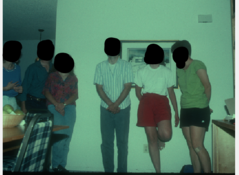
 

Attachments

  • Inititial preview while scanning.png
    Inititial preview while scanning.png
    419.9 KB · Views: 76
  • Preview after completing scan.png
    Preview after completing scan.png
    720 KB · Views: 71
So many bells and whistles layered upon each other in vuescan (disclosure: that's what I use, despite my gripes).
Sometimes vuescan gets itself in a spin for some unknown reason.
Suggest to delete vuescan.ini (same directory as the executable), start a fresh vuescan.
Beyond that, would need screenshots of at least the "input" and "color" tabs.
An expert might make use of the log file, provided it has been enabled (in Preferences,if memory serves).
Good luck. Please report back.
 
Agreed. Some screen shots of your settings would go a long way to troubleshooting potential issues. By the way, take the screenshots after you've loaded some film. I've noticed that - at least with my 9000 - that the settings will reload based on what film carrier I insert, i.e., I set a bunch of stuff and then load in a carrier and Vuescan changes the settings based on what I'd set the last time that carrier was inserted. It's a bit un-intuitive like that.

It is possible that the scanner has had a hardware failure of the LED variety but I think that's pretty rare. Perhaps trying a scan with Nikonscan or Silverfast to eliminate potential hardware failures would be a wise next step.
 
Thanks for the tips. I found the ini file, but before I deleted it I tried File...Default options and this seems to have cleared it up.
 
Greetings,

I'm new to scanning slides, and have a Nikon Super Coolscan 5000 and I am using VueScan 9.8.26 on Windows 11. I've been fairly successful, but now I'm getting scans that are way off-color.

Thanks.

Probably a very dirty mirror. Join the Coolscan Group on Facebook, it's full of gurus and professional Coolscan repair techs that will diagnose your issue within 5 minutes of you posting about it.
 
Probably a very dirty mirror. Join the Coolscan Group on Facebook, it's full of gurus and professional Coolscan repair techs that will diagnose your issue within 5 minutes of you posting about it.

Thanks for the tip; I've joined that group.
 
Photrio.com contains affiliate links to products. We may receive a commission for purchases made through these links.
To read our full affiliate disclosure statement please click Here.

PHOTRIO PARTNERS EQUALLY FUNDING OUR COMMUNITY:


Ilford ADOX Freestyle Photographic Stearman Press Weldon Color Lab Blue Moon Camera & Machine
Top Bottom