
• Welcome to Photrio!
    Registration is fast and free. Join today to unlock search, see fewer ads, and access all forum features.
    Click here to sign up

Note Taking

Recent Classifieds

Forum statistics

Threads
202,094
Messages
2,835,044
Members
101,112
Latest member
kinwahlok
Recent bookmarks
1

Buceph

Member
Allowing Ads
Joined
Jan 14, 2011
Messages
17
Format
35mm
I did a darkroom course just this weekend, and am looking to get my own equipment now (lots of fun.)

I know it's a good idea to keep notes of exactly what you did. Eventually when you change things up you'll be able to see what difference your changes did make. I was just wondering what specific notes do you take? From the start of the process right through the end.
 

winger

Subscriber
Allowing Ads
Joined
Jan 13, 2005
Messages
3,980
Location
southwest PA
Format
Multi Format
The only things I vary are the exposure for the print. I've developed a shorthand that I can write on the back of the print before putting it in the developer so that I'll know later exactly what I did with each print. I tried writing it all separately, but then I could never remember which print was which.
Basically, if it says "F2 f8 10" it means I used a #2 filter, f8 aperture, for 10 seconds. If I burn or dodge, that will be after the time for the whole print, so d 1/2 R side is dodged the right side for half the time. It's far from totally exact when referring to dodging and burning, but it's enough to give me a hint the next time I print it.
If I change anything else, I'll write it on there somewhere, but that's rare. I use a pencil (soft lead, blunt tip) on fiber and a fine point sharpie on RC. Once I'm doing "final" prints, I usually don't write on the back - the info for those is in a notebook.
 

Bob Carnie

Subscriber
Allowing Ads
Joined
Apr 18, 2004
Messages
7,735
Location
toronto
Format
Med. Format RF
I have never made notes for printing, but I am working on a project right now where I have scanned all the images , made small prints and put them in a rather large art book.
A page for each image, there will be well over a 100 images in the show and some of the prints are very difficult if not impossible to replicate, so I make notes on difficult areas, things to watch out for and such, ** for example some of the images are so hard to make, the next time I print them I will insist on minimum 10 prints made of the image for editions rather than printing a paticular image on demand.
little things on how I figured out problem areas with multiple filters and such are more important to me than any thing else.

Keeping notes on apeture, time,filters and such is IMO a waste of time, as over time this all becomes second nature.
 

Bill Burk

Subscriber
Allowing Ads
Joined
Feb 9, 2010
Messages
9,479
Format
4x5 Format
I used to be a forms designer, and recently came up with this.

http://www.beefalobill.com/images/labnotesprint.pdf

Bob's right about it becoming second-nature, I hardly ever dig out earlier records to decide on next negative, but having records can help you consistently make reprints. (For example having a record of enlarger height f/stop, paper and time comes in handy). And you can spot the end-cases (upper control limit and lower control limit of negatives that you can successfully print) to make it easier to nail down film processing times.
 

MattKing

Moderator
Moderator
Joined
Apr 24, 2005
Messages
55,368
Location
Delta, BC Canada
Format
Medium Format
I used to be a forms designer, and recently came up with this.

http://www.beefalobill.com/images/labnotesprint.pdf

Bob's right about it becoming second-nature, I hardly ever dig out earlier records to decide on next negative, but having records can help you consistently make reprints. (For example having a record of enlarger height f/stop, paper and time comes in handy). And you can spot the end-cases (upper control limit and lower control limit of negatives that you can successfully print) to make it easier to nail down film processing times.

Bill:

I get an "Invalid Color Space" error code when I attempt to download (and potentially 'borrow') your form.

EDIT: and now it comes out fine???
 

Rick A

Subscriber
Allowing Ads
Joined
Mar 31, 2009
Messages
10,038
Location
Laurel Highlands
Format
8x10 Format
Like Winger, I write on the back of my print as to contrast grade, f/stop, time, plus D&B data. If a print is very involved, I clip a print with dodge and burn lines and times along with a final print, then file them. I always keep a copy of my finished work as reference.
 

ROL

Member
Allowing Ads
Joined
Oct 27, 2005
Messages
795
Location
California
Format
Multi Format
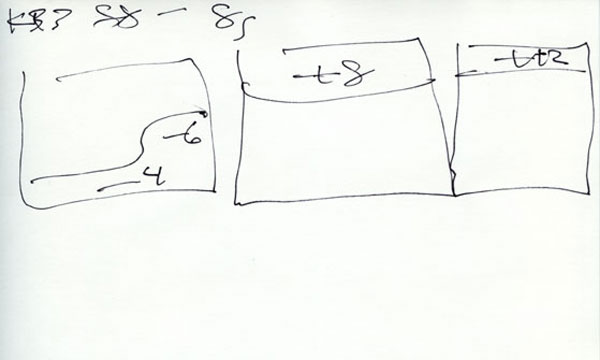
Proof Notes (start)

East-Lake-Proof-Notes.jpg


Fine Print Record (end)

East-Lake-OG4-%286X10%29.jpg
 
Last edited by a moderator:

eddie

Member
Allowing Ads
Joined
Jul 24, 2005
Messages
3,259
Location
Northern Vir
Format
Multi Format
I only take notes for difficult prints- if there's an inordinate amount of dodging/burning, split filtering, etc. I use a separate piece of paper for the notes. To keep track of the different prints, I clip off a 1/16th inch off of a specific corner- i.e. Print 1-top left, Print2-top right, etc. (I always print with a 1 inch border all around, so the clip has no effect on a mounted image).
It works for me...
 

Bill Burk

Subscriber
Allowing Ads
Joined
Feb 9, 2010
Messages
9,479
Format
4x5 Format
Bill:

I get an "Invalid Color Space" error code when I attempt to download (and potentially 'borrow') your form.

EDIT: and now it comes out fine???

Sometimes PDF's will do that when opened directly into a browser, refresh usually makes them appear fine.
 

Leigh B

Member
Allowing Ads
Joined
Jan 17, 2011
Messages
2,059
Location
Maryland, USA
Format
Multi Format
The key to darkroom work is standardization and consistency. Once you take the paper out of the easel, everything from there to a dry print should be exactly the same every time... no variation.

So all you need keep track of is information regarding the exposure and manipulation in the enlarger. I find a regular steno pad works well for that.

- Leigh
 

George Collier

Subscriber
Allowing Ads
Joined
Feb 23, 2005
Messages
1,374
Location
Richmond, VA
Format
Multi Format
I do something like Bethe does, a little more elaborate. I keep notes on a separate paper, numbering each successive print - 1, 2, 3, etc, by the notes and on the back bottom corner of each print. This way, the only thing I have to write is what changes from the previous print. After the "recipe" is finalized, I enter it into my database, along with a scan of the final 8x10 print. I've enclosed a pdf of a sample record, you can see where I have also recorded the 16x20 times also. (This particular image is 2 negs mounted side by side).
The Dbase also has shooting and developing information, you can see the three fields on the right side. I can look up any image by film and developer type (orange area near the top right) to research another roll taken later.
This database is done in Filemaker Pro, and as I've offered before, I will email an empty shell for anyone who would like to use it. You need at least FMPro v7
 

Attachments

  • Cedar and Breastwork 1.pdf
    163.8 KB · Views: 127

Steve Smith

Member
Allowing Ads
Joined
May 3, 2006
Messages
9,110
Location
Ryde, Isle o
Format
Medium Format
I used to make exposure notes for both film and paper. Then I realised that I never referred to them so I don't bother now.


Steve.
 
Photrio.com contains affiliate links to products. We may receive a commission for purchases made through these links.
To read our full affiliate disclosure statement please click Here.

PHOTRIO PARTNERS EQUALLY FUNDING OUR COMMUNITY:


Ilford ADOX Freestyle Photographic Stearman Press Weldon Color Lab Blue Moon Camera & Machine
Top Bottom