• Welcome to Photrio!
    Registration is fast and free. Join today to unlock search, see fewer ads, and access all forum features.
    Click here to sign up

NEwbie to split toning. Feedback, tips etc. ?

Emi on Fomapan 400

A
Emi on Fomapan 400

  • 3
  • 2
  • 38
Venice

A
Venice

  • 1
  • 0
  • 59

Recent Classifieds

Forum statistics

Threads
201,795
Messages
2,830,295
Members
100,953
Latest member
kevin1995
Recent bookmarks
0

crumpet8

Member
Allowing Ads
Joined
Nov 3, 2015
Messages
393
Location
Scandinavia
Format
Medium Format
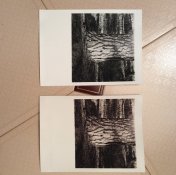
So I've never seen a split toned print in real life and was wondering how my print is? A big thanks to you guys for getting me this far :smile: I expected more blue tones though?

Ilford multigrade fb classic
Ilford multigrade dev

Kodak sepia toner, bleached for 3 mins

Redeveloped

Kodak selenium toner 1:4 for 6 minutes

Any more info needed? I tried uploading an image but it says it was too large. I don't know how my iPad works, but I've uploaded images taken with it before... hopefully this link works

Dead Link Removed
 

wilfbiffherb

Member
Allowing Ads
Joined
Nov 3, 2010
Messages
331
Format
Medium Format
Hi - a good start, well done. Selenium isn't really the toner to use for a blue colour, unless you are using a cold tone paper. You've got the basics down, just experiment with your bleach and selenium times. It helps to make a few copies of the same print and then bleach for different times, then you can see how you can move the split around.
 

Bob Carnie

Subscriber
Allowing Ads
Joined
Apr 18, 2004
Messages
7,735
Location
toronto
Format
Med. Format RF
Selenium if left on the surface of the print too long will go a purplish red rather than blue.. Blue tone is kind of hard to get at least in my darkroom
 
OP
OP
crumpet8

crumpet8

Member
Allowing Ads
Joined
Nov 3, 2015
Messages
393
Location
Scandinavia
Format
Medium Format
Selenium if left on the surface of the print too long will go a purplish red rather than blue.. Blue tone is kind of hard to get at least in my darkroom

Yeah, sorry I meant more purple or that selenium toned colour.. I've toned with just selenium before and the colour change is much clearer and towards that colder purple tone... does this look like I should use a shorter bleach on the sepia to reign it in a bit? I have a couple more to do and will bracket the sepia times :smile:
 
OP
OP
crumpet8

crumpet8

Member
Allowing Ads
Joined
Nov 3, 2015
Messages
393
Location
Scandinavia
Format
Medium Format
Also is the selenium finished or run its course after 6 mins in such a process?
 

Bob Carnie

Subscriber
Allowing Ads
Joined
Apr 18, 2004
Messages
7,735
Location
toronto
Format
Med. Format RF
I have found as long as the selenium agitates the fillings in your teeth and stinks its probably good to go, I reuse it quite a bit.

My dilution is 1:5 and I have three large jugs filled all the time with this ratio.
 
OP
OP
crumpet8

crumpet8

Member
Allowing Ads
Joined
Nov 3, 2015
Messages
393
Location
Scandinavia
Format
Medium Format
I have found as long as the selenium agitates the fillings in your teeth and stinks its probably good to go, I reuse it quite a bit.

My dilution is 1:5 and I have three large jugs filled all the time with this ratio.

Oh, meant is it finished effecting the paper/toning... I didn't see much change after a few minutes but wonder if it's just my inexperienced eyes.
 

MattKing

Moderator
Moderator
Allowing Ads
Joined
Apr 24, 2005
Messages
55,165
Location
Delta, BC Canada
Format
Medium Format
When you are doing this, it really helps to have an un-toned duplicate print in a water bath beside your toning both.
Also, your printing test strips and discards are really handy for toning tests. Don't be afraid to throw a bunch of them in to your toning bath and then take them out at various intervals thereafter. Wash and blow dry the results and you can evaluate the differences. It will help if you can mark, tear or punch them in different ways, in order to differentiate those results.
 
OP
OP
crumpet8

crumpet8

Member
Allowing Ads
Joined
Nov 3, 2015
Messages
393
Location
Scandinavia
Format
Medium Format
When you are doing this, it really helps to have an un-toned duplicate print in a water bath beside your toning both.
Also, your printing test strips and discards are really handy for toning tests. Don't be afraid to throw a bunch of them in to your toning bath and then take them out at various intervals thereafter. Wash and blow dry the results and you can evaluate the differences. It will help if you can mark, tear or punch them in different ways, in order to differentiate those results.

Thanks Matt! I always have a plain bw copy but I'm going to start making just sepia copies as well to differentiate after the selenium step as well I think. Here's a side by side bw and the toned :smile:
 

Attachments

  • IMG_2388.JPG
    IMG_2388.JPG
    514.2 KB · Views: 181

tezzasmall

Member
Allowing Ads
Joined
Dec 29, 2013
Messages
1,178
Location
Southend on Sea Essex UK
Format
Plastic Cameras
Ilford multigrade fb classic
Ilford multigrade dev

Kodak sepia toner, bleached for 3 mins

Redeveloped

Kodak selenium toner 1:4 for 6 minutes

Hi there,

I like the big difference between the two prints.

But I am a bit confused by your method.

Usually you take a finished print; bleach it back (how much depends on how much you want the toner to change the colour of the print. The more bleached back the more toned it will be in sepia).

One can then tone again in Selenium.

BUT you bleach then redevelop??? Doesn't that just take you back to a straight print or am I confused with the process rules or I am misreading something?
 
OP
OP
crumpet8

crumpet8

Member
Allowing Ads
Joined
Nov 3, 2015
Messages
393
Location
Scandinavia
Format
Medium Format
H
Hi there,

I like the big difference between the two prints.

But I am a bit confused by your method.

Usually you take a finished print; bleach it back (how much depends on how much you want the toner to change the colour of the print. The more bleached back the more toned it will be in sepia).

One can then tone again in Selenium.

BUT you bleach then redevelop??? Doesn't that just take you back to a straight print or am I confused with the process rules or I am misreading something?


Hi!

Sorry I wrote only the bleach time because I thought that this was the control part of the sepia process. I.e. The toner bath after bleaching runs to completion so the time in the second bath wasn't relevant (?).
 

MattKing

Moderator
Moderator
Allowing Ads
Joined
Apr 24, 2005
Messages
55,165
Location
Delta, BC Canada
Format
Medium Format
Sorry I wrote only the bleach time because I thought that this was the control part of the sepia process. I.e. The toner bath after bleaching runs to completion so the time in the second bath wasn't relevant (?).
Not necessarily.
The sepia toner itself actually re-develops the bleached print. You can choose to partially re-develop in that bath, and then either complete the re-development in something else (like standard developer) or transfer the print to fixer, which will result in a lightened print, or there may be other re-development options that I haven't used.
 

Patrick Robert James

Member
Allowing Ads
Joined
Jul 31, 2012
Messages
3,417
Format
35mm RF
Three minutes is a long time to bleach if you want to split tone a print. I use a weak bleach and only bleach until the midtones start to disappear. I never put a stopwatch on it, but I would guess around a minute, maybe less.

I don't think there really is a "split" like we used to be able to get back in the day with certain papers. Prints these days just look sepia toned, but with an added richness. We used to be able to do some really whacky stuff, and I have the prints to prove it.

If you look in my gallery here anything that is sepia toned is split toned for whatever that is worth.
 

Michael Wesik

Member
Allowing Ads
Joined
Jan 2, 2015
Messages
65
Location
Vancouver, B
Format
ULarge Format
If you selenium tone the print first, it will keep your shadows colder, though 6mins in KRST 1+4 might convert too much of the print to silver selenide to pull sepia out of the highlights. You'd definitely have more of a split. I've found that sepia followed by selenium typically pushes the whole print warmer but it depends on several other variables. For example, if you use a shorter (1min) or longer (5-7min) initial developing times you can augment the selenium colour - longer developing times will yield cooler colours, generally speaking. It's something to consider if you're using KRST at 1+4 for 6mins.

The amount of time in the bleach is relative to the image density and the strength of the bleach. There are several bleaches to pull from that will produce different results.

You're definitely doing the right things...the best thing is to just do it and make sure you employ adequate washing practices.
 
OP
OP
crumpet8

crumpet8

Member
Allowing Ads
Joined
Nov 3, 2015
Messages
393
Location
Scandinavia
Format
Medium Format
Lots of great tips here! And nice photos Patrick :smile: my next step is going to try a different paper, any tips on which ilford paper is best? Here are three more at 30s, 60s and 1:45 still muddy...on a side note, I toned a few portraits yesterday with the same method and got a light sepia that is almost golden so I have one look in my keeper file :smile: suited my blonde model. The selenium seemed to fill out the picture and give it a little more pop/contrast.

Dead Link Removed
 
OP
OP
crumpet8

crumpet8

Member
Allowing Ads
Joined
Nov 3, 2015
Messages
393
Location
Scandinavia
Format
Medium Format
If you selenium tone the print first, it will keep your shadows colder, though 6mins in KRST 1+4 might convert too much of the print to silver selenide to pull sepia out of the highlights. You'd definitely have more of a split. I've found that sepia followed by selenium typically pushes the whole print warmer but it depends on several other variables. For example, if you use a shorter (1min) or longer (5-7min) initial developing times you can augment the selenium colour - longer developing times will yield cooler colours, generally speaking. It's something to consider if you're using KRST at 1+4 for 6mins.

The amount of time in the bleach is relative to the image density and the strength of the bleach. There are several bleaches to pull from that will produce different results.

You're definitely doing the right things...the best thing is to just do it and make sure you employ adequate washing practices.

Thanks, I'm going to try this sel-sep combo next :smile:
 

Michael Wesik

Member
Allowing Ads
Joined
Jan 2, 2015
Messages
65
Location
Vancouver, B
Format
ULarge Format
Lots of great tips here! And nice photos Patrick :smile: my next step is going to try a different paper, any tips on which ilford paper is best? Here are three more at 30s, 60s and 1:45 still muddy...on a side note, I toned a few portraits yesterday with the same method and got a light sepia that is almost golden so I have one look in my keeper file :smile: suited my blonde model. The selenium seemed to fill out the picture and give it a little more pop/contrast.

Dead Link Removed

One thing to keep in mind is that the way colour registers in a print is relative to the density and contrast of that print. So it's always best to treat each subsequent image individually to find the balance that you like.
 
OP
OP
crumpet8

crumpet8

Member
Allowing Ads
Joined
Nov 3, 2015
Messages
393
Location
Scandinavia
Format
Medium Format
Thanks, yep I've been toning my over and under exposed work prints and have noticed the different colour changes. One dark print I had turned a really nice deep brown, but all in all it was still too dark...
 

LarsAC

Member
Allowing Ads
Joined
Jun 1, 2013
Messages
296
Location
Darkroom in Germany
Format
Medium Format
Nice results, really. Concerning your question on papers: try some Ilford MG Warmtone, it might react stronger to the sepia toner.

Lars
 
OP
OP
crumpet8

crumpet8

Member
Allowing Ads
Joined
Nov 3, 2015
Messages
393
Location
Scandinavia
Format
Medium Format
Nice results, really. Concerning your question on papers: try some Ilford MG Warmtone, it might react stronger to the sepia toner.

Lars

Thanks Lars, waiting for my local store to get some more in as I've been hoping to try it next. I think that's one of the most popular paper types, so almost always seems to be out of stock!
 
OP
OP
crumpet8

crumpet8

Member
Allowing Ads
Joined
Nov 3, 2015
Messages
393
Location
Scandinavia
Format
Medium Format
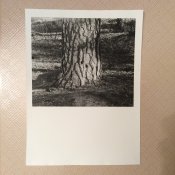
Here's a final bw print waiting for toning tests by the way. New printing method (split grade) and some dodging on the rock in the foreground :smile: happier with the overall print
 

Attachments

  • IMG_2404.JPG
    IMG_2404.JPG
    1 MB · Views: 149

tezzasmall

Member
Allowing Ads
Joined
Dec 29, 2013
Messages
1,178
Location
Southend on Sea Essex UK
Format
Plastic Cameras
One dark print I had turned a really nice deep brown, but all in all it was still too dark...

Yup, that's the way it works in general. Produce a dark print and put it in toner or whatever and you will get back a TONED dark print! :smile:

I think you're doing really well with your printing and the one just above is really good.

One thing though, is that you are leaving up to about 1/4 of each sheet of paper blank. I like a slightly larger border at the bottom if not mounting, but I would cut or trim off a bit from your prints before exposing, to use as test strips etc. Just a suggestion though. :wink:
 
OP
OP
crumpet8

crumpet8

Member
Allowing Ads
Joined
Nov 3, 2015
Messages
393
Location
Scandinavia
Format
Medium Format
Yup, that's the way it works in general. Produce a dark print and put it in toner or whatever and you will get back a TONED dark print! :smile:

I think you're doing really well with your printing and the one just above is really good.

One thing though, is that you are leaving up to about 1/4 of each sheet of paper blank. I like a slightly larger border at the bottom if not mounting, but I would cut or trim off a bit from your prints before exposing, to use as test strips etc. Just a suggestion though. :wink:

Thanks :smile: and yep I realise it's a large amount of space/waste, but it's just an aesthetic/artistic choice I've made.
 
Photrio.com contains affiliate links to products. We may receive a commission for purchases made through these links.
To read our full affiliate disclosure statement please click Here.

PHOTRIO PARTNERS EQUALLY FUNDING OUR COMMUNITY:


Ilford ADOX Freestyle Photographic Stearman Press Weldon Color Lab Blue Moon Camera & Machine
Top Bottom