Neg to Digital Conversion colour issues

Simpler Time

A
Simpler Time

  • 0
  • 0
  • 20
Rural Ohio

Rural Ohio

  • 3
  • 0
  • 30

Recent Classifieds

Forum statistics

Threads
201,053
Messages
2,818,311
Members
100,496
Latest member
Incredulousk
Recent bookmarks
0

Justyjust

Member
Allowing Ads
Joined
Nov 15, 2020
Messages
35
Location
London
Format
Digital
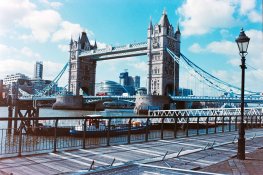
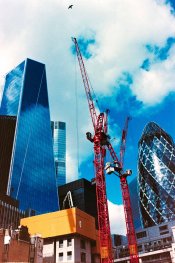
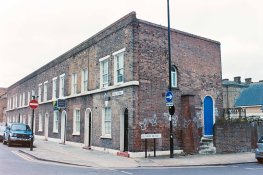
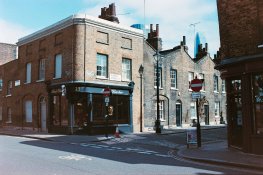
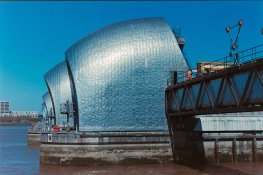
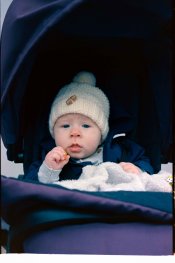
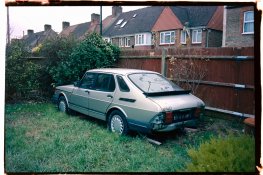
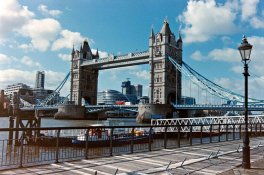
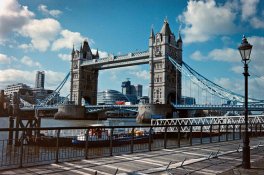
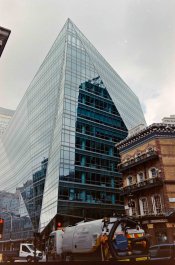
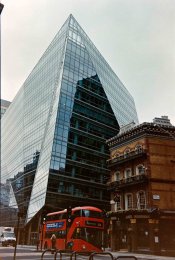
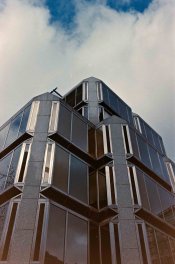
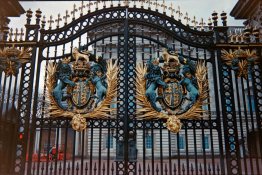
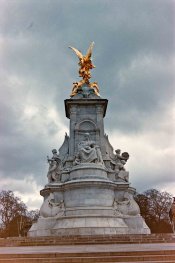
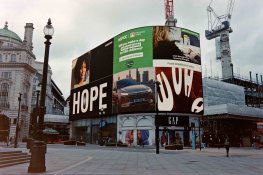
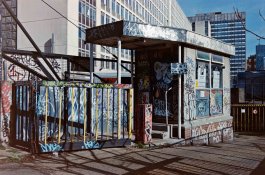
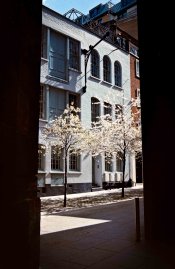
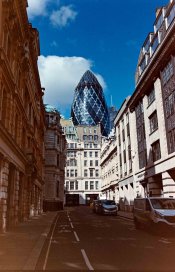
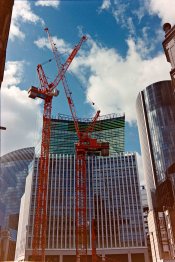
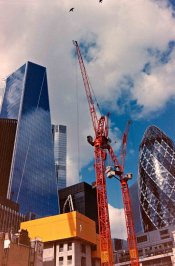
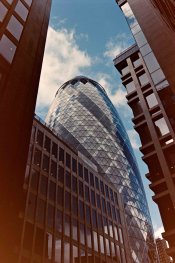
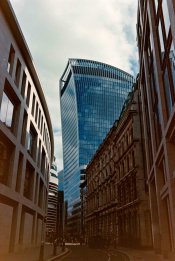
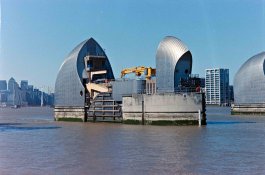
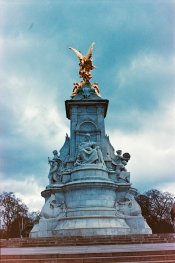
I have been trying to get to grips with my colour negative development in negative lab and Lightroom alone but I'm really struggling to get good output without a blue colour cast.

Can anyone advise me on there process and best way to get a good outcome, I have have added some raw images to my creative cloud if you fancy giving them a go.

Thanks Justin

All images shot on my Contax 159mm/167MT with the 35mm 2.8 or 35-70mm 3.5f

Negatives photographed with my Panasonic G9 and the Olympus 12-40 2.8

Kodak Colorplus 400
All shots shot on a bright sunny day

Kodak Ektar 100
over cast days

Folder Link https://shared-assets.adobe.com/link/15bd3314-6c6d-4033-49e6-c08e0ba76d13
 

Attachments

  • P1890418.JPG
    P1890418.JPG
    1.1 MB · Views: 167
  • P1890421.JPG
    P1890421.JPG
    1.1 MB · Views: 182
  • P1890426.JPG
    P1890426.JPG
    1.1 MB · Views: 174
  • P1890429.JPG
    P1890429.JPG
    997 KB · Views: 173
  • P1890433.JPG
    P1890433.JPG
    1,019.4 KB · Views: 169
  • P1890437.JPG
    P1890437.JPG
    912.1 KB · Views: 179
  • P1890448.JPG
    P1890448.JPG
    423.4 KB · Views: 190
  • P1890449.JPG
    P1890449.JPG
    996.9 KB · Views: 174

Alan9940

Member
Allowing Ads
Joined
Jun 17, 2006
Messages
2,476
Location
Arizona
Format
Multi Format
I downloaded one of your files and tried it. Not getting the blue cast. Did you make sure that the NLP profile was assigned properly in LR? I ask because I had to manually assign it.
 

Alan Edward Klein

Member
Allowing Ads
Joined
Aug 29, 2017
Messages
9,949
Location
New Jersey formerly NYC
Format
Multi Format
I don't want to dissuade you from negative color film. But I had problems scanning it as well and went back to chrome film. I just find it easier to scan chrome and get the color right. Plus, looking at the film result with chromes, you know immediately whether you got the exposure right. I prefer Velvia 50 which is pretty saturated. However, Provia 100 is less so and might be good for you.
 
OP
OP
Justyjust

Justyjust

Member
Allowing Ads
Joined
Nov 15, 2020
Messages
35
Location
London
Format
Digital
I downloaded one of your files and tried it. Not getting the blue cast. Did you make sure that the NLP profile was assigned properly in LR? I ask because I had to manually assign it.
I think I've given up with NLP I seem to be getting better results from grane2pixel especially with colour rendition, I'm finding that my lens Contax 35-70 has a vignette as I need to crank it up to about -25 to avoid the orange haze in the corners I'm guessing the vignette from the lens is causing the under exposure orange haze but I'm no pro on evaluating film images.
 

Attachments

  • no added vignette  Grain2pixel.JPG
    no added vignette Grain2pixel.JPG
    1,002.8 KB · Views: 144
  • vignette  -33 Grain2pixel.JPG
    vignette -33 Grain2pixel.JPG
    1,004.7 KB · Views: 133
OP
OP
Justyjust

Justyjust

Member
Allowing Ads
Joined
Nov 15, 2020
Messages
35
Location
London
Format
Digital
After using grain2pixel I'm getting better results can anyone take a look at my images and give me some advise on what may need adjusting in the image with Lightroom, I think I found that my lens the contax 35-70 gives the images a vignette which seems to be helping when adjusted in lightroom. all shots have been shot with kodak colorplus 400
 

Attachments

  • no added vignette  Grain2pixel.JPG
    no added vignette Grain2pixel.JPG
    1,002.8 KB · Views: 138
  • P1890413_48Bit_g2p0209.JPG
    P1890413_48Bit_g2p0209.JPG
    785.8 KB · Views: 143
  • P1890414_48Bit_g2p0210.JPG
    P1890414_48Bit_g2p0210.JPG
    848.8 KB · Views: 162
  • P1890416_48Bit_g2p0212.JPG
    P1890416_48Bit_g2p0212.JPG
    725 KB · Views: 154
  • P1890417_48Bit_g2p0213.JPG
    P1890417_48Bit_g2p0213.JPG
    1,020.1 KB · Views: 146
  • P1890418_48Bit_g2p0214.JPG
    P1890418_48Bit_g2p0214.JPG
    822.6 KB · Views: 144
  • P1890419_48Bit_g2p0215.JPG
    P1890419_48Bit_g2p0215.JPG
    771.4 KB · Views: 147
  • P1890420_48Bit_g2p0216.JPG
    P1890420_48Bit_g2p0216.JPG
    1 MB · Views: 131
  • P1890423_48Bit_g2p0219.JPG
    P1890423_48Bit_g2p0219.JPG
    688 KB · Views: 140
  • P1890424_48Bit_g2p0220.JPG
    P1890424_48Bit_g2p0220.JPG
    883.7 KB · Views: 152
  • P1890425_48Bit_g2p0221.JPG
    P1890425_48Bit_g2p0221.JPG
    993.5 KB · Views: 146
  • P1890426_48Bit_g2p0222.JPG
    P1890426_48Bit_g2p0222.JPG
    864 KB · Views: 140
  • P1890427_48Bit_g2p0223.JPG
    P1890427_48Bit_g2p0223.JPG
    768.5 KB · Views: 142
  • P1890428_48Bit_g2p0224.JPG
    P1890428_48Bit_g2p0224.JPG
    858 KB · Views: 149
  • P1890435_48Bit_g2p0231.JPG
    P1890435_48Bit_g2p0231.JPG
    840.9 KB · Views: 148

Alan9940

Member
Allowing Ads
Joined
Jun 17, 2006
Messages
2,476
Location
Arizona
Format
Multi Format
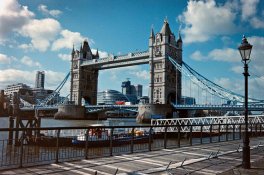
Color-wise they all look pretty good on my monitor. My only nit-pick, and this is totally my own preference, is skies that lean toward cyan. Since I don't like this, I always do a color adjustment to shift the color more toward something that looks like sky blue.
 
OP
OP
Justyjust

Justyjust

Member
Allowing Ads
Joined
Nov 15, 2020
Messages
35
Location
London
Format
Digital
Color-wise they all look pretty good on my monitor. My only nit-pick, and this is totally my own preference, is skies that lean toward cyan. Since I don't like this, I always do a color adjustment to shift the color more toward something that looks like sky blue.
Thanks Alan, The skies are cyan you don't think this is just the Kodak colorplus film do you??
 

wiltw

Subscriber
Allowing Ads
Joined
Oct 4, 2008
Messages
6,605
Location
SF Bay area
Format
Multi Format
The sense I am getting is when a scanner is provided with software, with a mode for scanning color negatives, the results are very easy and quick to obtain correct color positives. 50-60 year old negatives on Kodacolor

negscan_0001a_zpscbc14622.jpg

1964-3_zpszx130y2m.jpg


catalina_0001_zpsovnd9rfa.jpg


In comparison, a 40 year old neg done with 'scan positive' (equiv to dSLR shot of neg) and then turned into a positive image with postprocessing software neg-to-positive mode...

step2_zps2gmnwm5b.jpg


vs. the 'scan negative' with scanner software and no tweaking by me
IMG_0003a.jpg
IMG_0003a.jpg


Seeing the number of recent thread on the topic of conversion of color neg shots from dSLR images, I am not seeing much hope for software that does the neg-to-positive as well as the scanner software! Too much fuss and bother to get good results after dSLR 'scan', it seems.

Someeone, PLEASE, prove that last statement to be wrong!!!
 
Last edited:

MattKing

Moderator
Moderator
Allowing Ads
Joined
Apr 24, 2005
Messages
54,604
Location
Delta, BC Canada
Format
Medium Format
Scanners have three very clear advantages.
The light source is a constant, and known to the designers of the firmware and software associated with the scanner.
The lens and optical path is a constant, and known to the designers of the firmware and software associated with the scanner.
The sensor is a constant, and known to the designers of the firmware and software associated with the scanner.
Once the scanner is calibrated to itself, the scanner and its operator only needs to deal with variability in the negatives or transparencies being scanned.
It is at least theoretically possible to calibrate a dedicated to scanning DSLR and copy stand and fixed light source just as well, but how many are willing to leave a DSLR fixed to such a rig permanently and, perhaps more importantly, can it be done without full access and control of the firmware?
 

Alan Edward Klein

Member
Allowing Ads
Joined
Aug 29, 2017
Messages
9,949
Location
New Jersey formerly NYC
Format
Multi Format
Thanks Alan, The skies are cyan you don't think this is just the Kodak colorplus film do you??
One of the reasons I stopped using negative color and only shoot chromes. With chromes, you get what you see.
 

Alan9940

Member
Allowing Ads
Joined
Jun 17, 2006
Messages
2,476
Location
Arizona
Format
Multi Format
OTE="Justyjust, post: 2416174, member: 93781"]Thanks Alan, The skies are cyan you don't think this is just the Kodak colorplus film do you??[/QUOTE]

Certainly could be the film rendering; never shot ColorPlus myself. Interesting, though, that my digital cameras many times produce sky blue that leans toward cyan. Maybe it's the digital conversion? It might be a worthwhile exercise to have a good lab make a conventional print from one of your negs and compare the result.
 

wiltw

Subscriber
Allowing Ads
Joined
Oct 4, 2008
Messages
6,605
Location
SF Bay area
Format
Multi Format
Scanners have three very clear advantages.
The light source is a constant, and known to the designers of the firmware and software associated with the scanner.
The lens and optical path is a constant, and known to the designers of the firmware and software associated with the scanner.
The sensor is a constant, and known to the designers of the firmware and software associated with the scanner.
Once the scanner is calibrated to itself, the scanner and its operator only needs to deal with variability in the negatives or transparencies being scanned.
It is at least theoretically possible to calibrate a dedicated to scanning DSLR and copy stand and fixed light source just as well, but how many are willing to leave a DSLR fixed to such a rig permanently and, perhaps more importantly, can it be done without full access and control of the firmware?

You may have outlined the fundamental reason behind inferior color rendition using images of a negative generated from a dSLR.
That paints a somewhat bleak picture confronting everyone trying to 'scan' via dSLR. Especially since scanners handling 4x5 or even medium format get fewer and fewer over time, even if one can deal with expense of a scanner that handels larger than 135 format.
 

Tim Gray

Member
Allowing Ads
Joined
Sep 2, 2006
Messages
1,882
Location
OH
Format
35mm
What light source are you using?

I echo this.

I tried one of your negs, and got reasonable results in PS. Correcting lens vignetting will definitely help with the orange/red cast in the corners. Certainly had more difficulty than with my negs, but I don't have a Panasonic camera, nor have ever shot with Colorplus, so the whole combo is new to me.
 
OP
OP
Justyjust

Justyjust

Member
Allowing Ads
Joined
Nov 15, 2020
Messages
35
Location
London
Format
Digital
I echo this.

I tried one of your negs, and got reasonable results in PS. Correcting lens vignetting will definitely help with the orange/red cast in the corners. Certainly had more difficulty than with my negs, but I don't have a Panasonic camera, nor have ever shot with Colorplus, so the whole combo is new to me.
Thanks for checking the negs out I think my contax 35-70 3.4 does create a lot of vignette it seems, I'm still not very impressed with my colour film camera scans getting the colours right is very difficult.
I have found grain2pixel does a good job though.
 
Photrio.com contains affiliate links to products. We may receive a commission for purchases made through these links.
To read our full affiliate disclosure statement please click Here.

PHOTRIO PARTNERS EQUALLY FUNDING OUR COMMUNITY:


Ilford ADOX Freestyle Photographic Stearman Press Weldon Color Lab Blue Moon Camera & Machine
Top Bottom