• Welcome to Photrio!
    Registration is fast and free. Join today to unlock search, see fewer ads, and access all forum features.
    Click here to sign up

MSA July/August 2012: "Between Sharp and Unsharp"

Tree Farm

H
Tree Farm

  • 0
  • 0
  • 13
A long time ago...

A
A long time ago...

  • 0
  • 0
  • 63

Forum statistics

Threads
201,208
Messages
2,820,454
Members
100,587
Latest member
Maddog1776
Recent bookmarks
0

Bertus

Member
Allowing Ads
Joined
Dec 25, 2004
Messages
2,343
Location
The Netherla
Format
Multi Format
Thanks Noons, and I'll try again!
Two months earlier than usual, here is my new topic. "Between Sharp and Unsharp".
For example: movements, moved water or clouds, shots in haze and mist, long-time exposures in the dusk or dark, moved speedshots, selective sharpness, moved camera, etc.
So anything with a sharp and an unsharp or blurred area.
A tripod is often very useful in this type of photography.
I will show some examples later.

For any new readers, here's the basic idea of the MSA : (copy)
1. Take note of the MSA assignment, which will be inserted into the title of this thread.
2. Take your photo(s) according to the assignment guidelines. Try to shoot something new rather than grabbing from your archives.
3. You can post your photo in the MSA Gallery or, you can host your photo elsewhere and link to it in this thread, or, you can post it as an attachment to a message here in this thread and it will show as a clickable thumbnail.
4. It's all for fun, there are no prizes, but at the end of the MSA, a previous winner will choose a new assignment and a new "victim" to lead the MSA in the next two months.
5. How to upload: the same as in the standard gallery, press upload, then push on the "Categorie", you find a drop-down menu and press the Monthly Shooting Asignment, it’s placed under the "Member organized functions" and enter the rest, thats it. If you aren't a subscriber, you cannot upload to the galleries so subscribe first.

Good Luck!
 
Last edited by a moderator:
OP
OP
Bertus

Bertus

Member
Allowing Ads
Joined
Dec 25, 2004
Messages
2,343
Location
The Netherla
Format
Multi Format
Example between sharp and unsharp: selective sharpness and near and far.
Sharp-unsharp-1.jpg
 

Attachments

  • Sharp-unsharp-2.jpg
    Sharp-unsharp-2.jpg
    38.1 KB · Views: 241
Last edited by a moderator:

Kav

Member
Allowing Ads
Joined
Sep 13, 2011
Messages
145
Location
Time will te
Format
Multi Format
Two from my very recent trip to Thailand:

Scales on a dragon guarding a temple:
61870017-XL.jpg

Nikon F4 with a 55mm macro lens

My friend and I hanging out of the side of a taxi-truck while racing around the island of Ko Chiang:
61990015-XL.jpg

Nikon F4 with a 24mm lens
 

nsouto

Member
Allowing Ads
Joined
Nov 27, 2005
Messages
627
Location
Sydney Australia
Format
Multi Format
Awesome theme! Thanks, going to get cracking on this one!
 
OP
OP
Bertus

Bertus

Member
Allowing Ads
Joined
Dec 25, 2004
Messages
2,343
Location
The Netherla
Format
Multi Format
Exactly what we want!

Perfect!
Two from my very recent trip to Thailand:

Scales on a dragon guarding a temple:
61870017-XL.jpg

Nikon F4 with a 55mm macro lens

My friend and I hanging out of the side of a taxi-truck while racing around the island of Ko Chiang:
61990015-XL.jpg

Nikon F4 with a 24mm lens
 
OP
OP
Bertus

Bertus

Member
Allowing Ads
Joined
Dec 25, 2004
Messages
2,343
Location
The Netherla
Format
Multi Format
Between sharp and unsharp: distance

I've shoot this today at home with the lens diaphragm wide open and available light. cambo 120 mm, F8 - 1/2 sec. Ilford FP4 + HC110
 

Attachments

  • Sharp-unsharp-9.jpg
    Sharp-unsharp-9.jpg
    71.4 KB · Views: 199
  • Sharp-unsharp-7.jpg
    Sharp-unsharp-7.jpg
    74.2 KB · Views: 228
  • Sharp-unsharp-3.jpg
    Sharp-unsharp-3.jpg
    41.7 KB · Views: 199
Last edited by a moderator:
OP
OP
Bertus

Bertus

Member
Allowing Ads
Joined
Dec 25, 2004
Messages
2,343
Location
The Netherla
Format
Multi Format
Between sharp and unsharp: Fading shadow

Fading shadow, sharp to unsharp.
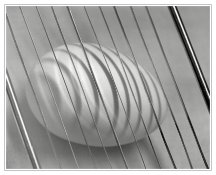
I am exercising with eggs and fading shadows. This is daylight, scan for now.
Cambo and 210 mm, Ilford MG neg.
 

Attachments

  • 10912-Egg.jpg
    10912-Egg.jpg
    74.3 KB · Views: 200
Last edited by a moderator:

Ezzie

Member
Allowing Ads
Joined
Feb 22, 2010
Messages
429
Location
Sande i Vest
Format
Multi Format
Between unsharp and sharp in my case, a matter of perspective: Serendipity

serendipity_-_850.jpg


Taken July 3rd, a most serendipitous event: (there was a url link here which no longer exists)
 
OP
OP
Bertus

Bertus

Member
Allowing Ads
Joined
Dec 25, 2004
Messages
2,343
Location
The Netherla
Format
Multi Format
Interesting image Eirik and good idea, thanks for sharing with us!
 
OP
OP
Bertus

Bertus

Member
Allowing Ads
Joined
Dec 25, 2004
Messages
2,343
Location
The Netherla
Format
Multi Format
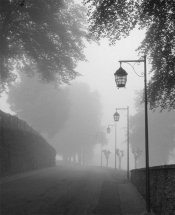
Between sharp and unsharp: fog

Taken at 7:surprised:o am with a little fog in Bouillon, Belgium.
 

Attachments

  • Boullion.jpg
    Boullion.jpg
    80.7 KB · Views: 233
OP
OP
Bertus

Bertus

Member
Allowing Ads
Joined
Dec 25, 2004
Messages
2,343
Location
The Netherla
Format
Multi Format
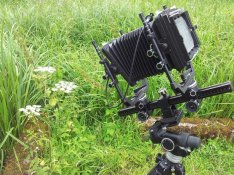
Between Sharp and Unsharp: diaphragm wide open.

Here is the setup from the plant I shoot yesterday, exposed in the MSA.
 

Attachments

  • 10923-plant-gear.jpg
    10923-plant-gear.jpg
    119.9 KB · Views: 223
  • 10923-plant.jpg
    10923-plant.jpg
    56.6 KB · Views: 221
Last edited by a moderator:

barbara ann

Member
Allowing Ads
Joined
May 10, 2006
Messages
393
Location
New Jersey USA
Format
35mm
Great to see so many wonderful entries for MSA! Glad I'm not judging this one! LOL
 

Griz

Member
Allowing Ads
Joined
Jan 22, 2012
Messages
78
Location
Landisburg,
Format
Multi Format
Thanks Noons, and I'll try again!
Two months earlier than usual, here is my new topic. "Between Sharp and Unsharp".
For example: movements, moved water or clouds, shots in haze and mist, long-time exposures in the dusk or dark, moved speedshots, selective sharpness, moved camera, etc.
So anything with a sharp and an unsharp or blurred area.
A tripod is often very useful in this type of photography.
I will show some examples later.

For any new readers, here's the basic idea of the MSA : (copy)
1. Take note of the MSA assignment, which will be inserted into the title of this thread.
2. Take your photo(s) according to the assignment guidelines. Try to shoot something new rather than grabbing from your archives.
3. You can post your photo in the MSA Gallery or, you can host your photo elsewhere and link to it in this thread, or, you can post it as an attachment to a message here in this thread and it will show as a clickable thumbnail.
4. It's all for fun, there are no prizes, but at the end of the MSA, a previous winner will choose a new assignment and a new "victim" to lead the MSA in the next two months.
5. How to upload: the same as in the standard gallery, press upload, then push on the "Categorie", you find a drop-down menu and press the Monthly Shooting Asignment, it’s placed under the "Member organized functions" and enter the rest, thats it. If you aren't a subscriber, you cannot upload to the galleries so subscribe first.

Good Luck!

Hi Bertus, I can't afford to subscribe at this time. Is is permissible to just post an attachment to the thread, or is this a subscribers only project?

Thanks,
Griz
 
OP
OP
Bertus

Bertus

Member
Allowing Ads
Joined
Dec 25, 2004
Messages
2,343
Location
The Netherla
Format
Multi Format
Hello Griz,
Just try to post an attachment or photo-link.
Better you subcribe first or later, but for now: just try and post it, thanks.

Bert
 

Leigh B

Member
Allowing Ads
Joined
Jan 17, 2011
Messages
2,059
Location
Maryland, USA
Format
Multi Format
Bertus,

When posting a topic, you might abbreviate Monthly Shooting Assignment as MSA in the title.

The vBulletin software truncates the thread title so it only occupies a single line in the search results.
This results in most of the assignment text being truncated and not visible until you click on the thread itself.

For example, with this thread only '"Between' appears on the search results.
The remaining text 'Sharp and Unsharp"' is truncated and not visible.

- Leigh
 
OP
OP
Bertus

Bertus

Member
Allowing Ads
Joined
Dec 25, 2004
Messages
2,343
Location
The Netherla
Format
Multi Format
Thanks for your helpful response Leigh.
After about one day thread text can no longer be modified, so the next MSA leader can do it and start with MSA sept/okt 2012: ....

-Bert
 
Last edited by a moderator:

Griz

Member
Allowing Ads
Joined
Jan 22, 2012
Messages
78
Location
Landisburg,
Format
Multi Format
Hello Griz,
Just try to post an attachment or photo-link.
Better you subcribe first or later, but for now: just try and post it, thanks.

Bert

Thanks for the reply Bert, I'll subscribe as soon as I'm able.
Griz

K1000test-1-1.jpg
 
OP
OP
Bertus

Bertus

Member
Allowing Ads
Joined
Dec 25, 2004
Messages
2,343
Location
The Netherla
Format
Multi Format
Griz, Thanks for participating.
Lovely forms and good sharp/unsharp effect.
Are there some details about this photo?

- Bert
 

Griz

Member
Allowing Ads
Joined
Jan 22, 2012
Messages
78
Location
Landisburg,
Format
Multi Format
Griz, Thanks for participating.
Lovely forms and good sharp/unsharp effect.
Are there some details about this photo?

- Bert

Hi Bert, shot was taken on a test roll of HP5+ in my backup K1000, SMC M50 F2 lens, wide open at 1/1000th, just a walkabout in the back yard. First roll through the camera, and first time focusing without a split image. Printed on Ilford MGIV VC Pearl, filtered to grade 3.5 due to the flat lighting conditions, developed in home brewed D72, and scanned on an old Canon flatbed.

Cheers!
Griz
 
OP
OP
Bertus

Bertus

Member
Allowing Ads
Joined
Dec 25, 2004
Messages
2,343
Location
The Netherla
Format
Multi Format
Ahh! Someone can change the thread text, even after one day! Great and thanks.
So it must be visible to everyone.
Many thanks again!

- Bert
 

AMS

Member
Allowing Ads
Joined
Dec 18, 2010
Messages
4
Location
Fridley, MN
Format
Multi Format
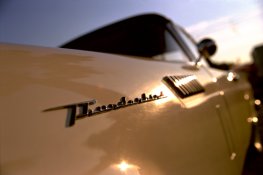
here is my photo (my first one for MSA)

Andrew
 

Attachments

  • Thunderbird(Ektar).jpg
    Thunderbird(Ektar).jpg
    267 KB · Views: 197
OP
OP
Bertus

Bertus

Member
Allowing Ads
Joined
Dec 25, 2004
Messages
2,343
Location
The Netherla
Format
Multi Format
Wow, this is fantastic Andrew, and welcom to the MSA!

- Bert
 

AMS

Member
Allowing Ads
Joined
Dec 18, 2010
Messages
4
Location
Fridley, MN
Format
Multi Format
Thanks! That photo was from my first attempt using Ektar 100. I am going to have to get some more of it.
 
OP
OP
Bertus

Bertus

Member
Allowing Ads
Joined
Dec 25, 2004
Messages
2,343
Location
The Netherla
Format
Multi Format
Questions MSA uploading

I received several questions where the MSA button is located after uploading an image.
Time for some explanation:

Choose your picture and you see a button right at the top "image tools". > choose "edit image"
Choose "Please choose a default category for your image(s)": the button "SELECT CATECHORIE" with an arrow on it. >
Choose "Member organized functions" Monthly shooting assignment >.
Save this with the "save" button down on the page. Ready.

This is also useful when you have made a mistake in you text (I allways do...:tongue:)
Good luck!

(Not written for experienced Forum Tigers)
 
Last edited by a moderator:
Photrio.com contains affiliate links to products. We may receive a commission for purchases made through these links.
To read our full affiliate disclosure statement please click Here.

PHOTRIO PARTNERS EQUALLY FUNDING OUR COMMUNITY:


Ilford ADOX Freestyle Photographic Stearman Press Weldon Color Lab Blue Moon Camera & Machine
Top Bottom