• Welcome to Photrio!
    Registration is fast and free. Join today to unlock search, see fewer ads, and access all forum features.
    Click here to sign up

Marks on negatives - developing or camera?

Recent Classifieds

Forum statistics

Threads
203,184
Messages
2,851,054
Members
101,717
Latest member
pauline121
Recent bookmarks
0

andersbis

Member
Allowing Ads
Joined
Mar 20, 2011
Messages
4
Format
35mm
Hello APUG

This is my first post on this remarkable forum, greetings from Denmark!

I recently bought a Nikon EM 35mm camera, and have by now developed two rolls of film, one Fujifilm Acros 100 and one Ilford HP5+ 400.

This leads to my question (see the images attached):
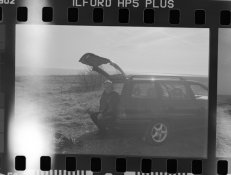
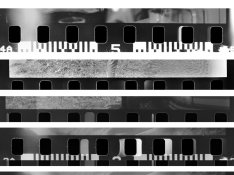
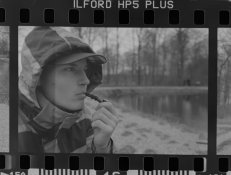
I get some light "streaks"/marks on my negatives, once developed - this happened for both films.
The last film (HP5+) got some exposure-shifts on some of the frames, with a hard-lined underexposed area.

attachment.php

attachment.php


I am developing as the following:
- HC-110 (1st roll dilution B 1:31 for 5½ minutes, second roll dilution 1:49 for 8 minutes).
- Stopbath using tap-water, 10 agitations, clean water, then 20 agitations.
- Adolux rapid fixer, dilution 1:5, 4 minutes, 4 agitations every 30 seconds.
- Rinse, Ilford method, 5 agitations - 10 agitations - 20 agitations - 5 agitations using deminarelized water.

What am i / the camera doing wrong?

I hope you guys can help me out, as i do not know where else to seek information, as a film-rookie.

Thanks
Anders
 

Attachments

  • 2. Neg scan-039.jpg
    2. Neg scan-039.jpg
    97.5 KB · Views: 271
  • 2. Neg scan-049.jpg
    2. Neg scan-049.jpg
    91.6 KB · Views: 272
I am not sure to be honest.

But why not use another camera and try developing that film and see if you get the same?
If you get good negs, it's probably the developing tank. But to be sure, shoot another roll in your regular camera, and use a different tank.

That should tell you a lot.

- Thomas
 
It looks to me like the shutter isn't traveling properly. It is strange, however, that in one example the left hand side has more exposure, while in the other example it has less.

Your camera probably needs service. Most older cameras do if they haven't been regularly maintained. It may help, however, if you give it some exercise, in case the problem results from extended inactivity
 
It looks like a shutter problem to me. In the two negatives you posted, the problem appears in the same place on the negative, the far left edge. The shutter curtain (this camera does have a curtain type shutter doesn't it--if not, I'm totally wrong) could be getting hung up and not fully closing. Hence the extra density/light leak on the edge of the negative.

If it was a developing problem, I would not expect the problem areas to be in the same place on the negative.
 
Something seems to be leaking and I'm quite sure it's the camera. Although I'm new to developing film myself, I used a leaking camera for a long time. Note that the anomalies occur at the beginning of each frame. That would hardly happen if the tank is to be blamed.
 
I too am not sure but my guess is handling of the film or equipment not in the developing sequence. The two samples appear to show different results. The samples are reversals of the negatives . I agree with Thomas. Repeat but with two cameras and the same film in each and develop both in the same tank at the same time. If the problem occurs on only one roll check that camera. If it's on both it is probably the tank.

http://www.jeffreyglasser.com/
 
I would bet it's a light leak, tank problem, or mis-handling the film, not a shutter problem. In the first example, the light leak is across the sprocket holes in the film, not just the image area. If the shutter was hanging up, I would expect the overexposed area to be just in the image area, not the sprocket holes too. Plus the EM has a vertically running shutter, not horizontally running, so any shutter issues I'd expect to see problems at the bottom or top of the image, not at the side.
 
Thanks for the help guys!

I am developing in a 1-roll plastic tank, winding the film up in total darkness.
As a couple of you have suggested, i might have made a mistake under developing - i leave the stirring-rod out of the tank, as i do not use it to agitate, but agitate horizontally instead. Am i supposed to have the rod in the tank, in order to lightproof the tank 100%?

When i look at the negatives the light-spot appears to be around the same spot on each of the frames, which is the left-hand side, covering the sprocket-holes in some of them, not just the image-area, as correctly observed by rjbuzz.

I do not have another camera at hand, and therefore cannot effectively test two cameras side-by-side.
 
If it's a shutter issue, you could shoot some in low light on a tripod, exposures that require several seconds, where you leave the camera open with a cable release on the bulb setting.

Mix it with some regular exposures.

Thanks for the help guys!

I am developing in a 1-roll plastic tank, winding the film up in total darkness.
As a couple of you have suggested, i might have made a mistake under developing - i leave the stirring-rod out of the tank, as i do not use it to agitate, but agitate horizontally instead. Am i supposed to have the rod in the tank, in order to lightproof the tank 100%?

When i look at the negatives the light-spot appears to be around the same spot on each of the frames, which is the left-hand side, covering the sprocket-holes in some of them, not just the image-area, as correctly observed by rjbuzz.

I do not have another camera at hand, and therefore cannot effectively test two cameras side-by-side.
 
If it's a shutter issue, you could shoot some in low light on a tripod, exposures that require several seconds, where you leave the camera open with a cable release on the bulb setting.

Mix it with some regular exposures.

What would then indicate a shutter issue? (Excuse me for being a novice)
 
The second neg looks like a light leak in the camera. I could be wrong.
 
It looks like a shutter release problem to me. Cocking and releasing the shutter several times without a film in the camera would seem like the best solution to me. If that fails a service may be required.
 
By using the B-setting you manually open and close the shutter for a long time, thus eliminating it from the chain of events.
By also including some frames with the shutter mechanism opening and closing you can compare the results where the shutter does the work and where it's not part of the photo taking sequence.

What would then indicate a shutter issue? (Excuse me for being a novice)
 
When I saw the post indicating that the EM has a vertically running shutter, I changed my mind - this doesn't look like a shutter problem to me.
 
On the lower photo around sprocket holes there are some sprocket hole shaped marks. That suggests that camera might not be fully light-tight or the film was accidentally fogged while handling.
 
I do seem to get these sprocket-hole shaped marks in the bottom of the negs:

33465d1301984489-marks-negatives-developing-camera-untitled-1.jpg.att
 

Attachments

  • Untitled-1.jpg
    Untitled-1.jpg
    106.8 KB · Views: 140
Photrio.com contains affiliate links to products. We may receive a commission for purchases made through these links.
To read our full affiliate disclosure statement please click Here.

PHOTRIO PARTNERS EQUALLY FUNDING OUR COMMUNITY:


Ilford ADOX Freestyle Photographic Stearman Press Weldon Color Lab Blue Moon Camera & Machine
Top Bottom