• Welcome to Photrio!
    Registration is fast and free. Join today to unlock search, see fewer ads, and access all forum features.
    Click here to sign up

Leitz V35 Focomat light path off center?

Bacon Fest 2013

A
Bacon Fest 2013

  • 0
  • 2
  • 48
Other side

H
Other side

  • 0
  • 0
  • 42

Forum statistics

Threads
203,420
Messages
2,854,374
Members
101,827
Latest member
moonie33
Recent bookmarks
2

slothroprock

Member
Allowing Ads
Joined
Mar 31, 2014
Messages
14
Format
35mm
[TABLE="class: tborder, width: 100%, align: center"]

[TD="class: alt1, bgcolor: #CCCCCC"]I recently acquired a V35 Focomat and the rectangle of light on the baseboard seems to be off center, favoring the left. At 14x it is almost an inch closer to the edge of the baseboard than it is on the right side. Is this normal? Should the rectangle of light be perfectly centered on the baseboard? Autofocus and everything else seems to be working fine. Thanks!
[/TD]

[/TABLE]
 
Have you checked the positioning of the bulb in the lamphouse? It could be out of place...maybe? My V35 was dead-center after I got it from its original owner but perhaps I was simply lucky...
 
Thanks for the quick reply. I have checked the lamp and it appears to be positioned correctly.
 
is the left edge of the light parallel to the baseboard or is it angled ? if angled, you need to swivel the column whichever direction will make the lines parallel. hope this makes sense.
 
Last edited by a moderator:
Ah I misunderstood the issue, I was under the impression the light was falling off, not simply off axis.

You can certainly swivel the lamp-head about the axis of the column, to make it square with the baseboard.
 
Thanks guys. When I have the left edge, right edge, and bottom edge parallel to the edges of the baseboard, the illuminated field is favoring the left side rather than being totally centered. So basically, if I bring the head up to where the left edge of light rest at the left edge of the baseboard, I have about a 1/2" of unilluminated space on the right side of the baseboard. I'm just wondering if this is by design, or if there's something wrong with my sample.
 
Last edited by a moderator:
Check the masking knobs at the negative stage to make sure they aren't cutting off any of your light. There are 4 small knobs that you can twist, fiddle with them until there are no obstructions in the lightpath
 
I've checked the masking nobs. I've also removed the light mixing box and replaced it. Still, no luck.
 
I can check mine tomorrow morning and let you know what the balance of space is as far as the light output goes...I think it should be equal though...
 
The only thing I can think of is that the base of the column is not installed correctly. On mine, it's off centre to the right (facing the enlarger) by a few inches (guesstimate). The rocker switch should be on the left and the column tightening knob on the back.

If the column base is centred, then that's the problem there.
 
The image of the negative should be centered under the lens.
 
I believe the base it installed correctly. Also, the projected image does appear to be centered under the lens, it's just the projected image is shifted toward the left.
 
I think Chris was going to check his V35 this morning. If any other V35 users would be willing to check their enlarger as well, that would be great. All you would need to do is bring the head up to 14, make the light on all sides parallel to the edges of the baseboard, and check to see if the light on the left side of the baseboard is closer to the left edge than the light on right side of the baseboard is to the right edge.
 
I believe the base it installed correctly. Also, the projected image does appear to be centered under the lens, it's just the projected image is shifted toward the left.
It is either directly under the lens or to the left, it can't be both.

There are a number of ways to assure everything is centered. If you have a Versalab laser you can try this:

First, align the lens and film plane in the usual manner.
Then Place the Versalab under the lens and aim it at the center of the lens. When you are in the exact center you will see concentric rings bouncing back from the laser, like a bullseye, on the face of the Versalab. I have pice of cardboard with an outline of the versalab and I have drawn exactly where the beam is. I place this cardboard on the baseboard. There is a big "x" on the cardboard going through where the versalab laser orifice would be. Without moving the cardboard (that is now perfectly aligned to the lens), I project the negative holder frame frame onto the cardboard. Lines connecting the corners of the projected frame should be centered over the "X". If not then the negative and lens are not centered.

Next step is different for condenser or diffuser. On diffuser enlargers, one then draws an outline of the projected mask (that has been adjusted to be perfectly centered over the lens) and then take out the negative mask (or negative carrier) so as to see the projected outline of the mixing box. It should be perfectly centered over where the projected opening for the negative was marked.
With a condenser enlarger, you can do the same and adjust the position of the condenser stack so the circular image cast by the condensers is on the center axis marked on the baseboard.

Remember, when adjusting the position of both the negative mask and light source the projected image is reversed, so if the negative mask projects too far to the right, you move the negative mask more to the right, etc.

 
It is either directly under the lens or to the left, it can't be both.


Hmmm. Now I'm a little confused. If you swivel the head, the image would remain centered under the lens, but the projection onto the baseboard would be altered, right? I'll just wait to see what other V35 users have to say about their sample. I'll look into the above if there is indeed a problem. However, I've read making adjustments to these enlargers isn't a simple task.
 
Last edited by a moderator:
The projected light is lined up perfectly on the baseboard on my V35. Are you definitely getting the full 2:3 ratio on the baseboard ? Can't help but think it's either the negative carrier or the masking blades . Also, is the rejected image sharp across the entire frame, edge to edge ? This would most likely rule out alignment issues, which honestly, I've never seen in a V35.

Does your carrier have glass on the top or bottom ? Possible to take happy snap of the projected image so we can see how it looks ?
 
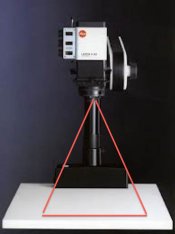
Is it possible this is not the original baseboard ? I've attached a quick jpeg with rough outlines of projection and if your image falls in this 'cone', directly under the lens, then I would't worry about the baseboard. All that matters is that the negative image is DIRECTLY under the lens and is sharp across the entire frame.

V35projection.jpg
 
Thanks for the info canuhead. I've checked the masking blades, and the image remains offset, even with the blades wide open. The negative carrier has glass above the negative. And the baseboard is original. The enlarger came in it's original box, and is in really excellent condition overall. It doesn't appear to have lived a hard life. I just don't understand why the projected light would be off to the left. I'll upload a picture soon.
 
should have asked, are you losing any part of the image ? Instead of thinking the image is too far left, maybe look at it as the right is being cut off. That might help with an explanation...
 
Here's a picture to illustrate what's happening.

photo-2.jpg

I'm not losing any part of the image when a negative is in the carrier, and to the naked eye, everything is sharp from edge to edge. Autofocus seems to be functioning properly as well.
 
Hmmm. Now I'm a little confused. If you swivel the head, the image would remain centered under the lens, but the projection onto the baseboard would be altered, right? I'll just wait to see what other V35 users have to say about their sample. I'll look into the above if there is indeed a problem. However, I've read making adjustments to these enlargers isn't a simple task.

Yes, you are correct, that is why you need to align everything (negative, lens plate and baseboard all parallel) first before centering the lens and negative.
 
Here's a picture to illustrate what's happening.

View attachment 85454

I'm not losing any part of the image when a negative is in the carrier, and to the naked eye, everything is sharp from edge to edge. Autofocus seems to be functioning properly as well.

If your lens is centered to the light source then you need to move the negative holder more to the left. If you negative holder is centered to the light source, then you need to move the lens plate more to the right. You really need to check that all three things are centered.

BTW if you don't have the Versalab laser, you may be able to center the lens (after aligning everything parallel) by looking at its projected image circle and locate the center of projection that way.
 
Thanks ic-racer. Have you aligned a V35 before? It doesn't seem like they were designed to be adjusted by users.
 
If your lens is centered to the light source then you need to move the negative holder more to the left. If you negative holder is centered to the light source, then you need to move the lens plate more to the right. You really need to check that all three things are centered.

BTW if you don't have the Versalab laser, you may be able to center the lens (after aligning everything parallel) by looking at its projected image circle and locate the center of projection that way.

On the V35 it's not that simple. The lens is screwed into a helical mount, and the only way you can move anything is to fine tune the lens height adjustment. There is no adjustment for moving things side to side.

If I were the owner of this enlarger I would have to decide to either just print with it the way it is, or contact Leica in New Jersey. See if you can get hold of Dave Elwell.
I bought a V35 three years ago that needs repair and I still can't afford to get it done... Kind of a pain in the butt these enlargers, but they are so nice to work with. Talk about double edged sword.
 
Photrio.com contains affiliate links to products. We may receive a commission for purchases made through these links.
To read our full affiliate disclosure statement please click Here.

PHOTRIO PARTNERS EQUALLY FUNDING OUR COMMUNITY:


Ilford ADOX Freestyle Photographic Stearman Press Weldon Color Lab Blue Moon Camera & Machine
Top Bottom