• Welcome to Photrio!
    Registration is fast and free. Join today to unlock search, see fewer ads, and access all forum features.
    Click here to sign up

Is calibration must?

Sunk

H
Sunk

  • 0
  • 0
  • 11
Sentry

A
Sentry

  • sly
  • Dec 16, 2025
  • 1
  • 1
  • 25

Forum statistics

Threads
201,224
Messages
2,820,720
Members
100,597
Latest member
Filmzgerald
Recent bookmarks
0

rustyair

Member
Allowing Ads
Joined
Apr 1, 2012
Messages
173
Location
Dallas, TX
Format
Large Format
Hi all,

I have an year old imac 21" and have a few questions.

1. Is calibration must ? (I send out digital files to online printers and sometimes the color does not match.)
2. Is imac monitor good enough? or Do I need to get a photography purpose monitor?
3. Is it worth to calibrate an imac monitor?
4. What are my options for calibration? I've heard calibration hardware such as Spiders etc doesn't really work well on glossy imac screen.

Thanks in advance!
 
Last edited by a moderator:

Pioneer

Member
Joined
May 29, 2010
Messages
3,974
Location
Elko, Nevada
Format
Multi Format
I assume you are asking about monitor calibration. If so, it is the only way I know to ensure that what you are looking at on your monitor is going to be somewhat similar to what you see from your printer.

If you edit your work and send it out for printing, ask your printer what kind of calibration you should consider. I use the Spyder Pro and I like it.

Not familiar with your monitor.
 

Dan Quan

Member
Allowing Ads
Joined
Jan 14, 2009
Messages
804
Location
Albuquerque,
Format
Multi Format
As far as I know, yes, calibration is a must. I know of no way to get around it.
 

tkamiya

Member
Allowing Ads
Joined
Oct 3, 2009
Messages
4,284
Location
Central Flor
Format
Multi Format
I don't know about Apple displays but LCD panels in general will drift adjustment slowly. Mine, higher end Dell kind, stayed very steady for the first year and after that, it tends to drift off a bit - enough to need re-calibration every 6 months or so.

Even IF you calibrate, color and density will never match between your display and the printed media. It's just that if you don't calibrate, you won't know how far it's different and it may change from time to time.
 

RalphLambrecht

Subscriber
Allowing Ads
Joined
Sep 19, 2003
Messages
14,859
Location
K,Germany
Format
Medium Format
as I am officially a Southerner now, I'll say:monitor calibration is a bunch of huiand , You'll be just fine with your standard iMac settings.set it to 1998RGB and call it a day.that will save you all kinds of moneyand avoid major headaches.I haven't found anybody yet who was able to claimto truly understanding color calibration.it seems to be a black art,designed to confuse us and get our money.I tried the Spider without much successand now stick to Apple's and Epson'sdefault settings without much of aa problemright out of the box; and I'm a pretty picky guywhen it comes to photographic quality. I will not invest any further money or effort and do more shooting instead.
 

pschwart

Subscriber
Joined
Jul 15, 2005
Messages
1,147
Location
San Francisco, CA
Format
Multi Format
Calibration is not *required*. But if you want your images to display consistently on other systems using color managed apps like Photoshop or (some) browsers, or use printer profiles created in a calibrated environment, or submit your work for contests or publication, then you will benefit from calibration. Luminance calibration is critical for B&W, and even if you are only printing B&W, you will want color calibration to provide a consistent workflow for tasks like channel mixing for converting digital captures to B&W, even creating digital negatives. With enough experience you can edit using the RGB numbers alone, but it's far easier to edit using a color managed setup. I profile my monitor and printers; I don't worry about scanners or digital cameras.
 
Last edited by a moderator:

toyotadesigner

Member
Allowing Ads
Joined
Jul 13, 2006
Messages
266
Location
Europe
Format
Multi Format
If you want to print yourself or have your images printed, monitor calibration is a must. As well as film or scanner calibration or both. Or printer and paper calibration.

Well, almost. If you happen to have enough funds to order the same print 25 times in a row until the colors are correct, you definitely don't need to calibrate anything. Simple as that.
 

Richard Boutwell

Member
Allowing Ads
Joined
Jul 21, 2003
Messages
583
Location
Philadelphia
Format
8x10 Format
I'm with kamiyacolor calibration doesn't even work.I stop at custom made luminance calibration.that's all I need for B&W.

Calibration works if you do it properly. It gives you the piece of mind that if you see what you thing is correct on your monitor, with your eyes, and then EMBED the correct profile (for the appropriate circumstance) it will be translated as more or less accurately when another user views it.

Telling people things to the effect of "I don't see a difference so it must not be important" is 1) not helpful, and 2) irresponsible. For black and white printing, need a constant luminance setting, but you also need a corrected gamma setting and corrected rgb setting. Otherwise the contrast in your file won't match what is displayed or printed.

If calibration didn't work there would not be an entire industry devoted to it, and the millions of users who implement color management correctly must be delusional. The point is making the translation of tone and color from one system/user to another be as accurate as possible. Can it be confusing to some people? Yes, obviously. Is it necessary? No, not if you don't care how it looks when displayed (or printed) anywhere other than on the monitor you originally viewed it.
 

David A. Goldfarb

Moderator
Moderator
Allowing Ads
Joined
Sep 7, 2002
Messages
19,992
Location
Honolulu, HI
Format
Large Format
The monitor calibration device isn't too expensive compared to paper and ink, and I've found I've gotten more consistent results since I started using it, so I don't see any particularly good reason not to calibrate.
 

lenny

Member
Allowing Ads
Joined
Oct 27, 2005
Messages
305
Location
Petaluma, CA
Format
4x5 Format
If you want the print to be a certain way, don't bother with online printing. Find a custom printer near you and bring your image there. Have him mask it up properly and print with you right there. Then you can have it exactly the way you want it...

Lenny
 

Neil Poulsen

Member
Allowing Ads
Joined
May 28, 2005
Messages
526
Format
4x5 Format
I wouldn't edit on any monitor that wasn't color managed, based on the ICC standard. Without a color managed monitor, at best, it'll be hit or miss on predicting the outcome of an edited color image. At worst, color editing can be a nightmare. While one can color manage printers, scanners, cameras, etc., the biggest advantage will come from color managing one's monitor.

As for a tool, I use X-Rite's I1 Display Pro. It consists of an excellent software and hardware combination that provides one with a broad range of options to color manage just about any monitor. I think that I paid about $150-$175 for mine; but, I see the price has increased quite a bit. I've also used one of the later Spyder versions, and that also appeared to be quite good. I've not used Color Monkey.
 

Doyle Thomas

Member
Allowing Ads
Joined
Oct 28, 2006
Messages
276
Location
VANCOUVER, W
Format
8x10 Format
in the day before there was color calibration we used what was know as "color by the numbers" we would find what should be a neutral color in the image and set an eyedropper there. then make a curve to set the RGB values equal. of course there were no printer profiles as well so printing was still hit or miss. standard practice was to print, evaluate and make another curve ignoring what it looked like on screen and repeat till happy. once you had a print curve it would work for most but not all images. Mr Goldfarb above is correct and a calibration device is worth the investment.
 

RalphLambrecht

Subscriber
Allowing Ads
Joined
Sep 19, 2003
Messages
14,859
Location
K,Germany
Format
Medium Format
Hi all,

I have an year old imac 21" and have a few questions.

1. Is calibration must ? (I send out digital files to online printers and sometimes the color does not match.)
2. Is imac monitor good enough? or Do I need to get a photography purpose monitor?
3. Is it worth to calibrate an imac monitor?
4. What are my options for calibration? I've heard calibration hardware such as Spiders etc doesn't really work well on glossy imac screen.

Thanks in advance!

I'm afraid monitor and printer calibration are a must for accurate work.I had the best success with the Color MunkiPhoto from XRite but others may work too:smile:
 

Alan Klein

Member
Allowing Ads
Joined
Dec 12, 2010
Messages
1,067
Location
New Jersey .
Format
Multi Format
I assume 90% of people take their picture (JPEG?) out of the camera and send to a printer that pints them pictures. Even if you crop and adjust, who changes the color hue etc in post? So I guess my question is what colors are changing? I know there may be an issue with darker prints, but how to most printing services deal with that and the color issue since so many people don't do anything to change the out of the camera files?
 

PerTulip

Member
Allowing Ads
Joined
Nov 7, 2017
Messages
226
Location
Vienna
Format
Medium Format
It's not a MUST, and you may be doing fine without it. But for really accurate and consistent results, no way around it. I have worked on enough photos without calibration and it was OK. But for my most important photos, I rely on a fully calibrated AdobeRGB monitor and there's a difference. Just click from the standard profile to the calibrated profile and you will notice a difference. Ok, it's not a "make or break" difference (huge color cast), so factory calibration of the monitor was pretty accurate (EIZO), but it's there.
 

Sirius Glass

Subscriber
Joined
Jan 18, 2007
Messages
50,717
Location
Southern California
Format
Multi Format
Calibration is not a must but is highly necessary if you are going to print anything or send it out to be printed.
 

chriscrawfordphoto

Subscriber
Allowing Ads
Joined
Mar 12, 2007
Messages
1,893
Location
Fort Wayne, Indiana, USA
Format
Medium Format
If you do any editing of your photos on the computer, then monitor calibration is non-negotiable. It must be done. It is a complete waste of time to edit images when they will look nothing like what you saw when you print them.

ALL screens are too bright from the factory. Most WAYYYYYYY too bright. So, your prints will be too dark. Many don't display color correctly without calibration, too.

As for the iMac screen: its ok, better than most general purpose screens, but it was not made for graphics work. A good screen costs as much as an iMac. I'm really disappointed in Apple introducing the overpriced "iMac Pro." I use an older Mac Pro with an NEC Spectraview screen, which is one of the best photo editing screens. All in one systems with 'ok' screens are good for kids to surf the web on, they're not for serious photo work.

Calibration does make them much better, though, and must be done.
 

Cholentpot

Member
Joined
Oct 26, 2015
Messages
6,922
Format
35mm
I'm drifting towards yes these days. My prints have been coming out OK but lately everything looks too yellow, so I'm going to need a spiderman at some point. For B&W I couldn't care less, histogram puts me in the ballpark and that's close enough for me.
 

wiltw

Subscriber
Allowing Ads
Joined
Oct 4, 2008
Messages
6,615
Location
SF Bay area
Format
Multi Format
I still think ,a simple luminance calibration will get you very close to the monitor image on paper,especially for B&W

I agree. I set my monitor Brightness and Contast to set the full range from black to white, to not get an overly bright monitor (the way they adjust them from the factory so that they look good when displayed in retail stores!), and I have gotten very low scores (= very high accuracy of visually detecting subtle color differences) even without color calibration...scored '4' on multiple successive tests. Try for yourself...

https://www.xrite.com/hue-test
 

ced

Member
Allowing Ads
Joined
Oct 10, 2011
Messages
866
Location
Belgica
Format
Multi Format
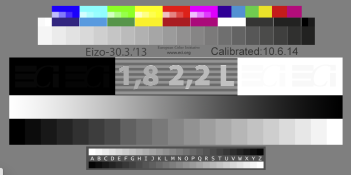
There are many colour/B&W stepwedges on the web or made yourself that can be displayed on your monitor (I put them on my desktop screen as a permanent diplay).
I think the main thing is the luminosity adjustment so that the highlights are not blown away and the shadows bunged up with no info shown in the dark areas.
Then that the greys are neautral throughout. This I would say is the minimum, if you can do that without a calibrator great! So yes a minimum of calibration is a must.
See attached screen grab from my monitor and note when it was last calibrated (it has held up very well so far).
Screen Shot 2018-09-10 at 11.25.01.png
 

GRHazelton

Subscriber
Joined
May 26, 2006
Messages
2,251
Location
Jonesboro, G
Format
Multi Format
While I don't know the type of monitor used by the IMac, the average LCD monitor's brightness varies drastically with changes in viewing angle. My understanding is that an IPS monitor or better is essential. Here's a quick guide: https://www.cnet.com/topics/monitors/buying-guide/ Prices have come down dramatically on IPS monitors in the last few years - since I bought mine - and the difference is worth the cost. I've used the X-Rite calibration device in several iterations; the difference it made in my prints really justified its cost. And of course if you send files out for printing ask what color space, etc, the printer uses. Before our local Costco went to a "business center" their printing service was excellent, aided by a staff member who really knew her stuff.
 
Photrio.com contains affiliate links to products. We may receive a commission for purchases made through these links.
To read our full affiliate disclosure statement please click Here.

PHOTRIO PARTNERS EQUALLY FUNDING OUR COMMUNITY:


Ilford ADOX Freestyle Photographic Stearman Press Weldon Color Lab Blue Moon Camera & Machine
Top Bottom