
• Welcome to Photrio!
    Registration is fast and free. Join today to unlock search, see fewer ads, and access all forum features.
    Click here to sign up

Increasing pring contrast

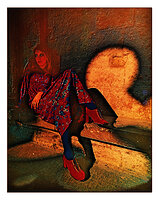
Girl in Cloisters

A
Girl in Cloisters

  • 0
  • 0
  • 0
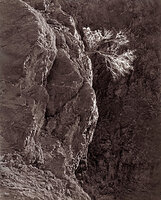
Bush on Canyon Wall

A
Bush on Canyon Wall

  • 2
  • 1
  • 20

Forum statistics

Threads
203,263
Messages
2,852,033
Members
101,749
Latest member
frieMo
Recent bookmarks
0

tomalophicon

Member
Allowing Ads
Joined
Feb 7, 2010
Messages
1,568
Location
Canberra, AC
Format
Sub 35mm
I mean print contrast, I can't work out how to edit the title.

I've got a negative that I quite like but I would like to make the print quite contrasty.
I've printed it using grade 5 paper but I still think it doesn't show enough contrast.
It would be impossibleto burn-in with this particular image to achieve what I want (with my current level of skill, anyway).


Is there another way I can again increase contrast? Developer dilution etc...?

Thanks in advance.
 
All three of the standard variables can work to increase contrast. Time: more is more (depending on the paper). Temperature: more (higher) is more, but you will generally increase grain. Dilution: less is more (knew I'd get to work that in). With papers the ability to increase contrast using these is less than with film, but then this is an empirical sport, no? Then there's lith processing, which gives you added contrast, along with a lot of other factors...
 
PROBABLY NOT, by much. You might just make the print a best you can, then make a copy neg which you can overdevelop for more contrast.
 
Thanks guys.
I didn't think of Lith.
Would toning with tea or something increase contrast too?
 
Bleach. Farmer's reducer or just potassium ferricyanide and fix. You can print darker and then bleach back the whites.
 
Or us potassium ferricyanide on the negative, and redevelop it. You can do that up to three or four times to make the negative denser. I have used this method to give density to abnormally thin negatives (don't ask and I won't tell). It has made most of them into reasonably good negatives. The only drawback is the chance of getting larger grain as a result of the process. But yes, I think toning the neg might help too.
 
Or us potassium ferricyanide on the negative, and redevelop it. You can do that up to three or four times to make the negative denser. I have used this method to give density to abnormally thin negatives (don't ask and I won't tell). It has made most of them into reasonably good negatives. The only drawback is the chance of getting larger grain as a result of the process. But yes, I think toning the neg might help too.

Is this stuff readily available from places like Freestyle?
 
I use a bleach-redevelop procedure to add contrast.

I use a rehalogenating bleach made of potassium ferricyanide and potassium bromide: 15g potassium ferricyanide,
15g potassium bromide to 1 liter of water. I often make this in smaller amounts. Save it and use it over and over if you don't contaminate it.

The entire process can be done in room light. Bleach the negative in the bleach solution till the image disappears. Drain it and transfer it to the developer. You can use a normal negative developer, but I recommend a staining developer like PMK, which adds stain to the image as well, increasing the contrast even more. The process can be repeated to get even more stain. There is a slight danger that the emulsion will get stiff and possibly crack with repeated bleach-redevelop cycles.

In the printing stage there are also things you can do to increase contrast. Use a condenser light-source if you are not already. Use the grade 5 filter instead of dichroic filters to get a smidgen more contrast. Use a high-contrast developer undiluted (straight Dektol or Ethol LPD for example). Underexpose slightly and develop longer. Selenium tone the print for a bit more contrast as well.

And yes, all the bleaching chemicals you need are available easily. If Freestyle doesn't have them, the Photographers' Formulary will.

Best and good luck,

Doremus Scudder
www.DoremusScudder.com
 
Thanks guys, I was thinking I wouldn't be able to do anything but this is all fantastic advice.
 
Photrio.com contains affiliate links to products. We may receive a commission for purchases made through these links.
To read our full affiliate disclosure statement please click Here.

PHOTRIO PARTNERS EQUALLY FUNDING OUR COMMUNITY:


Ilford ADOX Freestyle Photographic Stearman Press Weldon Color Lab Blue Moon Camera & Machine
Top Bottom
