
• Welcome to Photrio!
    Registration is fast and free. Join today to unlock search, see fewer ads, and access all forum features.
    Click here to sign up

Improving the sky on prints made on VC paper

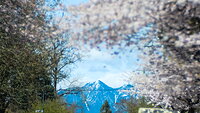
mountain_ko140.jpeg

D
mountain_ko140.jpeg

  • 0
  • 0
  • 0
Moment of Spin

A
Moment of Spin

  • 2
  • 0
  • 82

Recent Classifieds

Forum statistics

Threads
203,105
Messages
2,849,892
Members
101,670
Latest member
JeremiahPeterson
Recent bookmarks
0

Mahler_one

Member
Allowing Ads
Joined
Oct 26, 2002
Messages
1,155
I have noted that oftimes the sky tones in my black and white prints ( VC paper, both RC for work prints, and Fibre for final prints ) is/are a bland gray. I understand that yellow or red filters would improve the contrast between the sky and the foreground when I take photos in the future. However, the photos are done, and there is no turning back. Can anyone provide some advice on how to improve the "blah" gray on the prints? Would one do better burning in with the highlight, or the contrast setting? If the sky if too dark then the contrast between the grass and bushes in the foreground is attenuated. If I burn in with the highlight filter then the sky will simply become "grayer", correct? If I dodge the sky then the tones might simply become a lighter gray, correct? There are no clouds in most of the prints. Obviously there is no perfect answer, and "trade -offs" must be considered.

Thanks for the advice.

Ed
 
Burning in the sky will make the sky darker. It will be difficult to do while maintaining a believable look. The best option is, of course, to shoot with a deep yellow or orange filter which will make the skies darker and bring out the contrast between the sky and clouds.
 
It is a common, and traditional technique to burn-in light skies on darkroom made prints. You can develop considerable skill, with practice, and the print will not look "burned-in".
 
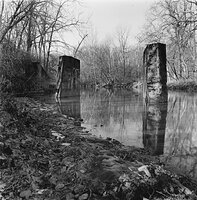
Depends on the image really. If the horizon line is relatively simple, a little burning in of the sky is pretty easy to do and doesn't look bad. To achieve a little more contrast between the sky and clouds, you might want to do your burn with a higher contrast filter. If the horizon line is complex, like in the attached example, you may want to make a mask from card stock to hold back everything else but the sky.
 
Last edited by a moderator:
Its a rare print that doesn't get some kind of burning in of the skies, even with filter use. Its a good skill to develop. Start with 1x the basic exposure, moving a card gradually toward the horizon line. Eventually you'll develop techniques to deal with all kinds of different shaped areas. Ansel has some charts of the burning he did on his prints, which are informative.
JY
 
I am a big fan of very light skies -- especially if they have no clouds. Keep that option open. A light gray sky can give an open feeling to the landscape, whereas a darkened sky can sort of just plop down on the landscape and squish it. Depending on the angle of view relative to the sun's position, some dodging and/or burning might be needed to even out the sky across the print.

Vaughn
 
I am a big fan of very light skies -- especially if they have no clouds. Keep that option open. A light gray sky can give an open feeling to the landscape, whereas a darkened sky can sort of just plop down on the landscape and squish it. Depending on the angle of view relative to the sun's position, some dodging and/or burning might be needed to even out the sky across the print.

Vaughn

I totally agree. A light sky gives the impression of atmospheric effect, i.e. accentuates distances and vastness. The main reason why I don't use heavy filtration at the film exposure stage is because it tends to cut through the distant haze which is exactly what I do not want to happen.

It was Robert Adams's brilliant book "The New West" which revealed to me the beauty of light, open skies. You may want to check out Adams's work, if you haven't done so far.
 
Pre or post flashing helps to retain the detail in the sky, burning in can cause the sky to look to contrasty compared tothe rest of the image unless you change the filtration and burn in at a much lower contrast grade.

Ian
 
When I burn a sky I try to burn the top of the sky (closest to the top of the print) a bit more then where the sky and horizon meet to give it some depth, so there is a natural looking gradation.
 
By calling the skies a "bland grey", do you mean that you want the skies to be brighter or darker? What tone of grey are they now?
 
I cannot thank all of you enough for taking the time to respond with such wonderful suggestions. Let me add that at this time in Florida ( our dry season ) there are usually NOT as many clouds as most of you associate with this part of the country. Hence, the sky is an endless blue which prints, of course, as a shade of gray across the top of the print.

Ed
 
Just remember when you are burning-in the sky to make sure that your motion overlaps the top of the land/sea horizon. If you don't, you'll end up with a light area just above the horizon in the lowest part of the sky.
 
Good questions...to my eye the skies are zone V, although as I examine the dry prints today I do notice that there is some range of grays from a lighter zone V to a slightly darker zone V ( if the parsing of the tones makes any sense to you... )

Ed


By calling the skies a "bland grey", do you mean that you want the skies to be brighter or darker? What tone of grey are they now?
 
The other problem with burning in an empty sky is that as you get into Zone IV and III, it may take on a drab look. When clouds are present it can develop a dramatic look, but without them you run the risk of making the print look boring (depending on the foreground)
 
Use a #0 filter to burn the sky, or other highlights. It will have little effect on anything darker than about Zoner VI.
 
I use split grade or 00 with shorter time than below horizon which may be 2 or 1.5. You say the sky is blue much of the time, something difficult to comprehend in the Cleveland area. Can you shoot when there are storms or some form of clouds so that burning with a lower grade will show some detail? I don't know, we Yankees may have to stop feeling sorry for you hurricane victims if we have to read any more about cloudless blue skies day after day.

Le Gray had an even bigger problem (1856-59) when the emulsions registered nothing on a bland sky. He solved it by pairing or overlapping negatives from a real storm with a below the horizon tranquil day. Search for “Mediterranean Sea at Sete”.
http://www.metmuseum.org/store/st_f.../catID/{74F9F29B-F6F3-4A17-A39E-53CD2EF10261}

John Powers
 
Thanks John. No kidding...lots of sunny days with high blue skies, although considerably colder then normal. Of course, colder means ( except we have had some plant killing freezes this year-very unusual even in Northern Florida ) in the 60's and 70's during the day with 50's and 60's at night. The denizens here get bent out of shape when they have to take out their wool coats.

Thanks for the printing advice. I hope it get nicer in Cleveland.

Ed
 
I use split grade or 00 with shorter time than below horizon which may be 2 or 1.5. You say the sky is blue much of the time, something difficult to comprehend in the Cleveland area. Can you shoot when there are storms or some form of clouds so that burning with a lower grade will show some detail? I don't know, we Yankees may have to stop feeling sorry for you hurricane victims if we have to read any more about cloudless blue skies day after day.

Le Gray had an even bigger problem (1856-59) when the emulsions registered nothing on a bland sky. He solved it by pairing or overlapping negatives from a real storm with a below the horizon tranquil day. Search for “Mediterranean Sea at Sete”.
http://www.metmuseum.org/store/st_f.../catID/{74F9F29B-F6F3-4A17-A39E-53CD2EF10261}

John Powers

Sometimes it's just better no to make the photograph. I'm in Milwaukee and we have the same issue with skies. I was lucky enough to find 4x5 resin contrast (red, yellow and orange) filters in a gradient from color to clear. I use them with my Lee filter holder and it really is effective for bringing down the sky without altering the landscape..Evan Clarke
 
Thanks Evan. I had purchased the ND gradient set from Lee to do the same thing, but the gradient filters in colors seems quite unique. Is the set made by Lee as well?

Ed
 
I agree with Vaughn and Ooze. Light, even skies are beautiful and are much more difficult to achieve. As Ooze mentions, Robert Adams is a master of these kinds of subtle skies.
 
Thanks Evan. I had purchased the ND gradient set from Lee to do the same thing, but the gradient filters in colors seems quite unique. Is the set made by Lee as well?

Ed

Hi,
No, they are Hitech made by Formatt. I bought them from 2filter.com. the link is: http://www.2filter.com/prices/Hitech/Hitech4x4.html . I bought the #3 yellow, #3 orange and #3 red 4x5". They are the equivalent of normal strong contrast filters, scroll down the page to find them. I also combine them with ND grad filters depending on how much I want to knock down the highlight contrast ( I always meter the shadow on Zone4)..Evan Clarke
 
Thanks...if I am looking at the correct items they are certainly costly.
 
Cokin makes similar filters. I don't know what kind of camera you're using, but the "A" and "P" series of filters are reasonably priced. They are not glass, but they work fine and cost a lot less. I use the "P" series because they fit all my Nikkor lenses as well as Hasselblad and large format gear. Check to see which sizes fit your gear. Find info here: http://www.cokin.com/ico3-p0.html.
 
Photrio.com contains affiliate links to products. We may receive a commission for purchases made through these links.
To read our full affiliate disclosure statement please click Here.

PHOTRIO PARTNERS EQUALLY FUNDING OUR COMMUNITY:


Ilford ADOX Freestyle Photographic Stearman Press Weldon Color Lab Blue Moon Camera & Machine
Top Bottom
