• Welcome to Photrio!
    Registration is fast and free. Join today to unlock search, see fewer ads, and access all forum features.
    Click here to sign up

Ilford filters

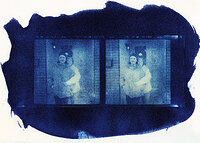
Cyanotype stereo card

A
Cyanotype stereo card

  • 1
  • 0
  • 13
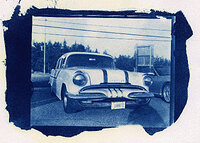
IMG_0025.jpeg

A
IMG_0025.jpeg

  • 0
  • 1
  • 11

Forum statistics

Threads
203,127
Messages
2,850,274
Members
101,690
Latest member
nisherii
Recent bookmarks
0

Mats_A

Member
Allowing Ads
Joined
Jan 31, 2010
Messages
570
Location
Finland
Format
Multi Format
Inside the box of Ilford filters (for MG papers) there is sheet of instructions. It says that all filters 00-3 and 4-5 should have same exposure. 1 stop difference between 3 and 4.
I just did a print with filter 2.5 and decided I wanted softer blacks so I changed to 2. I had to give a full stop less exposure to get same highlights.

Is this normal? Is there a one stop difference between all filters?

r
 
Yours filters may not be the same as what I have, but I just received some new Ilford filters. They were not labeled other than a little piece of paper stuck between each filter, with a number on it. And in my mind, they did not seem to be in a logical color progressive order. They kinda went from a dull light orange to magenta back to an orange again. Dont know, they might be right. It didn't seem right so I ordered another set of Kodak poly filters.

If my conspiracy theory is correct, yours may be out of order as well, or not.
 
Yours filters may not be the same as what I have, but I just received some new Ilford filters. They were not labeled other than a little piece of paper stuck between each filter, with a number on it. And in my mind, they did not seem to be in a logical color progressive order. They kinda went from a dull light orange to magenta back to an orange again. Dont know, they might be right. It didn't seem right so I ordered another set of Kodak poly filters.

If my conspiracy theory is correct, yours may be out of order as well, or not.

The filters are marked with a number so I don't think they are.

r
 
Agree with Greg little or no difference,unless you have a really thin neg.
 
Inside the box of Ilford filters (for MG papers) there is sheet of instructions. It says that all filters 00-3 and 4-5 should have same exposure. 1 stop difference between 3 and 4.
I just did a print with filter 2.5 and decided I wanted softer blacks so I changed to 2. I had to give a full stop less exposure to get same highlights.

Is this normal? Is there a one stop difference between all filters?

r

shimoda

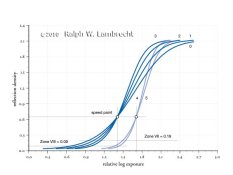
You discovered something important here. It's the difference between the way people print and the way the paper standard is defined. Ilford's (and other filter) instructions relate to the ISO standard, which may or, more likely, may not match your way of printing.

The standard sets the speed point for papers at 0.6 density above base+fog. All filters are designed around that standard. In other words, if you overlay the characteristic curves of test prints made with filter numbers 00-3, they will all cross over at 0.6 density, and consequently, match in speed at that point. But, that's where the problem lies.

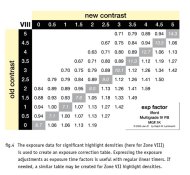
A density of 0.6 is a bit lighter than a medium gray! That's typically not a density people try to match when moving up or down in contrast. For example, I like to match the highlights at about 0.1 density. But, if you pick any other density than 0.6 to match, filters (Ilford, Agfa, Kodak and others) always need an exposure correction when changing contrast.

The way to fix this is to make yourself an exposure correction table. This will allow to move between paper contrasts without having to jump between exposure and contrast corrections.
 

Attachments

  • standard.jpg
    standard.jpg
    29.4 KB · Views: 106
  • exptable.jpg
    exptable.jpg
    59.9 KB · Views: 106
Ilford VC papers and filters, grades 00 to 3 1/2 are designed so the mid greys stay constant with changing contrast. For RC this is about 0.6OD (ZV - 18% grey - is 0.7OD), for FB it is about 0.45OD (ZVI - skin - is 0.47OD). For grades 4 - 5 The 'constant exposure' point, such as there is one, is at about 1.0OD (ZIV - light shadows). Warm tone has the constant exposure point at about 0.85OD, there isn't any constant exposure point for grades 4-5.

Although the highlight density at a constant exposure will change quite a bit over the range 00 to 3 1/2, with small changes in contrast in the middle of the contrast range, say between 2 1/2 and 3, there will be little to no change in highlight density. At the constant exposure point, however, densities will stay constant through the entire range of contrast 00 - 3 1/2.

HD graphs of the actual paper response (as opposed to idealized curves) can be found in the Darkroom Automation support files http://www.darkroomautomation.com
 
Last edited by a moderator:
Believe it or not, I make most of my prints without these filters...
 
Well, most times my negatives look a lot better when I don't brake out the filters. There are certain situations where I find they are needed but not overly often....
 
One suggestion I would like to make is to take a properly exposed negative and make a series of prints. One with each filter with no manipulation. You end up with a series which ranges from dead flat to almost black and white with no intermediate tones. This will help you visualize what results you can achieve either with one exposure or split grade printing. I did this many years ago and still refer to them.
 
Last edited by a moderator:
Believe it or not, I make most of my prints without these filters...

You might find your prints look better on graded paper. VC paper has all sorts of anomalies that single grade emulsions don't have. That said, some single grade emulsions are really MC emulsions: they are made from a mixture of a high contrast and a low contrast emulsion but lack the color sensitizers that allow you to change the paper contrast.
 
Ralph.
Do I understand your graph correctly:

I have an exp of x sec with filter 2.5 I change to filter 2 and should use 0.89x.

Or when you say "make yourself an exposure correction table" does that mean I need one for every combination paper/enlarger? If so, how does one make one? I have no equipment for measuring contrasts or negative denseness other than my eyes.

r
 
Ralph

Never mind. I found your excellent spreadsheet on your excellent website. I think I got it now. As soon as I get my own darkroom set up I will be busy making test charts.
Thanks

r
 
Photrio.com contains affiliate links to products. We may receive a commission for purchases made through these links.
To read our full affiliate disclosure statement please click Here.

PHOTRIO PARTNERS EQUALLY FUNDING OUR COMMUNITY:


Ilford ADOX Freestyle Photographic Stearman Press Weldon Color Lab Blue Moon Camera & Machine
Top Bottom