• Welcome to Photrio!
    Registration is fast and free. Join today to unlock search, see fewer ads, and access all forum features.
    Click here to sign up

Identifying LF sheets when processed together in one tank

BlueWind

Member
Allowing Ads
Joined
Aug 27, 2005
Messages
108
Location
Almada, Port
Format
35mm
Hello
I usually shoot four 13 X 18 cm B&W film sheets in every session, and I develop them in a Patterson tank.
The four sheets are randomly placed in the tank reels in total darkness. Often the exposure parameters are different in the four exposures.
Is there any practical way to mark each film sheet in order to know the details that were used in each one ?

Thank you in advance
Joao
 
Last edited by a moderator:
Quite a few ways, but all require good notes being taken.

One can modify the film holders to expose a unique mark on the edge of the film that one can link up to one’s notes.

One can mark the film holder itself with the developing needs of the film inside it….N+1, for example.

In my notes, I write the film holder number, all measured light values and exposure info. I also draw a tiny picture of the scene, pretty minimal, that lets me recognize the image and negative after development.

On a recent five week trip to Japan, as I emptied my holders on the trip I put them in a box in order of when they were exposed. As I worked my way through the box of film to develop them (6 at a time in a 3006 Expert Drum), I knew it was coming up and could give them their needed development.

PS…I include the rebate in my images, so modifying the film holder to mark the rebate is not a method I use.
 
Last edited:
I once had that problem/issue. The suggestion at the time was to make something like a small hole on the film magazine "flap" (the lower part that fold to hold the film. Probably a very small hole for one, two small holes for the second magazine, etc. You will need some kind of code. It depend if you are willing/able to do those marks/holes.
 
Thank you vaughan and Marcelo Paniagua, those sugestions will help me

grahamp: I take the sheets from the film holders and insert them in a reel with capacity for four sheets - there is no way to know which film sheet corresponds to a specific slot of the reel...

Best regards
Joao
 
You cannot mark the first slot in the reel (notch, dab of epoxy) and count from there? If you load the sheets in order from the holders, you would know which sheet was where.
I can do it with my Jobo 4x5 reels that hold 6 sheets in 2 sets of three. In that case I just need to know which set of three I am loading, and if the sheet is in the inner, middle, or outer slot, and stick to my system.

I accept that I may be missing something here.
 
I use Riteway sheet film holders. These holders feature small, clear numbered dials inside the film chamber that allow the superimposition of frame numbers onto each exposure.
They are readily available on Ebay.
 
Devising a scheme to mark them in the film holders is probably the best way to keep track. If you are lucky you might find some of the Riteway film holders that have number wheels which imprint onto the negative, like this:

IMG_5454a.jpg


There is also the option to buy one a "B's large format reel for 4x5" which has raised dots from 1 to 6 on the side of the reel, allowing you to keep track in the dark what went into each slot.
 
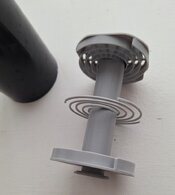
Let me clarify: what I'm looking for is a way to mark the negatives so that I know the parameters under which each negative was exposed. The photos are always taken in a studio, four at a time. I attach a photo of the reel I use.

If I mark the reel with a touch-sensitive mark, I can tell which film was inserted in each slot. But when I take the four films off the reel, the probability of mixing them up is high. That's why I prefer to mark each negative from the beginning.

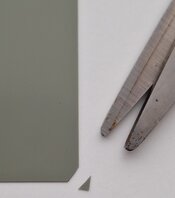
The suggestions presented are interesting. I've already been suggested elsewhere to try a combination of very small cuts in the corners of the negative – since I only use and develop four negatives in each session, this might work. No need to modify the film holder or to find a special model. I think I'll start there.

Thank you again for your input
 

Attachments

  • 13X18 reel.jpg
    13X18 reel.jpg
    100.3 KB · Views: 25
  • Corner.jpg
    Corner.jpg
    27.5 KB · Views: 25
  • Negatives.jpg
    Negatives.jpg
    67.4 KB · Views: 28
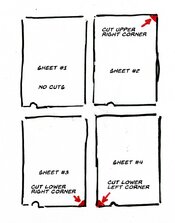
I cut little marks in the corners. i feel it in the dark and therefore know what film is which. I count them.
 
Negative with no corners cut = #1
Negative with corner next to code notch cut = #2
Negative with a corner on the opposite side of the code notch cut = #3
Negative with two corners clipped = #4

That assumes you know which negative is which when you unload them in the dark.

Best,

Doremus
 
Devising a scheme to mark them in the film holders is probably the best way to keep track. If you are lucky you might find some of the Riteway film holders that have number wheels which imprint onto the negative, like this:

View attachment 420601

There is also the option to buy one a "B's large format reel for 4x5" which has raised dots from 1 to 6 on the side of the reel, allowing you to keep track in the dark what went into each slot.

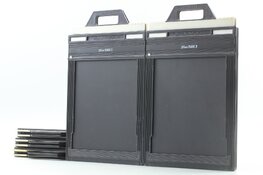
In all of my messing around with 4x5 stuff I have never seen this type. Are these the most recent Riteway holders?
 
In all of my messing around with 4x5 stuff I have never seen this type. Are these the most recent Riteway holders?

I don't know for sure, but out of all the 4x5 Riteway film holders I have, they certainly look the newest. I don't have any 5x7 holders with these number wheels though, unfortunately.
 
In all of my messing around with 4x5 stuff I have never seen this type. Are these the most recent Riteway holders?

They are the newest version with the larger plastic handles on the darkslides and the darkslide lock release button on the side.

Sometimes branded as Fidelity Astra or Lisco Mark II.

I've never tried them, but they seem pretty cool. Unfortunately they aren't compatible with all cameras. With compatible cameras the slide release button will automatically be depressed by the camera back, with non compatible cameras you have to press the release button manually.

Also apparently the number wheels can get loose with use causing your frames to be labeled incorrectly. Something to look out for when you're buying them.
 

Attachments

  • s-l1600.jpg
    s-l1600.jpg
    180.2 KB · Views: 7
I carefully cut the corners. For four sheets, sheet no. 1 goes uncut. Sheet no.2 top right. Sheet no.3 top left, and so on. How do I cut carefully, in the dark? by holding the film in my left hand, scissors in right, touching film corner to be cut with index finger of right hand. I use a pair of kiddy scissors. Only a tiny bit is snipped off.
 
They are the newest version with the larger plastic handles on the darkslides and the darkslide lock release button on the side.

Sometimes branded as Fidelity Astra or Lisco Mark II.

I've never tried them, but they seem pretty cool. Unfortunately they aren't compatible with all cameras. With compatible cameras the slide release button will automatically be depressed by the camera back, with non compatible cameras you have to press the release button manually.

Also apparently the number wheels can get loose with use causing your frames to be labeled incorrectly. Something to look out for when you're buying them.

That explains it.
 

Recent Classifieds

Forum statistics

Threads
202,980
Messages
2,848,390
Members
101,577
Latest member
Ostrevino
Recent bookmarks
0
Photrio.com contains affiliate links to products. We may receive a commission for purchases made through these links.
To read our full affiliate disclosure statement please click Here.

PHOTRIO PARTNERS EQUALLY FUNDING OUR COMMUNITY:


Ilford ADOX Freestyle Photographic Stearman Press Weldon Color Lab Blue Moon Camera & Machine
Top Bottom