• Welcome to Photrio!
    Registration is fast and free. Join today to unlock search, see fewer ads, and access all forum features.
    Click here to sign up

I Hate dust :(

Temporary Jewels

H
Temporary Jewels

  • 1
  • 0
  • 40
Horicon Marsh-5

A
Horicon Marsh-5

  • 2
  • 0
  • 95

Recent Classifieds

Forum statistics

Threads
201,259
Messages
2,821,335
Members
100,624
Latest member
ericstoynov
Recent bookmarks
1

Flyfishdk

Member
Allowing Ads
Joined
Mar 1, 2011
Messages
32
Location
Denmark
Format
35mm
Hi There.

I have a workflow where I develope my negativs and Then scan them.

I have a huge problem With dust.
My workflow is Like This:

1. Put the film on the reel in a dark bag. I use the jobo 1500 unitank

2. Develope the film With ID11, ilfostop and rapid fixer. I use the devchart to get my times. I Wash with the tube system There connect my tank with the faucet and let the water run for 12 min.

3. Drying the film in ny bathroom. Hanging down. Often Develope in the evning and in the morning Cut the film up and comeback Them in enverlopes.

I have not used gloves, is that the main problem? If so, Can i ude the thin rubber gloves? Are There better ways to dry the film?

Thanks in advance :smile:
 
OP
OP

Flyfishdk

Member
Allowing Ads
Joined
Mar 1, 2011
Messages
32
Location
Denmark
Format
35mm
wrong way to say it... not native english. I use these plastic sleeves for negatives sorry
 

Rick A

Subscriber
Allowing Ads
Joined
Mar 31, 2009
Messages
10,007
Location
Laurel Highlands
Format
8x10 Format
I use the white lintless gloves for handling negs, never rubber. If gloves aren't available to you, wash your hands with hot soapy water and dry with a cloth towel before handling. Get rid of all paper toweling and use terry towels instead. Use glassine envelopes or archival plastic sleeves to store negs. Wipe negs with antistatic brush before enlarging. Wipe down your scanner with a damp micro-fiber cloth to remove dust. never blow dust off anything, that only allows it to redeposit. Run a small hepa filtered air cleaner in the room where your equiptment is.
I could keep going, but these are just a few things to help avoid dust.
 

gandolfi

Member
Allowing Ads
Joined
Jan 28, 2005
Messages
1,820
Location
Denmark
Format
Large Format Pan
Hi There.

I have a workflow where I develope my negativs and Then scan them.

I have a huge problem With dust.
My workflow is Like This:

1. Put the film on the reel in a dark bag. I use the jobo 1500 unitank

2. Develope the film With ID11, ilfostop and rapid fixer. I use the devchart to get my times. I Wash with the tube system There connect my tank with the faucet and let the water run for 12 min.

3. Drying the film in ny bathroom. Hanging down. Often Develope in the evning and in the morning Cut the film up and comeback Them in enverlopes.

I have not used gloves, is that the main problem? If so, Can i ude the thin rubber gloves? Are There better ways to dry the film?

Thanks in advance :smile:

First: don't use envelopes as said...

second: "wrong" rinsing method.. Our inviromental minister will not be happy.. ;-)

Suggestion: fill up the tank with water (approx20 degrees) - then shake heavily five times - change water - shake 10 times - refil and shake 20 times : done!
Washing maschine method (refill with fresh water).

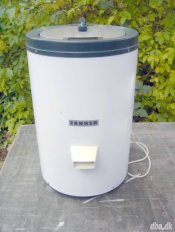
IF you can, get your self a small centrifuge! The ones our mothers used to centrifuge clothes in.
Used to be normal here in DK (try dba.dk) not in the states I think.

After rinsing, put the reel inthe centrifuge, standing up at the side of the centrifuge - if only on efilm to dry, put an emty reel at the opposite side to balance the thing...
Centrifuge for about 10 sec (be careful with 120 format, and the force of centrifugal might squash the film all together! So turn it on - let it come up in speed and then turn it off again...)

This way, you'll get rid of stain of chalk - the film dries very quick (which makes the time for dust to set short).

If you get something like this, you'll think it is the almost most important tool for developing!!

see picture..

EDIT: just checked DBA.. there's no centrifuges right now (the ones present are too big-fast and far too expensive...you're looking at a centrifuge for only a couple of 100's.. a small old fashioned one.)
 

Attachments

  • centrifuge.jpg
    centrifuge.jpg
    37.3 KB · Views: 123

lns

Member
Allowing Ads
Joined
Dec 30, 2006
Messages
431
Location
Illinois
Format
Multi Format
I use a similar method and have no dust issues. Do you see the dust on the negatives after they have dried? If so, it seems there might be dust in the room you hang them to dry. You could run the shower for a few minutes beforehand. Or in the worst case, use a hepa air cleaner for the first hour the negatives are drying. Or, on the contrary, do you see the dust on the negatives only later, when you take them out of the plastic film sleeves? If that's the case, maybe you need to change your brand of negative sleeves.

I do often use cotton gloves when handling negatives, but not for dust issues. I use the gloves so the oils from my fingers don't damage the negatives, which to me is a worse problem. I don't think I'd use plastic gloves.

-Laura
 

tkamiya

Member
Allowing Ads
Joined
Oct 3, 2009
Messages
4,284
Location
Central Flor
Format
Multi Format
I dry my film in bathroom as well but with some care. First, I close the air vent in bathroom. Second, I close the door to the bathroom. Third, I turn on the shower in HOT for about 30 seconds before the film is hung. I don't enter the room until the next day. I don't use gloves but I only hold film with edges. If I have to handle it, I use vinyl gloves.

I tend to have the worst dust issue if I handle the film before it is completely dry. Apparently, feeling dry to touch isn't dry enough. These days, I wait overnight for it to dry completely.
 

gandolfi

Member
Allowing Ads
Joined
Jan 28, 2005
Messages
1,820
Location
Denmark
Format
Large Format Pan
plastic film sleeves? If that's the case, maybe you need to change your brand of negative sleeves.


-Laura

:whistling:

I never recommend using plastic negative sleeves - they tend to create static electricity when you pull them out - use the "old fashioned" "paper" negative sleeves.... (Pergamyn?)

(better and cheaper!)
 

ann

Subscriber
Allowing Ads
Joined
Sep 10, 2002
Messages
3,336
Format
35mm
scanning = dust, dust, dust. even with careful handling it is a nightmare. scanners are electrical products, electricity attracts dust, of course it is important to handle the neagtives carefully, but pay very careful attention to the before and after placing the neagtive on the scanner
 

dnjl

Member
Allowing Ads
Joined
Sep 19, 2010
Messages
373
Location
Switzerland
Format
35mm
Check your changing bag for dust. Nylon bags can gather a lot of dust inside due to static energy. Use a cotton bag if yours is a dust-magnet.

Edit: nevermind, I just realised this cannot be a problem for you as the dust is a problem after development, not before.
 

MattKing

Moderator
Moderator
Allowing Ads
Joined
Apr 24, 2005
Messages
54,746
Location
Delta, BC Canada
Format
Medium Format
IF you can, get your self a small centrifuge! The ones our mothers used to centrifuge clothes in.
Used to be normal here in DK (try dba.dk) not in the states I think.

EDIT: just checked DBA.. there's no centrifuges right now (the ones present are too big-fast and far too expensive...you're looking at a centrifuge for only a couple of 100's.. a small old fashioned one.)

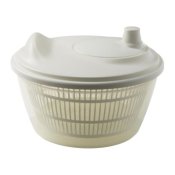
A "salad spinner" will work well as a centrifuge - example:

http://www.ikea.com/ca/en/catalog/products/60148678
 

Attachments

  • tokig-salad-spinner-white.JPG
    tokig-salad-spinner-white.JPG
    14 KB · Views: 82

bblhed

Member
Allowing Ads
Joined
Apr 12, 2010
Messages
600
Location
North Americ
Format
Multi Format
Get as much of the dust out of your scanning work area as you can, dust off the work area, and the outside of the scanner. Dust off the area around anything that you open to put your film into before you open it. Dust off the outside of anything that is an optical path for the light from the film before you open it. Clean your platen, clean your platen, and when you finish doing that dust your platen, dust your platen, and then dust your platen, yes I know how many times I said that because it's that important. Anything you open from a closed state will create a vacuum however slight that will pull dust into it.

Remove as much dust as you can from the work area, then worry about keeping the remaining dust off of your film, that is a lot easier than trying to keep all the dust off the film and out of the optical path.

Then dust off your platen.

If you don't know the word platen, it is the optical glass surface on a scanner or copier that you place the object you place the object to be scanned or duplicated onto, dust it again with a microfiber cloth.
 

chimneyfinder

Member
Allowing Ads
Joined
Mar 31, 2007
Messages
83
Location
Cardigan, We
Format
Multi Format
You can also get 'dust' in your mains water supply: that is, particles that adhere to the film emulsion during processing, which is a more serious problem than surface atmospheric dust as they create a permanent mark. With this in mind it would be good practice to use filtered/distilled/de-ionised water for your chemical solutions and for the final rinse. Water borne particles can be filtered out for a small investment and I would recommend it particularly for scanning negatives, which is a very unforgiving process in showing up negative particles.
Regards, Mark Walker.
 

Ronald Moravec

Member
Allowing Ads
Joined
Jan 17, 2005
Messages
1,355
Location
Downers Grov
Your hand in NEVER clean enough even if you wash it and leave it wet.

Water and air filters and a clean room are the secrets. Took me 40 years to learn so do not be stubborn like me.
 

bwrules

Member
Allowing Ads
Joined
Jun 18, 2008
Messages
195
Format
Multi Format
Dust is everywhere, but especially in/on scanners. You can minimize it, but not get rid of it completely. As far as scanning goes I wipe my flatbed before I scan, and fix the dust in PS. Sometimes I screw up and the negatives are very dusty - a lot of fixing in PS.
 
Photrio.com contains affiliate links to products. We may receive a commission for purchases made through these links.
To read our full affiliate disclosure statement please click Here.

PHOTRIO PARTNERS EQUALLY FUNDING OUR COMMUNITY:


Ilford ADOX Freestyle Photographic Stearman Press Weldon Color Lab Blue Moon Camera & Machine
Top Bottom