
• Welcome to Photrio!
    Registration is fast and free. Join today to unlock search, see fewer ads, and access all forum features.
    Click here to sign up

HP5+/Rodinal -- Bad soup, Bad exposure, or ???

Recent Classifieds

Forum statistics

Threads
201,903
Messages
2,831,928
Members
101,014
Latest member
photomaximo
Recent bookmarks
0

benveniste

Subscriber
Allowing Ads
Joined
Nov 1, 2007
Messages
536
Format
Multi Format
I realize my darkroom technique is rusty, but I though things had gone smoothly. HP5+/Rodinal 1:25, 6 minutes at 20°C. Clearly I blew out the grass, yet the shadow detail seems sold.

Any guesses what happened here? While I guess I should have used a yellow filter, is this the result of simple overexposure, a bad soup, or did I simply run out of dynamic range? Thanks in advance!
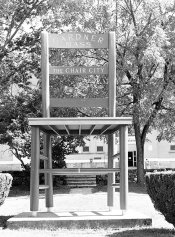
Chair.jpg
 

BetterSense

Member
Allowing Ads
Joined
Aug 16, 2008
Messages
3,151
Location
North Caroli
Format
35mm
You cannot fix lighting with film development.

How did you arrive at the attached image? Scanning the negative? It tells me nothing.

Rodinal and HP5 is a lovely combo; I use 1:50 at about 11 minutes or so, and print on MGIV RC.
 
OP
OP

benveniste

Subscriber
Allowing Ads
Joined
Nov 1, 2007
Messages
536
Format
Multi Format
Yes, it's a scan. I've used this combination before and I've come to expect more dynamic range than I got on this particular roll. I'm not looking for the developer to fix my mistakes; only to figure out what mistake I made.
 

Rick A

Subscriber
Allowing Ads
Joined
Mar 31, 2009
Messages
10,032
Location
Laurel Highlands
Format
8x10 Format
What I've found with Rodinal, I lose one full stop of speed with the developer. That being said, your photo appears to be scanned too light(printed too light) I never scan negatives, so I couldn't tell you how to remedy the final outcome.
 

pentaxuser

Member
Joined
May 9, 2005
Messages
20,348
Location
Daventry, No
Format
35mm
I can see nothing wrong with the developer/film combination per se, based on this scan of the negative but frankly you need to look at the negative and see if there is any detail in the highlights/ shadows area. My guess is there will be and it is then a question of printing to bring out such details.

You might not have a negative that will print as a straight print without dodging and burning but you won't know until you do a print or have a print made for you.

If you can't have a straight print made to scan then try scanning the negative as faithfully as possible and let us look at that.

pentaxuser
 

NickLimegrove

Member
Allowing Ads
Joined
Nov 13, 2005
Messages
57
Location
Berlin
Format
Multi Format
Any guesses what happened here? While I guess I should have used a yellow filter, is this the result of simple overexposure, a bad soup, or did I simply run out of dynamic range? Thanks in advance!

apparently the neg was scanned in a Noritsu minilab [you may want to provide that info yourself rather than have us look up your EXIF data], so we can assume it was given the standard auto-exposure treatment. Unless you print (or at least scan) it yourself, you won't be able to tell how bad the ›problem‹ is. To me it looks like you'll be able to get an okay-ish (analog) print from that neg. It's got more than enough shadow detail, and is likely contain more highlight detail than the scanner was able (or set) to record.

Re: Yellow Filter: I don't think that would have had a significant effect in this case -- other than deteriorating image quality.
 

NickLimegrove

Member
Allowing Ads
Joined
Nov 13, 2005
Messages
57
Location
Berlin
Format
Multi Format
that said, IMHO there's better choices than using the film you were using (and giving it the development you gave it) during a time of the year as sunny as this... next time, consider a slower film (FP4) and a higher dilution, and use your ›old‹ combination during cloudier times.
 

gzinsel

Member
Allowing Ads
Joined
Mar 20, 2011
Messages
402
Format
Med. Format RF
well, its kind of like this. . . . In order to to asses your negative, it would be nice for you if you had a densimeter. your image "problems" can be attributed to many problems, or any combination there of. my suspicion is in your development. as an example, your thermometer ? did it suffer the fate as so many of mine have? they do go bad! was/were contamination/ over concentration/ brain fart? agitating too much? For the scene( contrast range) it appears as though you should have subtracted time so your highlights do not build up so fast. poor metering/ dysfunctional light meter? sometimes a "false positive" meter reading does happen, did you set your ISO to the proper level, did it get changed accidentally? It appears in the scan, that the original scene was quite contrasty, that being said. . . . I suggest you go out and re shoot! if that image is something that you are committed to. ( p.s. I am not affirming or denying the artistic quality of the image, just trying to be an honest broker!)
 

rjs003

Member
Allowing Ads
Joined
Feb 4, 2004
Messages
269
Location
Port Richey, Fl.
Format
Large Format
Rodial and HP5

You cannot fix lighting with film development.

How did you arrive at the attached image? Scanning the negative? It tells me nothing.

Rodinal and HP5 is a lovely combo; I use 1:50 at about 11 minutes or so, and print on MGIV RC.

At what ASA are rating the film. The reason I ask is that your time and temp are very close to what I use and I'm rating the HP5 at 200 ASA
 

BetterSense

Member
Allowing Ads
Joined
Aug 16, 2008
Messages
3,151
Location
North Caroli
Format
35mm
I don't rate my film at anything because I typically don't use light meters. When I use a camera with metering like my N80, I tend to set the film speed at 320 or something, but then I expose more when I think the situation requires it.
 
Photrio.com contains affiliate links to products. We may receive a commission for purchases made through these links.
To read our full affiliate disclosure statement please click Here.

PHOTRIO PARTNERS EQUALLY FUNDING OUR COMMUNITY:


Ilford ADOX Freestyle Photographic Stearman Press Weldon Color Lab Blue Moon Camera & Machine
Top Bottom
