

• Welcome to Photrio!
    Registration is fast and free. Join today to unlock search, see fewer ads, and access all forum features.
    Click here to sign up

how i've been doing my contact printing..ipad + iphone

Frozen Pool

Frozen Pool

  • 6
  • 6
  • 73
Greenhouse Volunteer

H
Greenhouse Volunteer

  • 3
  • 0
  • 58

Recent Classifieds

Forum statistics

Threads
202,402
Messages
2,840,221
Members
101,313
Latest member
ohtoo
Recent bookmarks
0

heespharm

Member
Allowing Ads
Joined
Dec 8, 2009
Messages
527
Format
Medium Format
So i wanted a rough way to see which shots i should enlarge or at least take a better look at... so I've been using my ipad as a light source and the iphone camera to take a look at it... now it isn't a very sharp way or high quality way but it gives me a rough idea... and it doesn't waste paper or time...

here's an example
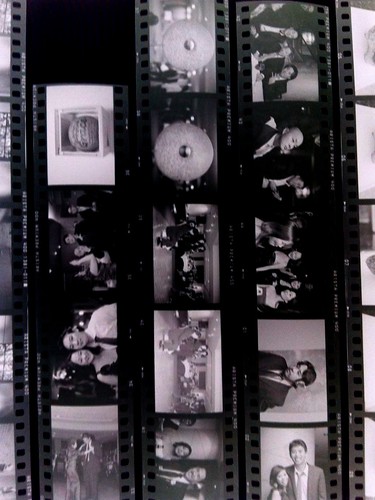

photo by Heespharm, on Flickr


I guess another good step would be to place a piece of glass on top to get rid of the film curl that would make the frames on the sides less blurry
 

MaximusM3

Member
Allowing Ads
Joined
Jul 11, 2010
Messages
754
Location
NY
Format
35mm RF
That's a brilliant idea indeed..and it save the scanning time just to see which ones are worth printing. I have the glass plates from betterscanning.com, so they should be perfect for this. Thanks for sharing! Is there anything that the iPhone/iPad can't do? Viva Apple! :smile:
 

Christopher Walrath

Member
Allowing Ads
Joined
Dec 30, 2005
Messages
7,175
Location
Milton, DE USA
Format
Analog
Cool beans! Doin' it. Beats a piece of crap, dark noise scanner.
 

Alex Bishop-Thorpe

Advertiser
Allowing Ads
Joined
Jul 6, 2006
Messages
1,451
Location
Adelaide, South Australia
Format
Multi Format
I used to do this with my phone and a light table, and it is really handy when you're on the go, but I quickly got frustrated not having contact sheets on file when I wanted to go back through my negatives later.
 
OP
OP

heespharm

Member
Allowing Ads
Joined
Dec 8, 2009
Messages
527
Format
Medium Format
Save the jpgs and date your archival sheets... That way you can just search by date
 

ghostcount

Member
Allowing Ads
Joined
Dec 27, 2008
Messages
252
Location
California
Format
Multi Format
What app do you use to invert the negative? Do you still process the jpeg on the pc?
 
OP
OP

heespharm

Member
Allowing Ads
Joined
Dec 8, 2009
Messages
527
Format
Medium Format
Photogene... Just drag the left bar in the levels adjustment all the way right and the right bar all the Way left
 

EASmithV

Member
Joined
Aug 22, 2008
Messages
1,985
Location
Virginia
Format
Large Format
I do this with my crappy cell phone and a light table.
 

Newt_on_Swings

Member
Allowing Ads
Joined
Mar 30, 2011
Messages
2,147
Location
NYC
Format
Multi Format
Holy thread revival! Lol

I also do this with a light box and an iPhone that's jailbroken with the invert colors sbsettings toggle. Very quick and easy to scan over negs. Not using a lightbox and just a LCD screen like an iPad you see the pixels. A opaque white plastic can solve that. You can also press a loupe to the camera to get magnified views.
 
Photrio.com contains affiliate links to products. We may receive a commission for purchases made through these links.
To read our full affiliate disclosure statement please click Here.

PHOTRIO PARTNERS EQUALLY FUNDING OUR COMMUNITY:


Ilford ADOX Freestyle Photographic Stearman Press Weldon Color Lab Blue Moon Camera & Machine
Top Bottom
