
• Welcome to Photrio!
    Registration is fast and free. Join today to unlock search, see fewer ads, and access all forum features.
    Click here to sign up

How do you expose sections of the photo paper individually when test printing?

Filling In

H
Filling In

  • 1
  • 2
  • 32
Painted Hills # 3.jpg

H
Painted Hills # 3.jpg

  • 4
  • 0
  • 79

Recent Classifieds

Forum statistics

Threads
203,208
Messages
2,851,428
Members
101,725
Latest member
Eric35mm
Recent bookmarks
0

ame01999

Member
Allowing Ads
Joined
Jul 28, 2009
Messages
76
Format
Medium Format
As we all know, making a test strip by progressive exposures produces an arithmetic series of times: not deal when exposure follows an exponential curve.

Back when my college had a color darkroom, we were able to make test prints with 10 individual filter combos because we had these ingenious printing frames. They had, for lack of the better word, swinging "doors" on them. Two rows of five. Great in the monochrome darkroom too because we didn't have to rely on the fussy test print method, and we could test out different contrast filters.

I don't know if these things exist anymore, and I don't even know what to call them. We called them "barn doors," which seems unlikely to turn up any matches on eBay.

I made a very primitive version by taking one half of an 8x10 paper box, taking the cardboard insert that fits inside it, cutting it into 5 pieces, and attaching little knobs to each. But it wasn't a great solution.

Have you ever worked with similar devices, and were they always DIY? Thanks.
 
I have a Saunders Easel that permits moving an 8x10 sheet of paper to each of the bottom plate's 4 corners sequentially, while the 4x5 window that you expose through stays stationary. You end up with 4 exposures on an 8x10 sheet.
It is heavy and a quite large: 15" x 12" on the baseboard. It would be fairly easy to make up a new version.
In the past I've worked with a proofing easel - again Saunders and again heavy and large - that has changeable top plates which permit you to choose image sizes between wallet size and 8x10. Friends still have one.
Here is a Photrio thread where one is pictured and discussed: https://www.photrio.com/forum/threads/saunders-multi-print-easels.159682/
 
As we all know, making a test strip by progressive exposures produces an arithmetic series of times: not deal when exposure follows an exponential curve.

Back when my college had a color darkroom, we were able to make test prints with 10 individual filter combos because we had these ingenious printing frames. They had, for lack of the better word, swinging "doors" on them. Two rows of five. Great in the monochrome darkroom too because we didn't have to rely on the fussy test print method, and we could test out different contrast filters.

I don't know if these things exist anymore, and I don't even know what to call them. We called them "barn doors," which seems unlikely to turn up any matches on eBay.

I made a very primitive version by taking one half of an 8x10 paper box, taking the cardboard insert that fits inside it, cutting it into 5 pieces, and attaching little knobs to each. But it wasn't a great solution.

Have you ever worked with similar devices, and were they always DIY? Thanks.

here is a DIY version
 

Attachments

  • TestStripPrinterEd2.pdf
    1.3 MB · Views: 185
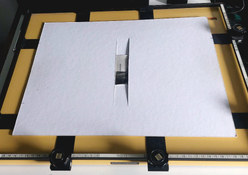
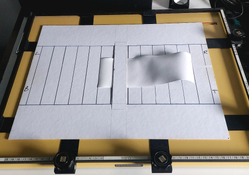
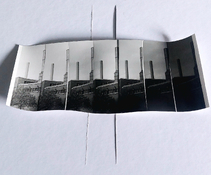
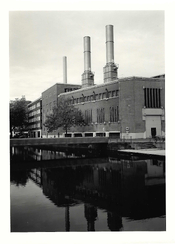
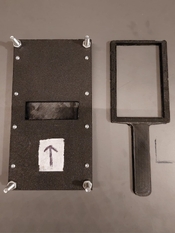
I only make localised test strips.

I use physical markers so the exposure window in the mounting board is replaced in same area for each exposure.

The exposure window can fit upto an 8x10" piece of paper but I generally only use half of that to get to an 8x10" proof print.

The back of the board is marked for each frame. I chose for 7 exposures of 3.5cms wide.
Plus left, right for landscape and top, bottom for portrait orientation.
 

Attachments

  • PSX_20251002_090028.jpg
    PSX_20251002_090028.jpg
    1.3 MB · Views: 154
  • PSX_20251002_090009.jpg
    PSX_20251002_090009.jpg
    1.4 MB · Views: 153
  • PSX_20251002_090052.jpg
    PSX_20251002_090052.jpg
    1.4 MB · Views: 143
  • PSX_20250927_171706.jpg
    PSX_20250927_171706.jpg
    923.6 KB · Views: 151
I only make localised test strips.

I use physical markers so the exposure window in the mounting board is replaced in same area for each exposure.

The exposure window can fit upto an 8x10" piece of paper but I generally only use half of that to get to an 8x10" proof print.

The back of the board is marked for each frame. I chose for 7 exposures of 3.5cms wide.
Plus left, right for landscape and top, bottom for portrait orientation.

That’s brilliant!
 
There have been a few commercially-available testing easels sold over the years -- similar to MARTIE's. Petersen's had a DIY method that used an 8x10" piece of Foamcore that was cut into 10 4x2" sections -- but you can set one up the whatever size & shape you want. You tape tabs on each top to remove one at a time. E-Z P-Z.
 
There have been a few commercially-available testing easels sold over the years -- similar to MARTIE's. Petersen's had a DIY method that used an 8x10" piece of Foamcore that was cut into 10 4x2" sections -- but you can set one up the whatever size & shape you want. You tape tabs on each top to remove one at a time. E-Z P-Z.

But with that design, and Ralph’s, you have to move the entire device across the baseboard, don’t you, to expose each section to the same bit of image? With @MARTIE ’s device, you can just pull the paper through.
 
With @MARTIE ’s device, you can just pull the paper through.

Yeah, I like that in his solution. The 'device' can be taped to the easel to form a makeshift hinge so it can be lifted up between exposures to allow the test strips to be pulled through; it can then drop back into the same place. Very neat solution that's accessible to everyone. I think I'm going to steal that excellent idea - thanks @MARTIE!
 
You're most welcome! :smile:

The photographic easel remains fully aligned ready for the print and the mounting board also has fixed reference points of your choosing, depending on the part of the negative to be exposed. It has always worked well even if the mounting board goes over the easel edges. The paper stays pretty much where it is all on its own, trapped between the slots.
So, it's only a matter of moving the test strip along a measured portion for changes in either exposure time or filter grade.

It's cheap and effective but most importantly, you're comparing like for like. Another advantage, in my view, is that each individual portion of the test strip gets the full amount of exposure rather than a series of shorter intermittent accumulated exposures by some cover/reveal methods.
 
But with that design, and Ralph’s, you have to move the entire device across the baseboard, don’t you, to expose each section to the same bit of image? With @MARTIE ’s device, you can just pull the paper through.

You're right. The "Petersen's" design works when you don't need to expose the exact same area of an image. It works fine for determining exposure or contrast or color of a scene -- or is good for test strips for determining maximum black with a fully developed but unexposed negative (Base + Fog), etc.
 
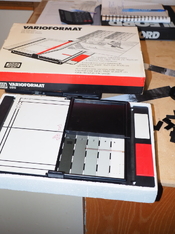
A slightly different approach is the following. One of the easiest print exposure tests is the use of the Kodak Projection Print Scale. Although no longer made, they can be found on eBay, often in like-new condition.

The Delta-1 version is still available and works the same way ($10.95 from B&H in NYC).

https://www.bhphotovideo.com/c/product/15711-REG/Delta_12610_Projection_Print_Calculator_Scale.html/?ap=y&ap=y&smp=y&smp=y&store=420&lsft=BI:514&gad_source=1&gad_campaignid=1413790935&gclid=EAIaIQobChMI-suQptqFkAMV8C_OBx1q-jNNEAQYASABEgJpG_D_BwE

Delta-1 instructions:

https://www.google.com/search?q=Del...yLjE0uAfLD8IHCDMuOS4xMS4xyAdU&sclient=gws-wiz

Each of these consumes a single 4” x 5” sheet (1/4 of an 8” x 10” sheet) of paper., You can generally nail the exposure in a single test. It works with B&W or color, since it is a form of neutral density filter. It can be used at any projection size.

Start with the optimum aperture, the one that gives the best combination of resolution and preservation of the negative’s inherent contrast. That’s usually when the aperture is closed about 2 stops from wide open.

There are many You Tube videos illustrating its use.

Kodak Instructions:

USING THE

KODAK PROJECTION PRINT SCALE


With the KODAK Projection Print Scale, you can determine the starting exposure time for black-and-white or color enlargements, or contact prints on paper or film. See the test print on the back of this sheet.

For Enlargements:

  • Place the negative or transparency in the enlarger and focus sharply.
  • Turn off the printing light and other white lights.
  • Place the enlarging paper (of film) on the easel.
  • Lay the scale (shiny side up) on the paper over the center of interest of the image; hold it flat in contact with the paper (or film) with a sheet of glass or your hands.
  • Expose for 60 seconds* and develop it as recommended by the manufacturer.
  • Inspect the image and select the sector that appears to have the corrcct density (darkness). The number on the rim of the sector is the starting exposure time in seconds.
  • Without the scale, make an exposure at this time on another sheet.
Note: Most photographic prints appear slightly darker when dry. Learn to adjust for this “dry down” when judging wet prints.

For Contact Prints or Negatives:

  • Place the scale on the contact printer glass, shiny side down.
  • Place the negative or transparency, and paper, in their usual relative positions over the scale.
  • See steps 5 and 6 and determine the correct exposure.
Although the segment may appear to have the correct density, when the entire print is made it may be slightly darker or lighter overall. This is because a small segment, out of context of the rest of the picture area, is not always an exact indicator of the correct density.

*If the exposure time is expected to be short, make the test exposure 30 seconds. The correct printing time will be half the number of the best sector. For printing black-and-white negatives from color transparencies, use a 6-second test exposure, and a printing time 1/10 the number of the best density sector.

EASTMAN KODAK COMPANY, Rochester, NY 14650

9-78-AXX


The 10 segments in seconds are: 2, 3, 4, 6, 8, 12, 16, 24, 32, and 48.
 
But with that design, and Ralph’s, you have to move the entire device across the baseboard, don’t you, to expose each section to the same bit of image? With @MARTIE ’s device, you can just pull the paper through.

With Ralph's design, you pull the paper across strip by strip, and the frame device stays in the same place.
 
This may fit your requirements.
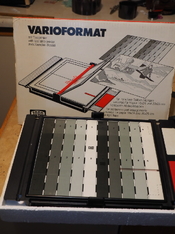
Not often found with the print scale
 

Attachments

  • P1010494.JPG
    P1010494.JPG
    491.7 KB · Views: 118
  • P1010493.JPG
    P1010493.JPG
    513.9 KB · Views: 148
Not sure if anyone has mentioned this one. Looks well made.

 
As long as I can remember I have used a Patterson test strip printer which has 5 separate fingers which can be dropped one after another so you get 5 additive exposure settings. So if I do a 1st test with 10 second intervals and the exposure is somewhere between 20 and 30 seconds I do a second test with 5 more strips of 2 second intervals more with which usually cover what I need.
 

Attachments

  • IMG-20251105-WA0003.jpg
    IMG-20251105-WA0003.jpg
    187.7 KB · Views: 1,885
But with that design, and Ralph’s, you have to move the entire device across the baseboard, don’t you, to expose each section to the same bit of image? With @MARTIE ’s device, you can just pull the paper through.

with mine, you move the paper 1" at a time to create the test strip.
 

Attachments

  • TestStripPrinterEd2.pdf
    1.3 MB · Views: 62
Photrio.com contains affiliate links to products. We may receive a commission for purchases made through these links.
To read our full affiliate disclosure statement please click Here.

PHOTRIO PARTNERS EQUALLY FUNDING OUR COMMUNITY:


Ilford ADOX Freestyle Photographic Stearman Press Weldon Color Lab Blue Moon Camera & Machine
Top Bottom