• Welcome to Photrio!
    Registration is fast and free. Join today to unlock search, see fewer ads, and access all forum features.
    Click here to sign up

Help with pushing hp5+

Recent Classifieds

Forum statistics

Threads
201,679
Messages
2,828,458
Members
100,887
Latest member
markcesene
Recent bookmarks
0

Fabote__

Member
Joined
Jan 2, 2026
Messages
1
Location
England
Format
35mm
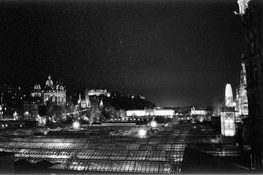
I recently home deved some hp5+ 400 that I pushed to 1600 and got some very grainy results. I got this "noise"/white dots especially in areas that were supposed to be black and I didnt know if its normal due to the push processing or if its an issue to do with the exhausted developer or fixer.

I developed with stock ID-11 however this was the 9th time using it and it exhausts after the 10 use. Also my Fixer has been used many many time and should have probably been replaced a while ago. I also scanned these myself soo there might have been an issue there. I'm still new to this and any help is appreciated thanks!
 

Attachments

  • DSC_0133-min.jpg
    DSC_0133-min.jpg
    1.9 MB · Views: 139
  • DSC_0158-min.jpg
    DSC_0158-min.jpg
    1.9 MB · Views: 120

Alex Benjamin

Subscriber
Allowing Ads
Joined
Aug 8, 2018
Messages
2,940
Location
Montreal
Format
Multi Format
I suspect a scanning issue, i.e., noise rather than grain, but I'll let people more versed in these matters chime in.
 

koraks

Moderator
Moderator
Joined
Nov 29, 2018
Messages
26,679
Location
Europe
Format
Multi Format
Welcome to Photrio!

You've just figured out what everyone realizes sooner or later when they start to push film. There's no way to develop shadow detail that's not recorded.
The noisy bits in the shadow areas are really just that - noise. Partly they're silver grains that received little or no exposure, but started developing anyway due to the extended development. Partly they're exposed silver grains that have developed to varying extents, again for the same reason. This results in an overall increase in grain. The final effect you're looking at is an interaction of the scanner with the film grain and the emphasis on this grain due to the contrast boost needed to eek out some gradation from the shadow areas.

Overall the result isn't too bad and just about what you can expect from this approach. This is about as good as it gets. In your scans, you did a pretty good job at setting the black point around the base+fog density of the film and then adjust contrast to the density range of these negatives. If you push the black point upwards a little, you lose some of the graininess, but you also lose shadow differentiation. You can't have this particular cake and eat it.

I developed with stock ID-11 however this was the 9th time using it and it exhausts after the 10 use.
It's not a cliff the developer drops off; exhaustion is a gradual process. It's also not necessarily only exhaustion (due to use and aerial oxidation) of the developing agents you're looking at. Part of it is the buildup of halides (bromide and iodide) that act as a restrainer. This doesn't help your shadow areas when push processing, coincidentally. The net effect is that the activity of the developer shifts; if someone or some document says "can be used for X rolls" then this 'X' will always be a more or less arbitrary number.

my Fixer has been used many many time and should have probably been replaced a while ago.
You can re-fix the film in fresh fixer. Partially fixed film generally has a somewhat milky look and it tends to be uneven across the film surface. I don't see clear signs of insufficient fixing in your two scans; usually esp. in bad cases it's visible in the scans, although it's easily mistaken for other issues. In this case, I don't see it.
 

Daybreak135

Member
Joined
Apr 30, 2025
Messages
24
Location
New England
Format
4x5 Format
I recently home deved some hp5+ 400 that I pushed to 1600 and got some very grainy results. I got this "noise"/white dots especially in areas that were supposed to be black and I didnt know if its normal due to the push processing or if its an issue to do with the exhausted developer or fixer.

I developed with stock ID-11 however this was the 9th time using it and it exhausts after the 10 use. Also my Fixer has been used many many time and should have probably been replaced a while ago. I also scanned these myself soo there might have been an issue there. I'm still new to this and any help is appreciated thanks!

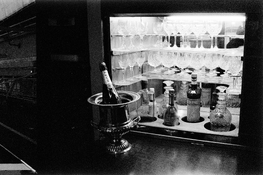
Seconding what other people have said but it almost looks like there’s little or no info in the black areas and that’s why you are getting “noise” there. Most likely from the scanning process. I get things like that when I scan night photos as well
 

snusmumriken

Subscriber
Allowing Ads
Joined
Jul 22, 2021
Messages
2,761
Location
Salisbury, UK
Format
35mm
The noise you are seeing has already been explained. The stark white dots are dust, more likely on your negatives rather than in the scanner, because they aren’t in the same places on both images.
 

Craig

Subscriber
Joined
Apr 8, 2004
Messages
2,522
Location
Calgary
Format
Multi Format
It's worth reading the Ilford developer data sheet on their website. Were you adjusting the development time with each film? By film 9 in a litre of ID-11 you should have added 90% to the developing time.

The spots look like dust to me. For pushing film, Microphen is a better choice, but it will also increase the grain. How much it increases grain over ID-11 in those conditions, I'm not sure.
 

pentaxuser

Member
Joined
May 9, 2005
Messages
20,321
Location
Daventry, No
Format
35mm
For these kind of night shots both look OK to me. I can just about see some shadow detail in the dark areas which is all I'd expect in the light conditions

Maybe I am easily pleased

pentaxuser
 

ntenny

Subscriber
Allowing Ads
Joined
Mar 5, 2008
Messages
2,513
Location
Portland, OR, USA
Format
Multi Format
Is your ultimate target the scan or an optical print? My experience with HP5+@1600 has been that it prints all right (contrasty, of course) but scans with a lot of noise in the shadows, very much like what you’re seeing.

-NT
 

loccdor

Member
Joined
Jan 12, 2024
Messages
2,546
Location
USA
Format
Multi Format
You can remove the noise in the shadows by setting the black point to a higher value. This will also increase the contrast though. You may want to compensate for that by also setting the midtones to a higher value. Something a bit like this...

1767465670892.png
 

Ian Grant

Subscriber
Allowing Ads
Joined
Aug 2, 2004
Messages
23,407
Location
West Midland
Format
Multi Format
I used to push process HP5 when shooting rock concerts, processed in ID-68 (which is Microphen).

When Ilford introduced XP1 I switched, there were push process times in the datasheet to 1600, you got the speed without the very increased contrast. With XP2 (and later XP2 Super) Ilford gave no push process times. At the time I was working with Ilford and asked the head of research why.

The truth was XP1 used a non-standard C41 development tine, and minilabs hated processing it, and then were also being asked for push-processing as well.

So when XP2 was introduced it used the standard C41 dev time, and all mention of push processing was dropped, But it push-processes really well, and you have normal contrast, finer grain than HP5 pushed.

I only stopped using XP2 pushed when the E6 specialist push process films were discontinued, and I had to switch to digital,

Ian
 

Randy Stewart

Member
Allowing Ads
Joined
Jan 1, 2006
Messages
291
Format
Medium Format
You show a few, irregularly spaced white spots on what I assume to be 35mm frames. These are not elements of the processing. They might just be dust spots on the negatives. However, given your extended reuse of the chemicals, I suspect that they are bits of chemical by-products accumulated in your working solutions. This can occur in the developer, but more likely the fixer. One remedy might be to filter the solutions after a few uses to keep them cleaner. However, you can avoid the issue and insure more consistent results by adopting a one-shot developer usage and change your fixer before it ages out or is exhausted. You also need to clean out your storage bottles before they are reused with freshly mixed working solutions. Plastic bottles are hard to clean; the accordion types used to squeeze out air pockets are impossible to clean. Glass is best and easiest to clean, and oddly, it can be the least expensive if you shop from glass bottle makers on-line.
 

snusmumriken

Subscriber
Allowing Ads
Joined
Jul 22, 2021
Messages
2,761
Location
Salisbury, UK
Format
35mm
You show a few, irregularly spaced white spots on what I assume to be 35mm frames. These are not elements of the processing. They might just be dust spots on the negatives. However, given your extended reuse of the chemicals, I suspect that they are bits of chemical by-products accumulated in your working solutions. This can occur in the developer, but more likely the fixer. One remedy might be to filter the solutions after a few uses to keep them cleaner. However, you can avoid the issue and insure more consistent results by adopting a one-shot developer usage and change your fixer before it ages out or is exhausted. You also need to clean out your storage bottles before they are reused with freshly mixed working solutions. Plastic bottles are hard to clean; the accordion types used to squeeze out air pockets are impossible to clean. Glass is best and easiest to clean, and oddly, it can be the least expensive if you shop from glass bottle makers on-line.

This is sound advice. I recommend you use two simple re-usable funnel filters like the Paterson ones, one for developer only, one for everything else. Filter chemicals out of the bottle into a measure or other container, and filter them back in. You will be surprised how much dust gets caught on the filter.

The other important consideration is where you hang your negatives to dry.
 

Agulliver

Member
Joined
Oct 11, 2015
Messages
3,718
Location
Luton, United Kingdom
Format
Multi Format
The white dots are almost certainly dust on the negatives, as others say. It's common enough. I tend to clean my flatbed scanner with isopropyl alcohol every time I use it (wiping the scanning and illumination surfaces with a paper towel that has IPA on it) and blow dust off my negatives....and I still get a few specks of dust which need to be edited out. They are, of course, most noticeable in the areas of the inverted photo that are most dark.

The noise in the dark areas will almost certainly be down to scanning settings. Depending on your setup you can probably do better.

Here is one example of what I get straight out of my ancient Epson flatbed. There's a little dust, a little grain/noise but I can deal with both with a couple of minutes editing....if I so choose. Or I can scan again with more care. Ilford HP5+ pushed to 3200, developed in ID-11 stock....inversions every 60 seconds in a Jobo tank.
 

Attachments

  • marco cinelli.jpg
    marco cinelli.jpg
    561.4 KB · Views: 26

dynachrome

Member
Allowing Ads
Joined
Sep 16, 2006
Messages
1,836
Format
35mm
I agree with the suggestion that you try Microphen instead for a little more speed. Any phenidone based developers will fo this. If you intend to do more low light shooting, you might try using Delta 3200 or T-MAX 3200 instead. These films have native ISO speeds in the area of 1000 and can be used at 1600 with more shadow detail than you will get from pushing any 400 speed film. The only disadvantage is that they cost more than the 400 speed films. My preference is got the T-MAX 3200. It has grain but the pattern is tight. It works well with Microphen. One more possibility is using Portra 800 and pushing it a stop.
 

Agulliver

Member
Joined
Oct 11, 2015
Messages
3,718
Location
Luton, United Kingdom
Format
Multi Format
I've more or less switched to Microphen in the last 3 years as the majority of my B&W film photography is now shot at gigs and pushing films with box speed of 400.

I find Delta 3200 to be a bit mushy in 35mm though I love it in 120. It's worth OP trying TMAX 3200 which actually outperforms Delta in my opinion. Though perfecting use of HP5+ and scanning technique will help.
 

Carnie Bob

Member
Allowing Ads
Joined
Nov 5, 2023
Messages
473
Location
Toronto , Ont Canada
Format
4x5 Format
I used to push process HP5 when shooting rock concerts, processed in ID-68 (which is Microphen).

When Ilford introduced XP1 I switched, there were push process times in the datasheet to 1600, you got the speed without the very increased contrast. With XP2 (and later XP2 Super) Ilford gave no push process times. At the time I was working with Ilford and asked the head of research why.

The truth was XP1 used a non-standard C41 development tine, and minilabs hated processing it, and then were also being asked for push-processing as well.

So when XP2 was introduced it used the standard C41 dev time, and all mention of push processing was dropped, But it push-processes really well, and you have normal contrast, finer grain than HP5 pushed.

I only stopped using XP2 pushed when the E6 specialist push process films were discontinued, and I had to switch to digital,

Ian

HP5 pushed to 800ISO and developed in Microhen is IMHO the best combination. This was legendary Catherine Ashmoores formula that we followed for all her musical stage photography we did with her.
 

Sirius Glass

Subscriber
Joined
Jan 18, 2007
Messages
50,814
Location
Southern California
Format
Multi Format
Welcome to Photrio!

It looks like a scanning issue to me too.
 
Photrio.com contains affiliate links to products. We may receive a commission for purchases made through these links.
To read our full affiliate disclosure statement please click Here.

PHOTRIO PARTNERS EQUALLY FUNDING OUR COMMUNITY:


Ilford ADOX Freestyle Photographic Stearman Press Weldon Color Lab Blue Moon Camera & Machine
Top Bottom