• Welcome to Photrio!
    Registration is fast and free. Join today to unlock search, see fewer ads, and access all forum features.
    Click here to sign up

Help with B&W exposures

Tree with Big Shadows

Tree with Big Shadows

  • 2
  • 0
  • 25
Everal Barn

A
Everal Barn

  • 0
  • 0
  • 26

Forum statistics

Threads
203,450
Messages
2,854,906
Members
101,848
Latest member
DLelandC
Recent bookmarks
2

BennyL

Member
Allowing Ads
Joined
Oct 5, 2017
Messages
6
Location
Toronto
Format
35mm
Hi everyone,

I recently got in to film photography and have been toying with various 35mm SLRs over the past few months. I get the film developed and scanned at a lab and am usually quite happy with the results, but have run in to an issue I don't understand and hope someone here can help. The C-41 processing has been very consistent and good as far as I can tell, but I have now had 2 rolls of B&W developed and both rolls came out looking totally bad. I thought the first roll might have been a camera problem, as I shot it on a Ricoh P&S that I hadn't previously tested so I figured it might have a metering problem. The second roll however was shot on an Olympus OM-40 that I have shot numerous rolls of color film on. I'm just wondering if this is the right place for me to post some of the photos and maybe get advice as to why the exposure are totally off and just generally look like heck.
 
Hi Benny. definitely post some images - it's usually better to show a picture of the negs on a lightbox or held up to a window against the sky, as a scan can often distort what you've actually captured on the flm.

Once you've uploaded these, I'm pretty sure you'll get a variety of answers and suggestions to answer the initial question. :smile:
 
Hi everyone,

I recently got in to film photography and have been toying with various 35mm SLRs over the past few months. I get the film developed and scanned at a lab and am usually quite happy with the results, but have run in to an issue I don't understand and hope someone here can help. The C-41 processing has been very consistent and good as far as I can tell, but I have now had 2 rolls of B&W developed and both rolls came out looking totally bad. I thought the first roll might have been a camera problem, as I shot it on a Ricoh P&S that I hadn't previously tested so I figured it might have a metering problem. The second roll however was shot on an Olympus OM-40 that I have shot numerous rolls of color film on. I'm just wondering if this is the right place for me to post some of the photos and maybe get advice as to why the exposure are totally off and just generally look like heck.
Oh sure;just bring 'em on.
 
I'm just wondering if this is the right place for me to post some of the photos and maybe get advice as to why the exposure are totally off and just generally look like heck.
Absolutely. As Nanette posted, take a picture of them on a lightbox or against a window (phone snap is fine) so we can see the edges (aka rebates). The way the lab scans them may even be the issue.
 
Benny,

The title of this post is "Help with B&W Exposures" and, yet, you speak of C-41 processing. Are you developing color film or a B&W film such as Ilford XP-2 (which is generally processed in C-41 chemistry?) I ask because what film you're shooting, chosen EI, and metering technique all play a key role in results. But, as others have said, posting pics of the negs would be very helpful.
 
Benny,

The title of this post is "Help with B&W Exposures" and, yet, you speak of C-41 processing. Are you developing color film or a B&W film such as Ilford XP-2 (which is generally processed in C-41 chemistry?) I ask because what film you're shooting, chosen EI, and metering technique all play a key role in results. But, as others have said, posting pics of the negs would be very helpful.

Sorry, I just mentioned the C-41 to indicate that I've run numerous rolls of color film through this particular camera and know that it meters correctly. As previously mentioned, it's an Olympus OM-40. I shot this roll using Program mode with ESP metering enabled. I will post some photos shortly.
 
It's much better for diagnosis to have even a crappy pic of the negatives including the rebates/frame numbers than to have a scan. With a scan, too much can be due to correction during the scanning process and you don't get to see the blank bits in the rebates nor the factory exposed numbers which, being relatively consistent can give clues about issues with developing.
 
Oh, ok, I'll snap pics of the negs tomorrow. So the picture files don't tell us anything at all?
 
So the picture files don't tell us anything at all?
They tell us some things about the files themselves, but they reveal very little about exposure and development of the negatives.
 
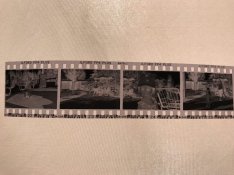
I am uploading a picture of one strip of the negatives, let me know how it is.
 

Attachments

  • photo5098637393585612723.jpg
    photo5098637393585612723.jpg
    294.7 KB · Views: 171
Those negs look just fine to me.
 
I am uploading a picture of one strip of the negatives, let me know how it is.

Benny, given that these images were made in harsh, contrasty light, and that the lab probably leans toward overdevelopment (or at least uses a standard/contrasty developer) I would say your negs are about as good as you could hope for.
You stated: "I get the film developed and scanned at a lab" and so I have to assume your complaint is with how the scans look - and admittedly, they look way too contrasty with nonexistent highlights. That is the fault of the person/equipment used to scan your negs, not the negatives themselves. Looking at the snapshot you posted of the negs themselves, there's nothing wrong with how they are exposed and development is "normal" (where you might have underprocessed a wee bit to heel in the hottest highlight areas). A reasonably skilled technician would have no difficulty getting both good scans/prints from those negatives.
My impression is that labs generally treat customer scans as "proofs" in much the same way you make a contact sheet; they are for initial evaluation and not to be thought of as a final product. That said, you should probably discuss with your lab how you feel about the results and find out if in the future you could specify how you want your B&W scans to look. Depending on the lab, you may have options to request a more dynamic set of scans to work with.
 
The negs are probably okay, they look over developed but that could be because of the darkish fabric you photographed the strip against.
 
photo5098637393585612723quick.jpg
The image is in there. The problem is in how it is being digitally processed.
 
This is precisely why I wanted opinions from people here.

So am I to understand that the photos were taken with generally good exposure, and the processing was done quite well, but the scanning and digital processing is the problem?

If so, how can I scan the negatives and process them myself?
 
Too me, the negatives look a little bit contrasty, which implies a little more development than would be ideal (for the lighting conditions).
(note the word "little").
Higher contrast negatives with fairly dense highlights are a bit more difficult to scan, and those scans are a bit more difficult to print from.
You certainly can process film yourself. There is a little bit to learn, a bit to purchase, and a bit of time to devote to it.
And a lifetime of enjoyment to follow.
On the scanning yourself question, it would be best to start a separate thread, also in this "Hybrid" part of PHOTRIO, asking for suggestions about scanners and procedures.
In the meantime, here is a link to a resource that helps you assess your negatives: https://www.ephotozine.com/article/assessing-negatives-4682
And with respect to those prints and scans, are you able to bring your concerns to the lab? They might be happy to both give you advice and redo the prints and scans.
And finally, I am sorry I didn't say this earlier - welcome to PHOTRIO from 5000 km away nearer the other end of the country.
 
Last edited by a moderator:
This is precisely why I wanted opinions from people here.

So am I to understand that the photos were taken with generally good exposure, and the processing was done quite well, but the scanning and digital processing is the problem?

If so, how can I scan the negatives and process them myself?

You can "scan" them with a digital camera, which takes a bit of a set-up to do, but isn't particularly difficult to do. I won't go into that, you can search the digital part of this site and/or google/youtube it.

The easiest way, imo, is to just buy a scanner. There's a bunch out there, with a range of features/capabilities. Epson makes good ones - I use the V600, though there are better (and more expensive) models.

Processing...there's a bunch of options there, too. The two that I use are Adobe's Lightroom and Photoshop. There's also a free program called GIMP, which is actually a pretty capable program...you can check it out at gimp.org .
 
This is precisely why I wanted opinions from people here.

So am I to understand that the photos were taken with generally good exposure, and the processing was done quite well, but the scanning and digital processing is the problem?

If so, how can I scan the negatives and process them myself?
The digital process, like the analog process, is a flexible and fluid process.

There isn’t ‘one right answer’.
 
Scanners are now inexpensive and easy to use, check out the selection from EPSON, I am happy with the V600 which cost about $200 new.
 
agree about poor scans. btw, which Toronto lab did the processing ?
We need to remember that there are two significant variable classes in scanning.

1- The film.

The exposure of negative film can be used over a wide range of exposure, consider disposable cameras for example. Good positives can be had across a 4+ stop variance. Those exposure differences are just fixed in post.

2- The operators choices.

The 'fix' I did in post #17 used about half the info that was in the photo of the negatives.

The operator has to choose how much of the scanned info to use, just like with regular printing, much of the info available in a negative needs to be ignored to get a good print. By ignored, I mean for example by setting the black and white points. That is effectively the equivalent of adjusting enlarger exposure and paper grade. Everything 'outside' those points is either black or white and without detail in the positive.

The operator makes that choice one way or another. The job is either done actively by a person or it is automated if the 'scanner software' does it.

Automated scans are cheaper that actively edited scans, at any lab. The positives from the scans that the OP got I'm guessing were simply the automated scans, maybe even just meant as a proof sheet, not for prints.
 
Photrio.com contains affiliate links to products. We may receive a commission for purchases made through these links.
To read our full affiliate disclosure statement please click Here.

PHOTRIO PARTNERS EQUALLY FUNDING OUR COMMUNITY:


Ilford ADOX Freestyle Photographic Stearman Press Weldon Color Lab Blue Moon Camera & Machine
Top Bottom