

- Joined
- Jun 16, 2008
- Messages
- 128
- Format
- 35mm
I think I may have done something to destroy my stash of ilford paper. The paper is about 1.5 years old, I printed with it a couple months ago and it worked flawlessly--no fogging, no splotches. However, now it appears the paper is ruined, just look at the horrible, fogged, splotchy print.
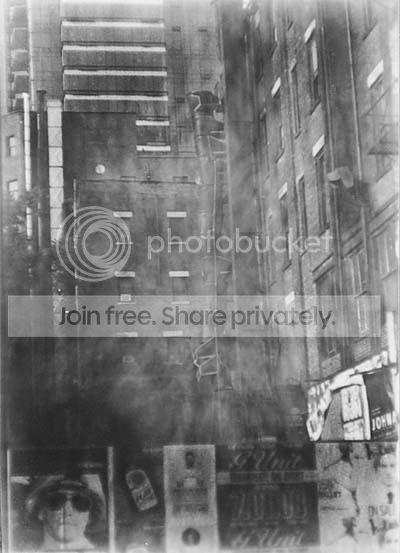
All my photos are printing like this (or worse), I tested the paper for fogging by developing an unexposed piece, and it came out bright white (no fog). The problem seems to be aggravated by using high contrast filters and longer exposure times, because of this i suspected some stray light bouncing around my darkroom, but I've ruled that out as well.
Very high-contrast negatives that print with no filtering and 10-15 second exposure times come out alright (but not perfect, black areas are still a bit splotchy).
By comparison, here's the scanned negative:

The only thing I can think of that may of ruined the paper would be strong ammonia and sulfur fumes from another project in my garage, where I store the paper.
Any insight would be appreciated; I'm pretty novice when it comes to trouble shooting. Here's a 2nd, even worse printing of the same negative:
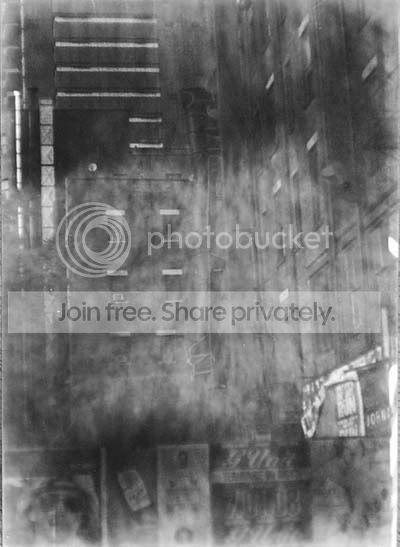
All my photos are printing like this (or worse), I tested the paper for fogging by developing an unexposed piece, and it came out bright white (no fog). The problem seems to be aggravated by using high contrast filters and longer exposure times, because of this i suspected some stray light bouncing around my darkroom, but I've ruled that out as well.
Very high-contrast negatives that print with no filtering and 10-15 second exposure times come out alright (but not perfect, black areas are still a bit splotchy).
By comparison, here's the scanned negative:
The only thing I can think of that may of ruined the paper would be strong ammonia and sulfur fumes from another project in my garage, where I store the paper.
Any insight would be appreciated; I'm pretty novice when it comes to trouble shooting. Here's a 2nd, even worse printing of the same negative:


