
• Welcome to Photrio!
    Registration is fast and free. Join today to unlock search, see fewer ads, and access all forum features.
    Click here to sign up

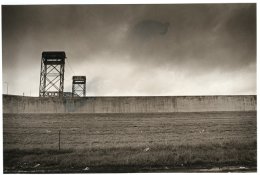
Help! Anyone know what is causing this?

MIT. 25:35

MIT. 25:35

  • 0
  • 0
  • 24
Lutheran Cemetery Angel

H
Lutheran Cemetery Angel

  • 0
  • 0
  • 32

Recent Classifieds

Forum statistics

Threads
202,945
Messages
2,847,988
Members
101,552
Latest member
rbaltman409
Recent bookmarks
0

Sportera

Member
Allowing Ads
Joined
Dec 16, 2003
Messages
933
Location
New Orleans
Format
4x5 Format
As shown in the photo I have been having this happen while printing during my last two sessions. I spilt toned this so its more obvious on this print but I have been getting these darkspots, visible when the print is in the fixing bath, so its not toning, that brings it out. It just emphasizes it.
Any body know what could be causing it?

I am using Ilford MG WT FB and it shows up on my 11x14's and 8x10's .

Edwal Platinum II 1:9
Kodak Stop
Ilford Hypam Fixer
Brown toner
Perma wash/ selinium

I am perplexed
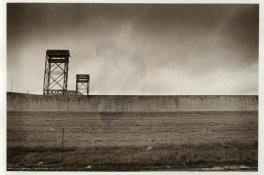
 
here the pic
 

Attachments

  • hellp.jpg
    hellp.jpg
    199.5 KB · Views: 285
I can offer little more than sympathy and the obvious questions. Are you certain that the issue is in the print and not in the negative? There is what appears to be a band of increased density along the left edge of the print. Is that part of what you're asking about or is it something else? That looks like it could be a [neg] development issue, but hard to say from here. If it's not in the negative, then start changing your scheme one thing at a time starting with the paper, then the developer and fix in order and see if it doesn't go away with one of those steps. Good luck!
 
Have you tried a sheet of the paper in the developer without exposing it? Looks like some kind of contamination of the paper. Other possibility is the paper not sinking under the developer fast enough or wet fingers getting on the paper before it develops.
 
Its not on my negs and its showing up on negs Ive printed before, perhaps a contamination. I never thought of processing an unexposed sheet. I'll try that tomorrow.

Here is a work print from the same neg, notice the spots are in a different location.
 

Attachments

  • hellp2.jpg
    hellp2.jpg
    215.2 KB · Views: 185
Probably not the paper

Its not on my negs and its showing up on negs Ive printed before, perhaps a contamination. I never thought of processing an unexposed sheet. I'll try that tomorrow.

First: Check the fixer. It is the most likely source. Maybe in combination with lack of aggitation.

j-fr

www.j-fr.dk
 
The edges of the print have a veiling they aren't clean. It looks like your fixers exhausted. (Or is this just the scan). The dark stains in the middle are exactly what you'd expect if the fixer is exhausted.

Try two bath fixing as this helps overcome the problem.

Ian
 
Sam,

Not trying to second guess those with more experience than I, but a couple of years ago I had the same sort of stains on a couple of prints (8x10 contact prints) from an old box of AZO gr3. I contact printed the sheets on both sides of the spoiled prints (there were two of them) and had no trouble, so all I could assume was that those two sheets were contaminated in production and just happened to be in the middle of the box. That's the only time it has happened to me.

cheers
 
Most important point when toning is to get rid of the any residual halide on the print. Therefore, I would recommend a complete fix and wash before going into the bown-toner.

Stefan
 
Photrio.com contains affiliate links to products. We may receive a commission for purchases made through these links.
To read our full affiliate disclosure statement please click Here.

PHOTRIO PARTNERS EQUALLY FUNDING OUR COMMUNITY:


Ilford ADOX Freestyle Photographic Stearman Press Weldon Color Lab Blue Moon Camera & Machine
Top Bottom