• Welcome to Photrio!
    Registration is fast and free. Join today to unlock search, see fewer ads, and access all forum features.
    Click here to sign up

Glass for a glass negative carrier project (Philips PCS 130/150)

Recent Classifieds

Forum statistics

Threads
201,679
Messages
2,828,440
Members
100,886
Latest member
Zansung
Recent bookmarks
1

ic-racer

Member
Joined
Feb 25, 2007
Messages
16,719
Location
USA
Format
Multi Format
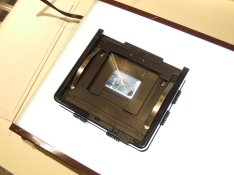
I'm fixing up a Philips 130/150 PCS. The negative stage takes masks and the only mask I have is for 35mm slides. The negative stage does accept two pieces of glass, and does contain moveable masks. This seems like it would be an ideal setup. Focal Point does sell the correct glass for this application: PHILLIPS 62MMX72MM 2MM CLEAR GLASS PH23CLR2

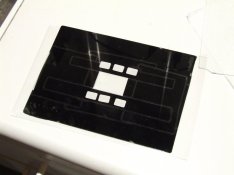
I did happen to have some old enlarger glass. Both anti-Newton and plain glass, so I decided to make my own. This is an example of one of the pieces of scrap glass. This one has tape all over it to mask it down to 35mm.
Under the tape the glass seemed to be in OK condition for the project.
DSCF7254.jpg
 
Last edited by a moderator:
OP
OP
ic-racer

ic-racer

Member
Joined
Feb 25, 2007
Messages
16,719
Location
USA
Format
Multi Format
It was nice having an insert for the carrier because I could match the glass to that exact size. I took all the tape off the scrap glass and cleaned the glass. Then I used a glass cutter to cut the glass to approximate size. In this case around 62 by 72mm.
DSCF7255.jpg
 
Last edited by a moderator:
OP
OP
ic-racer

ic-racer

Member
Joined
Feb 25, 2007
Messages
16,719
Location
USA
Format
Multi Format
I wet-sanded the edges of the glass. I rounded off the sharp corners and beveled the glass all around. The bevel allows the glass to be locked in place. I made two pieces, Anti-Newton on the top and plain glass on the bottom.
DSCF7256.jpg
DSCF7257.jpg
 
Last edited by a moderator:
OP
OP
ic-racer

ic-racer

Member
Joined
Feb 25, 2007
Messages
16,719
Location
USA
Format
Multi Format
Pictures of the carrier in use. As you can see the built-in masking device is very handy. Better than the masking systems I use on my Omega, Minolta or Durst enlargers.

Just as an FYI for beginners. With glass carriers, one does not usually need a separate sized glass for each negative size. One can use the largest glass all the time and use some system to mask the extraneous light. Since glass carriers and expensive, this makes some sense.

DSCF7260.jpg
DSCF7259.jpg
 
Last edited by a moderator:
OP
OP
ic-racer

ic-racer

Member
Joined
Feb 25, 2007
Messages
16,719
Location
USA
Format
Multi Format
This is a 6x7cm negative carrier and you can see above that by using the built-in masks the carrier can be used for 35mm and other smaller formats like half-frame, 16mm and Minox. Since this is my fifth enlarger, I'm thinking of setting this one up specifically for 16mm and Minox.
 
Last edited by a moderator:
OP
OP
ic-racer

ic-racer

Member
Joined
Feb 25, 2007
Messages
16,719
Location
USA
Format
Multi Format
Another FYI. When making big enlargements with a lens 'normal' to the format, the negative needs to be perfectly centered over the enlarging lens, not haphazardly placed in the carrier. Otherwise one or two corners are going to be blurry. The trick I use is to use a laser to find the spot directly under the enlarging lens, then I center the negative in the glass carrier so its projected image is perfectly centered under the enlarging lens. This indirectly centers the negative over the enlarging lens. (The negative stage and lens axis have been made perpendicular previously, by the usual methods).
 
OP
OP
ic-racer

ic-racer

Member
Joined
Feb 25, 2007
Messages
16,719
Location
USA
Format
Multi Format
The glass is about 2mm thick. To bevel the edge and smooth the corners I simply used 180 or 220 wet sandpaper that I had laying around. Either folded over on itself, or flat on the workbench. It took about an hour to do both little pieces but no fancy equipment was needed; only patience. One should put tape over the glass to protect it as you work the edges with the sandpaper.
 
OP
OP
ic-racer

ic-racer

Member
Joined
Feb 25, 2007
Messages
16,719
Location
USA
Format
Multi Format
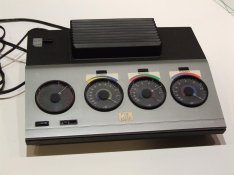
To get this Philips enlarger working, I also had to find a power supply. Interesting to see the vintage price tag on the unit. It reads $489.95 US Dollars.
 

Attachments

  • DSCF7261.jpg
    DSCF7261.jpg
    83.2 KB · Views: 304
  • DSCF7262.jpg
    DSCF7262.jpg
    72.3 KB · Views: 361
OP
OP
ic-racer

ic-racer

Member
Joined
Feb 25, 2007
Messages
16,719
Location
USA
Format
Multi Format
In use, this additive unit functions just like a subtractive system, when printing to multigrade paper. The dials are calibrated in CCs of color and there is a chart included in the manual giving the contrast grades. Just set the dials to the numbers in the chart, just like using a subtractive head.
 
OP
OP
ic-racer

ic-racer

Member
Joined
Feb 25, 2007
Messages
16,719
Location
USA
Format
Multi Format
I got the enlarger set up and aligned. This enlarger has no adjustment for alignment, so this is the procedure I use:

To align the negative carrier to the baseobard (laser projecting from the baseboard though the lens mount with no lens in place and bouncing off the negative carrier glass) one can either shim the negative carrier with tape or put a shim under the attachment of the column to the baseboard. Some enlarger service manuals recommend shimming the column. In many cases enlargers tend to tip forward with age, so the shims usually need to go under the front of the attachment. In this case I used a 0.7mm brass shim under the front of the column.

To align the lens to the baseboard, I built up some electricians tape around 1/4 of the orifice of the lens mount. I needed two thicknesses to bring it in to alignment.
 
Last edited by a moderator:

OP
OP
ic-racer

ic-racer

Member
Joined
Feb 25, 2007
Messages
16,719
Location
USA
Format
Multi Format
To center the negative on the lens, I use two methods. One is to shine the laser at the front of the lens so the bullseye pattern is centered back at the beam origin. This puts the beam directly under and perpendicular to the lens axis. Then I project the negative masks and center them to that point on the baseboard, using a ruler.
The other check is to see that the projection of the negative is exactly in the center of the image circle. To do this you need condensers or diffusion boxes one or two sizes bigger than the lens format (otherwise you project the edges of the diffusion box, rather than the edge of the lens circle. Mark the circle on the baseboard, then put the negative carrier in place and measure from the edges of the projected negative to the image circle.

The final check involves using the Peak 1 grain focuser to check the center and all 4 corners.

In this case I'm sad to report my fine Nikkor 50mm lenses have sharp-image coverage with only a millimeter or two to spare (projecting an 8x10 image). That made it way to fiddly for me to center the negative with this glass carrier. The Schneider 45mm APO-HM lens I tried gave a bigger sharp image circle, and made it easier to center the negative on the glass. I also tried a standard 6 element 80mm lens and that huge image circle made it extremely easy to center the negative.
 
OP
OP
ic-racer

ic-racer

Member
Joined
Feb 25, 2007
Messages
16,719
Location
USA
Format
Multi Format
I did not want to use the 80mm lens for 35mm film with this enlarger. Unlike a diffusion enlarger, where one can maintain light output by using a 35mm mixing box with the 80mm lens, this condenser enlarger requires one to use larger condenser combinations to get even illumination with the 80mm lens. This wastes light when projecting a 35mm negative and this enlarger can't tolerate that because it uses only three 35 watt lamps and the multigrade paper has its primary sensitivity to just the green and blue lamps. Also, the built in timer only goes up to 50 seconds.

When I did use the 80mm lens at f8, projecting a 4x6" image my times were in the 15 to 30 second range.

My smaller condenser for the 50mm lens just came in the mail yesterday, so I'll try that out today and see. By focusing the condenser light beam to a smaller area, the printing times should be shorter. (All other things being equal, the lens focal length, of course, does not affect printing time at the same aperture number, by design).
 
Last edited by a moderator:

Mike Bates

Subscriber
Joined
Jan 3, 2006
Messages
159
Location
Columbus, OH
Format
Multi Format
Thanks for the info one the Philips PCS Tri-One enlarger. I have one in like new condition i picked up on craigslist a couple of years ago. I haven't tried to align it or use it yet.

Mine came with a couple of spare lamps, but I'm worried they don't last forever. Do you know a source for extra replacement lamps?
 
OP
OP
ic-racer

ic-racer

Member
Joined
Feb 25, 2007
Messages
16,719
Location
USA
Format
Multi Format
I did not mention with respect to my column alignment that the column was just tipped forward; no side-to side adjustment was needed (good thing, because that is harder to do with shims).

Lamps don't have the usual three letter designation. Most of the usual bulb places have them from $12 to $20 dollars each. They are: PHILIPS 44295-4 13165

MFG CODE 44295-4 35 WATTS
14 VOLTS GZ4 (MINIATURE 2-PIN) BASE TYPE
MR-11 BULB TYPE CLEAR FINISH
100 CRI 50 HRS.
3400 K 1.378" BULB DIAMETER
1.654" MAX OVERALL LEN

BC2235_1_fs.jpg
 
Photrio.com contains affiliate links to products. We may receive a commission for purchases made through these links.
To read our full affiliate disclosure statement please click Here.

PHOTRIO PARTNERS EQUALLY FUNDING OUR COMMUNITY:


Ilford ADOX Freestyle Photographic Stearman Press Weldon Color Lab Blue Moon Camera & Machine
Top Bottom