
• Welcome to Photrio!
    Registration is fast and free. Join today to unlock search, see fewer ads, and access all forum features.
    Click here to sign up

Getting this b/w look

PenStocks

A
PenStocks

  • 1
  • 0
  • 31
Landed Here

H
Landed Here

  • 4
  • 3
  • 46

Recent Classifieds

Forum statistics

Threads
201,833
Messages
2,830,868
Members
100,976
Latest member
Gorrunyo
Recent bookmarks
0

Anon Ymous

Member
Allowing Ads
Joined
Feb 7, 2008
Messages
3,679
Location
Greece
Format
35mm
I don't think you need to pull process your film to get this look. It's fairly low contrast with not very bright highlights - white parts, combined with a fair amount of true black. Or at least that's what it looks like in the screen I use at the moment (not a great one). I'd say just take a similar negative and try split grade printing. Find out what the exposure with the soft filter needs to be to get highlights like these and then do the same with the hard filter, in order to get such blacks.

EDIT: I need to stress that screen settings, calibration (or lack of) can make things look very differently. Don't be surprised if you get very different answers.
 
Last edited by a moderator:

Ian Grant

Subscriber
Allowing Ads
Joined
Aug 2, 2004
Messages
23,409
Location
West Midland
Format
Multi Format
That look is from the (litho) printing process.

Ironically in the UK a printing style arose from the multitude of books that came into the country after WWII, I'm talking about Adams, Weston, Minor White etc, few if any here had seen original prints and printed to get the same feel as the reproductions, You can do the same it's not really dependent on the film type itself just the way you print.

Ian
 

MDR

Member
Allowing Ads
Joined
Sep 1, 2006
Messages
1,402
Location
Austria
Format
Multi Format
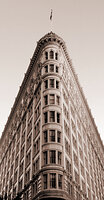
If you mean the picture of the house, simply use a yellow filter and/or develop in pyro.
 

pdeeh

Member
Allowing Ads
Joined
Jun 8, 2012
Messages
4,770
Location
UK
Format
Multi Format
I'd suggest joining photo.net and contacting the photographer who posted it to ask what his process was.

Plus you need to remember this every time you see a photo on your screen
screen settings, calibration (or lack of) can make things look very differently.
... as can the process of digitisation by the originator and any post-processing s/he applied, plus is it a negative scan or a print scan, plus loads of stuff.
 
OP
OP

rayonline_nz

Member
Allowing Ads
Joined
Mar 20, 2010
Messages
658
Location
Wellington,
Format
Multi Format
I don't do my own printing yet, only development. I just have the option of scanning now.

I mean the wide tonal range and the smooth look. I looked at my Delta100 film mine tend to be more contrasty.
 

pdeeh

Member
Allowing Ads
Joined
Jun 8, 2012
Messages
4,770
Location
UK
Format
Multi Format
You may be making the mistake of thinking that a particular look is inherent to the negative, whereas much of the "look" of a final image will be the result of how the printer has decided to print it, or how, if the process is not wet but digital, any adjustments have been made in post-processing.

There are things you can do to change some of the characteristics of a negative, and that might include choices of developer or techniques like Sabattier (not applicable in this case of course), but you may end up being frustrated if you are chasing a "look" that has actually been achieved in the darkroom (or LightRoom) and not the developing tank.

Hence the suggestion to ask the photographer.
 

bernard_L

Member
Allowing Ads
Joined
Feb 17, 2008
Messages
2,133
Format
Multi Format
If you mean the picture of the house, simply use a yellow filter and/or develop in pyro.
+1. Look at other posts by Rick Drawbridge on photo.net, classic cameras forum. His photos consistently have that look. See especially:
http://photo.net/classic-cameras-forum/00daup
but beware: "Because of the pyro's ability to retain huge amounts of highlight and shadow detail, there's always a danger that things can get a little muddy, losing the "silvery" look I'm always aiming for"

I like/admire that look, but for myself I'm content with any long-scale film+dev, e.g.TX400, D-76(1+1). Plus, whether wet printing or s***g "protect" the highlight by keeping them below "paper white"
 

gone

Member
Allowing Ads
Joined
Jun 14, 2009
Messages
5,504
Location
gone
Format
Medium Format
As bernard mentioned, that's Rick's, and he generally uses Pyro and slow films, which gives a really tight grain and sharpness. You would have to discuss this w/ him, but he may have done some post work to clean up the web images. He's my favorite photographer over there, and his posts are often gems of good writing and images. Sometimes the shots look too cleaned up for my tastes though. I want to see some grain there Rick!

You should be able to put his name in the search box in the top right corner and see more of his posts. He often gives details on the film and developing.
 
Last edited by a moderator:

RalphLambrecht

Subscriber
Allowing Ads
Joined
Sep 19, 2003
Messages
14,930
Location
K,Germany
Format
Medium Format
Hi all, I have shot Delta 100, HP5+; and Tri-X at 400 and 250. Using the standard ID-11 developer. How do I get this look?

Second photograph on this page:
http://photo.net/classic-cameras-forum/00dfCF?start=10


Is it some kind of pulling? I read that Kentmere 100 and 400 are essentially FP4 and HP5 with less silver. I haven't shot HP4 though.


Thanks.
looks like exposed at box speed and developed in Rodinal to me; nasty tones in the first image.You will do much better with D76 or ID11:smile:
 

JW PHOTO

Member
Allowing Ads
Joined
May 15, 2006
Messages
1,148
Location
Lake, Michig
Format
Medium Format
I don't do my own printing yet, only development. I just have the option of scanning now.

I mean the wide tonal range and the smooth look. I looked at my Delta100 film mine tend to be more contrasty.

You also have to remember that these are not wet printed but scan negatives. With some films there is a big difference between scanned and wet printed results and with other films not so much. My pyro developed negatives scan very nicely, but my scanner likes slightly underexposed(thinner) negatives as compared to wet printing. I think Rick underexposes his negatives also, but not sure.
 
Photrio.com contains affiliate links to products. We may receive a commission for purchases made through these links.
To read our full affiliate disclosure statement please click Here.

PHOTRIO PARTNERS EQUALLY FUNDING OUR COMMUNITY:


Ilford ADOX Freestyle Photographic Stearman Press Weldon Color Lab Blue Moon Camera & Machine
Top Bottom
