

• Welcome to Photrio!
    Registration is fast and free. Join today to unlock search, see fewer ads, and access all forum features.
    Click here to sign up

Foggy band on home-developed negatives

Fujino Trail

H
Fujino Trail

  • 1
  • 1
  • 36
Dead and Living.

H
Dead and Living.

  • 5
  • 4
  • 100

Recent Classifieds

Forum statistics

Threads
201,822
Messages
2,830,709
Members
100,973
Latest member
Arthur Deomi
Recent bookmarks
0

James Carandja

Member
Allowing Ads
Joined
May 15, 2016
Messages
8
Location
Hamilton, Scotland
Format
35mm
Hi all,
I'm pretty new to B+W negative development (35mm and 120) but enjoying it tremendously. However, I'm often getting the effect where some of the negatives come out with a mainly horizontal stripe (white once the negative is reversed) which can be foggy or quite distinct. Sometimes there are strata within the band.

The band is usually in the main body of the negative - half to two thirds down, which is particularly annoying as I can't crop it out. I expect this is a well known problem, so sorry to have to ask, but it is so difficult to know how to search for this on the forum!

I'm using a small changing bag, then 2 reel "AP" developing tank with ilfosol 3. Finally I scan them in. The same effect occurs with different film/camera combinations. The example is OM-4 loaded with HP5.

Any advice appreciated!
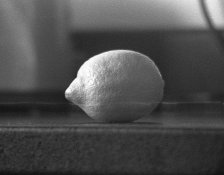
 

Attachments

  • om4033.jpg
    om4033.jpg
    937.4 KB · Views: 200

HiHoSilver

Member
Allowing Ads
Joined
Sep 7, 2015
Messages
2,170
Format
Multi Format
FWIW, James, I have a similar issue where the line is usually dark or black. I sometimes suspect the scanning, but I don't know for sure. Your thin line (mine is also thin) would argue against a light leak - which would be more dispersed fog. 'Hope I can learn some from this thread also.
 

Svenedin

Member
Allowing Ads
Joined
Mar 19, 2016
Messages
1,191
Location
Surrey, United Kingdom
Format
Med. Format RF
If you examine the negative in good light can you see this flaw? Angle the negative in the light and see what you can see. Is it a scratch or a drying mark? I use a changing bag and scan too because my darkroom is not yet resurrected. It is easy to scratch film in a changing bag by catching the film on something else in the bag. +1 for squeegee damage no matter how careful. It looks more like a drying mark though. My water is very hard so I switched to battery top-up water for the final rinse with a tiny quantity of rinse aid and the situation is better but not perfect. Most of the marks on my negatives cannot be seen when projected using my enlarger so I suspect they would not be seen on a print but cannot confirm until darkroom ready.
 
Last edited:

Ian Grant

Subscriber
Allowing Ads
Joined
Aug 2, 2004
Messages
23,409
Location
West Midland
Format
Multi Format
As it's different films and cameras that seems to rule out a camera issue, it's unlikely it's happening during processing, although I suppose a tiny pin-hole light leak in the changing bag might be one explanation but I would expect it be more random.

You need to check the negatives themselves use a loupe or the standard lens off the camera if it's on the negatives then look for a light leak. If it's not on the negative check the scanner it may be dirt internally. I guess you could set the scanner to scan a negative, then scan with nothing in the holder if the line shows up there's the culprit.

Welcome to APUG BTW :D

Ian
 
Joined
Sep 10, 2002
Messages
3,675
Location
Eugene, Oregon
Format
4x5 Format
Scan a neg, then turn it 90° and scan again and see if the line changes orientation or not. If so, then it's definitely in the scanning.

Doremus
 
OP
OP

James Carandja

Member
Allowing Ads
Joined
May 15, 2016
Messages
8
Location
Hamilton, Scotland
Format
35mm
Thanks all
To pick up some of the good points here, I've had a close look and the mark is definitely in the negative, not the scan. It appears to be in the image though, not a surface artifact.

I have used various things for drying including - nothing at all, gloved fingers, kitchen towel, chamois leather (disastrous BTW) and clean kitchen sponge.

I've uploaded another example which perhaps shows the effect more clearly, this time 120 film from a Lomo Diana F+. This example is very typical, a mostly straight line, sometimes segmented. I hope this might be a reference to others.

POSSIBLE ANSWER
It's funny how asking the question sometimes prompts you to come up with an answer yourself, even after weeks of pondering: I think I may have been wearing my Fitbit watch inside the changing bag! This watch periodically emits a green pulse of light which could illuminate the spirals and splash on to the film. Possibly this could explain why the effect isn't quite at the edge.

This is really stupid I know, even if it isn't the answer. I can only put it down to the over-excitement at home developing.

I'll post confirmation one way or the other when I next develop a roll, and thanks again for all suggestions.
 

Attachments

  • cymk012.jpg
    cymk012.jpg
    460.4 KB · Views: 154

HiHoSilver

Member
Allowing Ads
Joined
Sep 7, 2015
Messages
2,170
Format
Multi Format
Scan a neg, then turn it 90° and scan again and see if the line changes orientation or not. If so, then it's definitely in the scanning.

Doremus

So simple & so effective - feel silly for not thinking of it. Thank You, Doremus.
 

canuhead

Member
Allowing Ads
Joined
Mar 12, 2006
Messages
831
Location
Southern Ont
Format
Multi Format
the watch could be the cause. guess you'll be doing tests with and without the Fitbit. a reason why my iPhone stays outside the film loading room :wink:
 

jvo

Subscriber
Joined
Dec 6, 2008
Messages
1,782
Location
left coast of east coast
Format
Digital
...
POSSIBLE ANSWER
It's funny how asking the question sometimes prompts you to come up with an answer yourself, even after weeks of pondering: I think I may have been wearing my Fitbit watch inside the changing bag! This watch periodically emits a green pulse of light which could illuminate the spirals and splash on to the film. Possibly this could explain why the effect isn't quite at the edge....


AH HAH!!! another reason for me to avoid the gym today, "i'll ruin my negatives!":wink:

welcome to apug!
 

winger

Subscriber
Allowing Ads
Joined
Jan 13, 2005
Messages
3,980
Location
southwest PA
Format
Multi Format
I was about to load 4x5 holders when I noticed my fitbit pulse. Ever since, it goes in my pocket when the lights go off in the darkroom. I'd definitely suspect this as a likely cause. Please let us know if a roll without it comes out fine.
 

piu58

Member
Allowing Ads
Joined
May 29, 2006
Messages
1,545
Location
Leipzig, Germany
Format
Medium Format
The first one may be a streak from wetting agent. It is easy to use too much from it, and the streaks are hard to remove without scratching the negative. I use a real homeopathic amount of it and remove the remaining water with a film squeegee . No more issues from that point.
 
Photrio.com contains affiliate links to products. We may receive a commission for purchases made through these links.
To read our full affiliate disclosure statement please click Here.

PHOTRIO PARTNERS EQUALLY FUNDING OUR COMMUNITY:


Ilford ADOX Freestyle Photographic Stearman Press Weldon Color Lab Blue Moon Camera & Machine
Top Bottom