
• Welcome to Photrio!
    Registration is fast and free. Join today to unlock search, see fewer ads, and access all forum features.
    Click here to sign up

Fog, Help! (35mm, Canon AE-1)

Moment of Spin

A
Moment of Spin

  • 2
  • 0
  • 71
Bad patch

H
Bad patch

  • 2
  • 1
  • 45

Recent Classifieds

Forum statistics

Threads
203,103
Messages
2,849,873
Members
101,669
Latest member
JeremiahPeterson
Recent bookmarks
1

Nelson

Member
Allowing Ads
Joined
Jan 7, 2012
Messages
34
Location
East Jordan,
Format
35mm
Here is a neg scan out of my Canon AE-1 that is fogged on the upper and lower edge with the upper edge being worst (upper meaning the top of the negative, but bottom of the camera). This is only in the frame, I don't see any fogging at all elsewhere on the negative. There are about eight frames in the middle of the roll that are fogged like this. Any ideas?

I had the seals replaced on the camera about three years ago. Are there any common things to check on the AE-1? If it matters, I was using a Canon 28mm prime lens.

Also, this image is cropped a bit thanks to how my Epson scanner scans negatives.
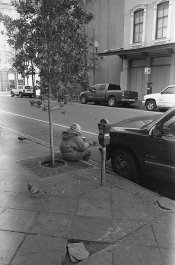
fog.jpg
 
I'll guess that the light-seal between the curtains and the body is poor, so that when the camera is pointed toward something bright, such as the sky, a little light sneaks past the upper and lower edges of the curtain and onto the film. The mirror would block most of the light on the upper edge of the film, which would explain why one edge is fogged more. An easy test is to shoot some frames, aiming the camera at the sky between frames, and some more frames but capping the lens between exposures and/or keeping the aperture stopped down the whole time.

EDIT: Also, light can be entering the mirror-chamber through the eyepiece. If the camera is pointed down, the eyepiece is pointed toward the bright sky. So for the experiment above, I suggest covering the eyepiece for the second set of test-frames.

HTH,

Mark Overton
 
Last edited by a moderator:
Sounds like a good idea, I'll do exactly what you suggested and see what happens.
 
Any chance you are using bulk loaded film?
 
I am! Bulk-load Tri-X. Still, I don't see any fogging between frames, only in the frame.
 
I am! Bulk-load Tri-X. Still, I don't see any fogging between frames, only in the frame.

Sounds more like an unwanted flare problem or a light leak somewhere near the lens mount. Otherwise the fogging would be between the frames.
 
Interesting. Did the test and can't recreate the problem. I didn't get any fog on the roll I just tried. For now I won't worry about it. If it happens again, I'll try to see what I am doing differently when the problem appears. Thanks again for the suggestions!
 
Photrio.com contains affiliate links to products. We may receive a commission for purchases made through these links.
To read our full affiliate disclosure statement please click Here.

PHOTRIO PARTNERS EQUALLY FUNDING OUR COMMUNITY:


Ilford ADOX Freestyle Photographic Stearman Press Weldon Color Lab Blue Moon Camera & Machine
Top Bottom
