• Welcome to Photrio!
    Registration is fast and free. Join today to unlock search, see fewer ads, and access all forum features.
    Click here to sign up

"Fine Art" style of exposure

Recent Classifieds

Forum statistics

Threads
202,020
Messages
2,833,880
Members
101,074
Latest member
T B
Recent bookmarks
0

Pandysloo

Member
Allowing Ads
Joined
Sep 15, 2012
Messages
30
Format
Medium Format
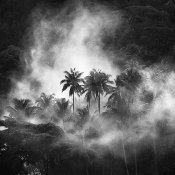
I'm completely new to B&W film. I would like to get into the "fine art" style; dramatic contrast: 8168360891_5e2cb19dd4.jpg
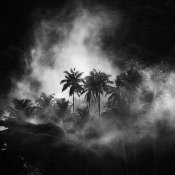
I realize lighting is the biggest factor, but I also am not trying for a technically perfect exposure, meaning I don't want as much tonal detail as possible because that leads to a flatter image (from what I can tell).

I have some Pan F+ and some Acros 100. Do I need to push it in order to get this look?
 

markbarendt

Member
Allowing Ads
Joined
May 18, 2008
Messages
9,422
Location
Beaverton, OR
Format
Multi Format
Lighting is always big, yes.

You don't have to push, extra development can help but isn't required.

Much of the contrast you see in your example can be added when printing (paper grade) or it can be inherent in the film/process combo you choose. Pan F regularly produces contrasty results but that can be manipulated.

Also technically perfect exposure is simply the exposure that gets you the result you want, nothing more, nothing less. It is the exposure that makes your printing easier.
 

Guillaume Zuili

Subscriber
Allowing Ads
Joined
Aug 3, 2005
Messages
3,005
Location
Los Angeles
Format
Multi Format
Your negative needs to get most of the informations in highlights and shadows.
But it's just a matrix. Everything happens in the darkroom making the print.
"Fine Art" is the print.
 
OP
OP
Pandysloo

Pandysloo

Member
Allowing Ads
Joined
Sep 15, 2012
Messages
30
Format
Medium Format
So if this look achieved in the printing process, does that mean that this photo was printed then scanned, as opposed to scanning the negative to digitize it?

When I shoot color print I always underexpose by at least 2 stops because otherwise it looks washed out and boring (despite the highlights not clipping). I like the dark and moody feel. Is the "proper" M.O., then, to expose the negative to achieve the most tonal range, then darken the image to taste when printing?

Sorry I'm completely unfamiliar with darkroom stuff at this point. Right now I'm only shooting negatives and scanning them in the meantime (a shame really, since screens can never do film justice).
 

eddie

Member
Allowing Ads
Joined
Jul 24, 2005
Messages
3,259
Location
Northern Vir
Format
Multi Format
I understand your desire to get a dramatic look to your images, but to completely control your photos (in addition to the above mentioned printing controls) you really should learn to develop properly before tweaking for your desired results. Without determining your EI, and standard developing time, you really won't be able to adjust exposure/development to consistently get the results you're after. "Fine Art" involves seeing the subject, and having the ability to get what you want on the negative and then on the print.
 

eddie

Member
Allowing Ads
Joined
Jul 24, 2005
Messages
3,259
Location
Northern Vir
Format
Multi Format
So if this look achieved in the printing process, does that mean that this photo was printed then scanned, as opposed to scanning the negative to digitize it?
I don't know if that's a darkroom print, or a digital print. Here, when we say print, it means a darkroom produced print.
 

markbarendt

Member
Allowing Ads
Joined
May 18, 2008
Messages
9,422
Location
Beaverton, OR
Format
Multi Format
You can get there digitally or in a darkroom, here at APUG we only discuss the traditional processes, no digital. See DPUG.org or one of the many other sites that deal with photoshop for digital questions.

Having to underexpose with a color neg says to me that the guy or gal printing you negs needs some management. Ask them to print it darker.

I regularly overexpose color negs by 2-4 stops and still get nice, not washed out, prints.
 

Noble

Member
Allowing Ads
Joined
Nov 25, 2012
Messages
277
Format
Multi Format
I would like to get into the "fine art" style; dramatic contrast: View attachment 61830

As others have said learn the basics first. Pick one film and one developer and learn how to expose that particular emulsion correctly and develop it correctly. Then you can tweak from there. The other thing to look into once you have the basics down is contrast filters for your camera lens. I use orange and red filters to increase contrast and darken blue skys. I also use a circular polarizer. Sometimes if I want something really dramatic I will stack a deep red filter and a polarizer. It's something to experiment with. Invariably noobs will use the deep red filter +/- polarizer way too much initially. Then they will calm down and use filters a bit more appropriately. Give it a try.
 

removed account4

Subscriber
Allowing Ads
Joined
Jun 21, 2003
Messages
29,832
Format
Hybrid
i have no idea how this print was achieved
but what i do know is that it is necessary to know
one's materials and only after that is done
can someone have a clue as to how to use them
to get them to look like that image.

good luck !
john
 

andrew.roos

Member
Allowing Ads
Joined
Jan 4, 2011
Messages
572
Location
Durban, Sout
Format
35mm
As you say, to start you need suitably dramatic lighting.

Then choose a film that gives you the tonal and grain qualities you desire - essentially the choice is between a more "S" shaped HD curve of a film like FP4+ which gives more contrast in the midrange at the expense of weaker highlight and shadow detail, or a straighter curve like that of Delta 100 that preserves highlights and shadow detail better but at the expense of less midrange punch.

Then, the correct colour/contrast filtering when you take the photograph. This determines which colours will be recorded as light tones, and which will be recorded as darker tones. An orange filter is probably a good place to start for pictures that include sky and clouds, for example.

The exposure should be tailored to obtain good detail and contrast in the areas that you want it in the print. The best way to achieve this is the zone system. There is plenty of material about it online. You will probably want a spot meter for this.

If possible, negative development should also be tailored to expand or reduce the contrast range as required by the exposure range. And/or the correct grade of paper (or filter, for multigrade paper) needs to be chosen to get the required local contrast (not global contrast).

Then dodging and burning should be used to bring the global contrast into a range that can be reproduced on the paper in order to achieve your visualisation of the image.

All of this is important. However the most basic mistake that I made when I started printing was to use too soft a grade of paper in order to accommodate the entire tonal range of the negative in a straight print. In all but the least demanding lighting, this results in a muddy, flat print. By dodging and burning appropriately you can manage your global contrast, as well as the visual impact of the print, while printing on a harder (higher grade) paper to preserve good local contrast.

Oh, and don't underexpose unless you like grain and muddy shadows, or intend to print the shadows as solid black.

It's a journey. I have a long, long way to go but am enjoying every step.
 
Last edited by a moderator:

piu58

Member
Allowing Ads
Joined
May 29, 2006
Messages
1,545
Location
Leipzig, Germany
Format
Medium Format
Most of such effects are not in the negative. They are made in the darkroom and can be made from quite ordinary shots. For such images the use of a harder grade of paper is necessary. This leads to differences in the overall image brightness at different parts of your shot which must equalized first (by burning and dodging). Using normal or soft grade, such problems are much less obvious. Then you add the "dramatic", again with burning and dodging, often with shields cut for this single image.
You need much time in the darkroom to learn this.
Your example got much more light in the cupper corners and at the bottom. Possibly the center part is dodged. If you try such manipulation using soft grade of paper the image gets muddy. If you use harder grade you have much more problems with the overall brightness (macro contrast). But this is manageable at least.
 

StoneNYC

Member
Allowing Ads
Joined
Aug 5, 2012
Messages
8,345
Location
Antarctica
Format
8x10 Format
I'm completely new to B&W film. I would like to get into the "fine art" style; dramatic contrast: View attachment 61830

I realize lighting is the biggest factor, but I also am not trying for a technically perfect exposure, meaning I don't want as much tonal detail as possible because that leads to a flatter image (from what I can tell).

I have some Pan F+ and some Acros 100. Do I need to push it in order to get this look?

Where did you find this example? Have you tried to ask the photographer?

Are you sure it's even a film image and not a digital one?


~Stone

Mamiya: 7 II, RZ67 Pro II / Canon: 1V, AE-1, 5DmkII / Kodak: No 1 Pocket Autographic, No 1A Pocket Autographic | Sent w/ iPhone using Tapatalk
 

250swb

Member
Allowing Ads
Joined
Apr 22, 2012
Messages
1,614
Location
Peak District
Format
Multi Format
I think it is very easy to see how the OP's example image was made. It is an essentially straight exposure, nothing special, and some burning around the edges has been done in the darkroom. But it doesn't matter whether it was done after scanning, the same applies.

Obviously choices about the initial contrast range have to be made, to get the definition in the swirling mist. But it is all post processing one way or another, the photographer has seen the end result in his minds eye, perhaps seen what is possible from the initial exposure and developed the film to give himself the best chance, but that is all. Everything else in this image seems to have been done with dodging and burning. This is one of the most basic darkroom techniques, and which can (I would say should) be applied to every image, if nothing else just to balance the edges of the print against the white paper.

Steve
 

markbarendt

Member
Allowing Ads
Joined
May 18, 2008
Messages
9,422
Location
Beaverton, OR
Format
Multi Format
I agree that some burning was probably used to finish the print Steve, but there are a variety of ways to get that type of print that can produce a better result than a bunch of after the fact burning.

The swirling mist against the dark sky for example it is hard, really hard, to burn the sky without burning the clouds some too.

Camera exposure placement is one, a camera filter possibly, print exposure placement choices surely, maybe negative masking...

The thing I'd look for though, if I were going to try and recreate this particular look would be a bright moonlit night. From that lighting condition it might even be possible to print straight, no burn at all.
 

MDR

Member
Allowing Ads
Joined
Sep 1, 2006
Messages
1,402
Location
Austria
Format
Multi Format
An already dark background and higher paper grade or constrast setting plus the white mist lit by sunlight (is a natural effect no special printing etc. necessary) created this image. Photography is about light this Picture is a good example what the right light can do.

But the best way to get an answer would be to ask Hengki Koentjoro how he did it.

Dominik
 

250swb

Member
Allowing Ads
Joined
Apr 22, 2012
Messages
1,614
Location
Peak District
Format
Multi Format
I agree that some burning was probably used to finish the print Steve, but there are a variety of ways to get that type of print that can produce a better result than a bunch of after the fact burning.

The swirling mist against the dark sky for example it is hard, really hard, to burn the sky without burning the clouds some too.

Camera exposure placement is one, a camera filter possibly, print exposure placement choices surely, maybe negative masking...

But the sky isn't dark, there isn't any sky, the image is shooting down onto the rainforest, you can see the trees in the background, so all the photographer had to do was make the mist stand out and burn.

Steve
 

markbarendt

Member
Allowing Ads
Joined
May 18, 2008
Messages
9,422
Location
Beaverton, OR
Format
Multi Format
But the sky isn't dark, there isn't any sky, the image is shooting down onto the rainforest, you can see the trees in the background, so all the photographer had to do was make the mist stand out and burn.

Steve

What's the blank area above the trees?
 

George Collier

Subscriber
Allowing Ads
Joined
Feb 23, 2005
Messages
1,374
Location
Richmond, VA
Format
Multi Format
As others have said, in general, learn the process and materials, then control the image as you want (your vision will improve as you travel up the learning curve).
And don't be impatient about making art - you have plenty of time, unless you are in your 80's.
 

StoneNYC

Member
Allowing Ads
Joined
Aug 5, 2012
Messages
8,345
Location
Antarctica
Format
8x10 Format
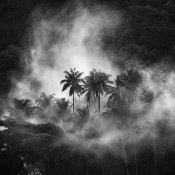
Here we are

View attachment 61841

we can see they are all trees now. Click for larger view.

Steve

Wow I like that better actually, did you find the photo and digitally alter it or find a different version?


~Stone

Mamiya: 7 II, RZ67 Pro II / Canon: 1V, AE-1, 5DmkII / Kodak: No 1 Pocket Autographic, No 1A Pocket Autographic | Sent w/ iPhone using Tapatalk
 

ic-racer

Member
Joined
Feb 25, 2007
Messages
16,747
Location
USA
Format
Multi Format
If the OP is interested in learning more about the creation of dramatic B&W images like that presented, he might want to check out John Sexton's Listen to the Trees. I believe that is the book with the useful technical information on John's technique. Oh, yes, look at the pictures in the book also!
 

markbarendt

Member
Allowing Ads
Joined
May 18, 2008
Messages
9,422
Location
Beaverton, OR
Format
Multi Format
Assuming you don't mean the steam/mist there is a marginally lighter area top right that I think is a cliff face/slope, but it is still possible to see detail in it as something to do with the Earth.

Steve

Fair enough. In the original on my screen it was dark enough that I didn't see any detail there.
 
Photrio.com contains affiliate links to products. We may receive a commission for purchases made through these links.
To read our full affiliate disclosure statement please click Here.

PHOTRIO PARTNERS EQUALLY FUNDING OUR COMMUNITY:


Ilford ADOX Freestyle Photographic Stearman Press Weldon Color Lab Blue Moon Camera & Machine
Top Bottom