
• Welcome to Photrio!
    Registration is fast and free. Join today to unlock search, see fewer ads, and access all forum features.
    Click here to sign up

Even more contrast for the flat negative

Filling In

H
Filling In

  • 1
  • 2
  • 32
Painted Hills # 3.jpg

H
Painted Hills # 3.jpg

  • 4
  • 0
  • 79

Recent Classifieds

Forum statistics

Threads
203,208
Messages
2,851,427
Members
101,725
Latest member
Eric35mm
Recent bookmarks
0

hiroh

Member
Allowing Ads
Joined
Dec 30, 2021
Messages
319
Location
Lisbon
Format
Multi Format
I was printing a photo of a wooden fence in shadow today. It's properly exposed, and every detail is visible, but it looks flat because there are no elements in the photo to add contrast. I'm used to seeing this image printed from a scan of the negative, where I added a lot of contrast to the wood texture digitally, however, in the darkroom, even with a grade 5 filter, the contrast isn't there.

I know this isn't the ideal negative to print, but I'm curious if there's any way to add even more contrast than what the highest contrast filter provides.
 
One or two step chemical process:

Lightly bleach and refix the negative. Must be done carefully as not to remove wanted detail in the shadows. This will affect shadows more than highlights...adding contrast.

and/or

Selenium tone the negative (1:4 is often used). More selenium will be deposited in areas which have the most silver -- increasing the density of the highlights more than the shadows...adding contrast.

I have done both with sheet film. Works best with well-exposed negatives.
 
Have a good look at the entire film this image came from. Try to understand if it was under developped.

Fresh paper developer with a double concentration can help. Make sure your darkroom light(s) are not too near to the paper (not near the enlarger, not near the developing tray), and no enlarger light is bouncing off ceiling or walls.

If you're using fiber paper to print, be prepared the print dries up darker. Sometimes this is hardly visible, with an image you describe this will be visible for sure. In other words, do not print too dark.

In general your contrast may be a little higher using later 6 elements enlarging lenses. Then, some lenses just give stronger contrast than others. Like later EL Nikkors. The later Focotars give a beautiful contrast while keeping a very pleasant feel to the image.

Having said that, comparing to scans is difficult. Digital is a different medium.
 
if there's any way to add even more contrast than what the highest contrast filter provides.

Lith print.

Cut the negative from its strip and intensify it; chromium or permanganate works best as the density boost is the greatest and the procedure can be repeated. (It's far, far more powerful than selenium toning, which only adds about a grade of contrast or so).

Make a duplicate with increased contrast through an interpositive.

Make a 'hybrid' print from a scanned and enhanced digital version and then outputting that as a negative again (inkjet negative, imagesetter or even film recorder if you can find a service that still does it).
 
I also have lith printed in these cases.
I've read that a blue filter gives a little more contrast than the hardest filter in a multigrade kit usually does, another thing to try.
 
From my experience:
Paper contrast is baked in, canot be increased with stronger dev.
Selenium will add at most half a grade.
Chromium will work. Caution hazardous chemical.
Off the top of my head:
Change to a point source enlarger. Borrow one. Or hack your existing enlarger.
 
I had a similar problem a few years ago with a particular negative on my Beseler MX-II enlarger with a V54-tube-equipped cold light head. Using an Ilford #5 filter didn't do it, nor did the standard blue Rosco 68 used in split-printing along with the 389 green. There was no discernable difference between the 68 and the Ilford #5 filter. I also tried a deep blue Rosco 384, which was very slow and only marginally better than the 68.

When I looked at the Rosco 68 transmission spectrum I noticed that it didn't have a perfect cutoff and actually transmitted a little green. So I started looking through all the Rosco spectrum charts and found the P1394. This is a sharp-cutoff glass filter with zero green transmission that had to be ordered through a Rosco dealer (a local theater-supply place in my case). It cost me about $100 at the time because I wanted a 6x8 inch filter for possible future 5x7 use; a 6x6 filter would have been cheaper. The P1394 allowed me to get a satisfactory print of this very flat negative. As a side benefit, the transmission in the blue is very high so my exposures were reasonably short.

I've rarely used it since, but it's there if I need it.
 
Last edited:
You could also try working with ferri bleach. It does more in the highlights so even bleaching the entire print increases contrast. You might need to print darker if you plan on doing that though as it does affect darker tones.
 
You may have excellent contrast, but lack dynamic range. In other words, it isn't contrast you need, it is added drama.
The "problem" comes from the nature of the subject combined with the light used to expose it.
The way you deal with that is to use burning and dodging, rather than contrast adjustment.
Judiciously burn in local areas of shadow, and hold back (dodge) areas that have more highlights - that may add the drama you need.
 
If it's a wooden fence of relatively uniform colour and in a uniform kind of shadow then as Matt says it s matter of dynamic or lack of range

It might help if you show us a scan of the negative or better still a print of it at grade 5 It might be easier then to see what if anything is possible and what improvement this might bring

pentaxuser
 
Some ideas in order of least likely to damage the negative:

For the print:

Try printing with a condenser lamphouse and a #47 blue filter. That adds significantly more contrast than maximum magenta on my color head.

You don't say which paper you are printing on. I've found that Ilford Classic gives more contrast than Foma and Bergger. You might try a different paper.

Try printing a little heavy and then bleaching the print back to where you want it in a weak potassium ferricyanide solution.

Try local bleaching of areas of the print that you need lighter.

Now, on to the negative.

Least invasive would be masking. You might explore that.

Making a copy negative to boost contrast would maybe do the job. You'd make a contact positive (film-to-film, emulsion-to-emulsion), develop that, and then repeat the process to get a negative to print. That would take quite a bit of dialing in, probably. Or, you could just scan your negative and output a digital neg with more contrast (easier, but not analog).

There are several ways to intensify negatives. Selenium intensification, mentioned above gets you 1/2-1 paper grade more contrast. Once you've done this, though, other intensification methods are not an option.

I like intensifying with bleach/redevelop. I use a potassium ferricyanide and potassium bromide rehalogenating bleach, bleach the negative till the image is completely converted to halides and then develop it back with a staining developer (PMK, Pyrocat, etc.). This adds a layer of stain to the negative and helps contrast quite a bit. It's relatively easy and risk-free (as is selenium intensification).

There's chromium intensification too. I've never tried it due to lack of necessity, but it will, purportedly, boost contrast more than other methods. You'd have to research.

Best,

Doremus
 
I was printing a photo of a wooden fence in shadow today. It's properly exposed, and every detail is visible, but it looks flat because there are no elements in the photo to add contrast. I'm used to seeing this image printed from a scan of the negative, where I added a lot of contrast to the wood texture digitally, however, in the darkroom, even with a grade 5 filter, the contrast isn't there.

I know this isn't the ideal negative to print, but I'm curious if there's any way to add even more contrast than what the highest contrast filter provides.

Perhaps this is a stupid question, but are you using multigrade paper?
 
There are some very interesting suggestions here. Lith printing is something I want to try. I'd like to avoid manipulating the negative, at least for now, as I'm still a darkroom newbie.

I'm attaching the photo in question. Please note that I took these snapshots with an iPhone, which adds a bit of contrast, so both my platinum and silver gelatin prints are a bit less contrasty in real life.

Click to enlarge.

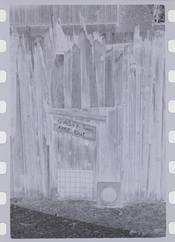
The negative (yeah, very flat):
negative.jpg

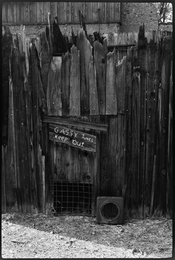
Digitally converted negative with added contrast:
converted negative.jpg

11x14 Platinum print made from a digital negative:
platinum.jpeg

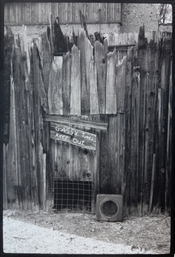
5x7 Silver gelatin print on Ilford MG FB WT paper with G5 filter and minor D+B (sloppy, but to add drama to certain parts as @MattKing suggested):
silver.jpeg
 
Last edited:
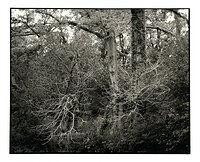
That isn't a particularly low contrast negative. It is a moderate contrast negative of a low contrast, limited dynamic range subject. There are some techniques you can use to artificially add drama, but I might suggest instead that you pursue mood.
For example,
43d-2017-09-23-res.jpg
 
I routinely intensify negatives with Selenium 1+3, when deemed to flat. If you decide to give it a go, practice on a meaningless negative with a similar density range....Or, since you know how to make digital negatives, and have printed them in PD, why don't you just make one for silver gelatin?
 
As you write in the OP that it's well exposed, I think to avoid this in the future, it's worth discussing exposure. I beg to differ, I think it's underexposed, the subject may be low contrast but it's not helped by being mostly on the toe of the film.
 
That isn't a particularly low contrast negative. It is a moderate contrast negative of a low contrast, limited dynamic range subject. There are some techniques you can use to artificially add drama, but I might suggest instead that you pursue mood.

That's quite moody and dramatic, @MattKing! I tried burning the sides, but I overdid it on one print and didn't like it. I did it by hand, and I still need to practice D+B.

I routinely intensify negatives with Selenium 1+3, when deemed to flat. If you decide to give it a go, practice on a meaningless negative with a similar density range....Or, since you know how to make digital negatives, and have printed them in PD, why don't you just make one for silver gelatin?

Part of the reason I like the darkroom is to be away from the computer.

...baring in mind that this is not the forum for such discussions šŸ˜‰

I thought twice before mentioning the "d-word" when posting my OP, but I had to :smile:
 
I have a low contrast negative that I used to print on Brovira grade 6 (BEH1, i.e. single weight glossy). Now I'd like to print again. My paper is Ilford Multigrade and the enlarger light is a two-tube VC Aristo (green and blue). With the blue only, contrast isn't like the old Agfa. I'm interested in using a 47 blue filter (glass, under the lens) in addition to the blue only light source.. Would it be worthwhile going for 47B which is darker and "more blue"?

From what I've read, higher contrast print developers don't achieve much, and I'm reluctant to selenium tone the negative which is valuable to me.
 
Last edited:
Multigrade paper will not get to Brovira #6 levels of contrast no matter how much filtration you use. Once you have the two emulsion HD curves on top of each other there is nothing more to be had. (Ref. http://www.darkroomautomation.com/support/appnotevcworkings.pdf)

As paper is developed to completion there isn't much that can be done by changing development.

Adding a tablespoon of S. Carbonate and a half teaspoon of P. Bromide to a liter of developer will add a very small bit of contrast, as will selenium toning. However, the change will only be readily apparent if the print is placed right next to a 'straight' print.
 
Thanks Nicholas. I've read your reference and I see that both emulsions will be exposed fully even with extremely blue light no matter how far off the scale at the violet end of the spectrum. So I guess that leaves me with toning or intensifying the negative. The density is reasonable, so no particular problem with underexposed shadows.
 
I have a low contrast negative

What about a contrast mask?
You could also make a decent-size low contrast print and rephotograph that, which could get you a higher contrast negative.
 
Photrio.com contains affiliate links to products. We may receive a commission for purchases made through these links.
To read our full affiliate disclosure statement please click Here.

PHOTRIO PARTNERS EQUALLY FUNDING OUR COMMUNITY:


Ilford ADOX Freestyle Photographic Stearman Press Weldon Color Lab Blue Moon Camera & Machine
Top Bottom