• Welcome to Photrio!
    Registration is fast and free. Join today to unlock search, see fewer ads, and access all forum features.
    Click here to sign up

Epson V500 default ouput levels

Street photo Nashville

A
Street photo Nashville

  • 2
  • 0
  • 61
Rome

H
Rome

  • 2
  • 2
  • 69

Recent Classifieds

Forum statistics

Threads
202,547
Messages
2,842,187
Members
101,375
Latest member
JoannaG
Recent bookmarks
0

fs999

Member
Allowing Ads
Joined
May 3, 2010
Messages
401
Location
Luxembourg
Format
Multi Format
Hello,

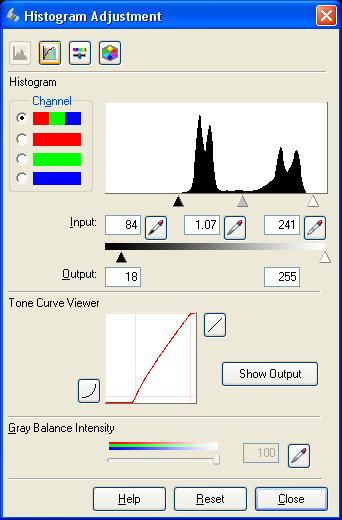
Is there a way to change the default output levels in the epson Scan software ?

A5j1c.png


The two values after "Output :"
 
The black and white triangles under the output line do the job. Put your mouse cursor on one, hold the right mouse button down in windows or Mac equivalent, and slide it to where you want it.
It will reset to Epson default on the next preview. It will remain as set if you next press scan.
 
You can also highlight the number and then type the number you want.

Question I have, is which are the best numbers you should put in there and why?
 
Make a preview, open the histogram window and set your desired output values and close the histogram window. Now, press 'Save' button in the Settings section. It will create a new entry in the settings dropdown.
 
You can also highlight the number and then type the number you want.

Question I have, is which are the best numbers you should put in there and why?

Alan, with my Epson V700, I use Epson Scan with a technique that I learned at the link below, which works well in my experience (and I tested it against several other advanced scanning techniques that folks have developed for Vuescan, Silverfast, etc.)

Essentially, you do a scan preview (which sets the scanner's exposure), then adjust the input and output levels to make sure that you capture all the tones available in the film that you're scanning (within the limits of the scanner's capabilities). The result is a fairly "flat" scan — i.e. low contrast, possibly appearing a little underexposed (it's not really underexposed), and not crisp looking. The scan will typically need to be edited in Photoshop or Lightroom to enhance these qualities. But its advantage is that you're starting with the most possible information from the film (i.e. the scanning process doesn't discard usable tones and details, as it will if you use the straight default scanning settings that Epson Scan starts out with.)

One important note on this method: you must do the preview scan on the image area only — i.e. don't include any of the frame edges within the bounding box. Then set the levels as described in the link below. Then enlarge the bounding box to the full size of the frame (Epson Scan should not do a second autoexposure at this point, as long as you have the "Configuration" settings properly set as shown in the link below). Then do the final scan. You have to repeat the process for each new frame that you scan, but it only takes a few seconds. I should say that I don't use the same color option in the "Configuration" settings that the author below recommends (he recommends "No color correction"). For color film, I use "Colorsync" with "Epson standard" as the source profile.

Here's the link. The description of the method begins at the section entitled "Epson Scanner Preview - Too Harsh!"

http://www.kennethleegallery.com/html/scanning/index.php#bypass

 
Last edited:
The black and white triangles under the output line do the job. Put your mouse cursor on one, hold the right mouse button down in windows or Mac equivalent, and slide it to where you want it.
It will reset to Epson default on the next preview. It will remain as set if you next press scan.
That was my question : how to change Epson's default values...

You can also highlight the number and then type the number you want.
I know that. But how can I change the default numbers ?

Make a preview, open the histogram window and set your desired output values and close the histogram window. Now, press 'Save' button in the Settings section. It will create a new entry in the settings dropdown.
I will try it.

Alan, with my Epson V700, I use Epson Scan with a technique that I learned at the link below, which works well in my experience (and I tested it against several other advanced scanning techniques that folks have developed for Vuescan, Silverfast, etc.)

Essentially, you do a scan preview (which sets the scanner's exposure), then adjust the input and output levels to make sure that you capture all the tones available in the film that you're scanning (within the limits of the scanner's capabilities). The result is a fairly "flat" scan — i.e. low contrast, possibly appearing a little underexposed (it's not really underexposed), and not crisp looking. The scan will typically need to be edited in Photoshop or Lightroom to enhance these qualities. But its advantage is that you're starting with the most possible information from the film (i.e. the scanning process doesn't discard usable tones and details, as it will if you use the straight default scanning settings that Epson Scan starts out with.)

One important note on this method: you must do the preview scan on the image area only — i.e. don't include any of the frame edges within the bounding box. Then set the levels as described in the link below. Then enlarge the bounding box to the full size of the frame (Epson Scan should not do a second autoexposure at this point, as long as you have the "Configuration" settings properly set as shown in the link below). Then do the final scan. You have to repeat the process for each new frame that you scan, but it only takes a few seconds.

Here's the link. The description of the method begins at the section entitled "Epson Scanner Preview - Too Harsh!"

http://www.kennethleegallery.com/html/scanning/index.php#bypass

Thank you but that was not my question.
 
That was my question : how to change Epson's default values...


Thank you but that was not my question.

It was Alan's question; I was responding to him (which is why I started the paragraph with his name and a quote from his post).

On your question, I don't have an answer, but, like you, I'd like to be able to change the defaults. It only takes a few seconds to adjust the output values for each scan, but I'd certainly prefer to have it set where I want it by default.
 
On your question, I don't have an answer, but, like you, I'd like to be able to change the defaults. It only takes a few seconds to adjust the output values for each scan, but I'd certainly prefer to have it set where I want it by default.
Oops ! Sorry ! Didn't see it :smile:

I have asked the support of Epson, but I have no answer for the moment...
 
Photrio.com contains affiliate links to products. We may receive a commission for purchases made through these links.
To read our full affiliate disclosure statement please click Here.

PHOTRIO PARTNERS EQUALLY FUNDING OUR COMMUNITY:


Ilford ADOX Freestyle Photographic Stearman Press Weldon Color Lab Blue Moon Camera & Machine
Top Bottom