

• Welcome to Photrio!
    Registration is fast and free. Join today to unlock search, see fewer ads, and access all forum features.
    Click here to sign up

Enlarging previews on Epson Scan 2?

Viaduct.jpg

A
Viaduct.jpg

  • 3
  • 1
  • 42
Durham walk.jpg

A
Durham walk.jpg

  • 0
  • 0
  • 30

Recent Classifieds

Forum statistics

Threads
202,538
Messages
2,842,048
Members
101,369
Latest member
hluvmiku
Recent bookmarks
0

Duceman

Member
Joined
Jan 17, 2009
Messages
660
Location
Home
Format
Multi Format
On my Mac I recently upgraded to BigSur, which means my old Epson Scan software was toast. I downloaded and installed Epson Scan 2 without any issues. However, I'm attempting to scan some B/W 135mm film using the wet mount method (thumbnail previews are not available), and while I'm getting a preview, the images are much too small for me to make any accurate corrections or crop them individually. See screenshot below of preview with two negs I'm trying to scan. I can not figure out a way to enlarge this preview (which was EASILY done in the prior version of Epson Scan). I've checked some YT videos, but the only wet mounting ones I'm able to find are MF and the preview is much larger.
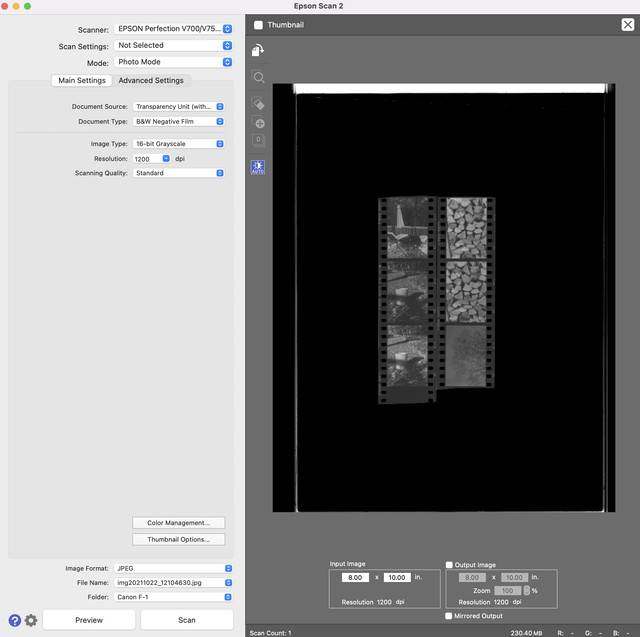

Epson-Scan2.jpg
 
Ok, so I figured it out. It's not very intuitive, but you have to make the selection, then hit the 'preview' icon once again (before, I believe there was a "+" sign to enlarge); it then rescans the area that was selected, and presents it as a larger image.
 
Photrio.com contains affiliate links to products. We may receive a commission for purchases made through these links.
To read our full affiliate disclosure statement please click Here.

PHOTRIO PARTNERS EQUALLY FUNDING OUR COMMUNITY:


Ilford ADOX Freestyle Photographic Stearman Press Weldon Color Lab Blue Moon Camera & Machine
Top Bottom