

- Joined
- Mar 31, 2014
- Messages
- 399
- Format
- 35mm
Hi all!
I've been processing my paper since latest tuesday with a Durst RCP 20. However I've got a strange problem..
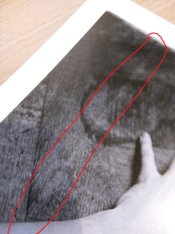
As you can see in the picture there is a brighter line (vertical line) in the picture that got been processed. First thought was another light source hit the paper... So I took another pack of paper and same problem.
However, weird thing is, the line is always at the same distance from the side and always at the beginning. (so doesn't matter which side I put in the machine, it's always the first part that gets it).
Anyone any idea what it could be? It started yesterday.. and happened at first but then went away and now it's on every print.
I already tried to change the developer but no avail.
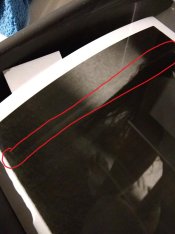
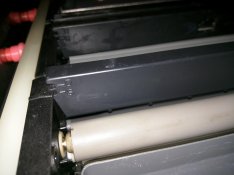
Edit: I put a fully exposed paper in the machine. You could clearly see, just one piece that doesn't develop as good as the others and I don't have a single clue why. I can see that one roller is a bit expanded from aging but then again why is it always at the beginning...
Edit #2: I tried to put in a print facing exposure down. Looks perfect now. ( See bonus question 2... could that be the solution? )
Bonus question: Anyone knows what the D or S means on the plastic parts on the racks? I can move them up or down but can't find anything about it in the manual.
Bonus question 2: Do you have to put the paper in with exposure on the top (so the foam in the stopperbad hits the bottom of the paper) or face the exposure down (so the foam in the stopperbad hits the actual exposure)
I've been processing my paper since latest tuesday with a Durst RCP 20. However I've got a strange problem..
As you can see in the picture there is a brighter line (vertical line) in the picture that got been processed. First thought was another light source hit the paper... So I took another pack of paper and same problem.
However, weird thing is, the line is always at the same distance from the side and always at the beginning. (so doesn't matter which side I put in the machine, it's always the first part that gets it).
Anyone any idea what it could be? It started yesterday.. and happened at first but then went away and now it's on every print.
I already tried to change the developer but no avail.
Edit: I put a fully exposed paper in the machine. You could clearly see, just one piece that doesn't develop as good as the others and I don't have a single clue why. I can see that one roller is a bit expanded from aging but then again why is it always at the beginning...
Edit #2: I tried to put in a print facing exposure down. Looks perfect now. ( See bonus question 2... could that be the solution? )
Bonus question: Anyone knows what the D or S means on the plastic parts on the racks? I can move them up or down but can't find anything about it in the manual.
Bonus question 2: Do you have to put the paper in with exposure on the top (so the foam in the stopperbad hits the bottom of the paper) or face the exposure down (so the foam in the stopperbad hits the actual exposure)
Attachments
Last edited by a moderator:


