• Welcome to Photrio!
    Registration is fast and free. Join today to unlock search, see fewer ads, and access all forum features.
    Click here to sign up

coolscan V turned wrong

2break

H
2break

  • 4
  • 2
  • 50
Autumn

A
Autumn

  • 1
  • 1
  • 47

Recent Classifieds

Forum statistics

Threads
202,573
Messages
2,842,604
Members
101,385
Latest member
Spekplant
Recent bookmarks
0

bob100684

Member
Allowing Ads
Joined
May 8, 2006
Messages
510
Format
35mm
The weirdest part is, I scanned my roll of reala fine, now suddenly I'm trying to scan my friend's roll of ektar and its producing INCREDIBLY bright previews, we're talking RGB values of about 100-125 in the area between frames. Analog gain and all other settings are at factory default.
 
mine went wacko too ... I had to do a force reset to factory default and deleted all the "saved settings" I'd made.

check if its doing auto-exposure on anything in your preferences. If you then do a manual contrast setting it seems to do it again on scan essentially doubling things.

I highly recommend scanning neg as pos in my workflow

http://cjeastwd.blogspot.com/2009/10/quick-negative-scan-tutorial.html

PS ... a scan from yesterday in full sunlight in snow


done using my above method. Using scan as neg my LS-4000 blew out the snow and gave way more grain in the shadow blue/cyan areas

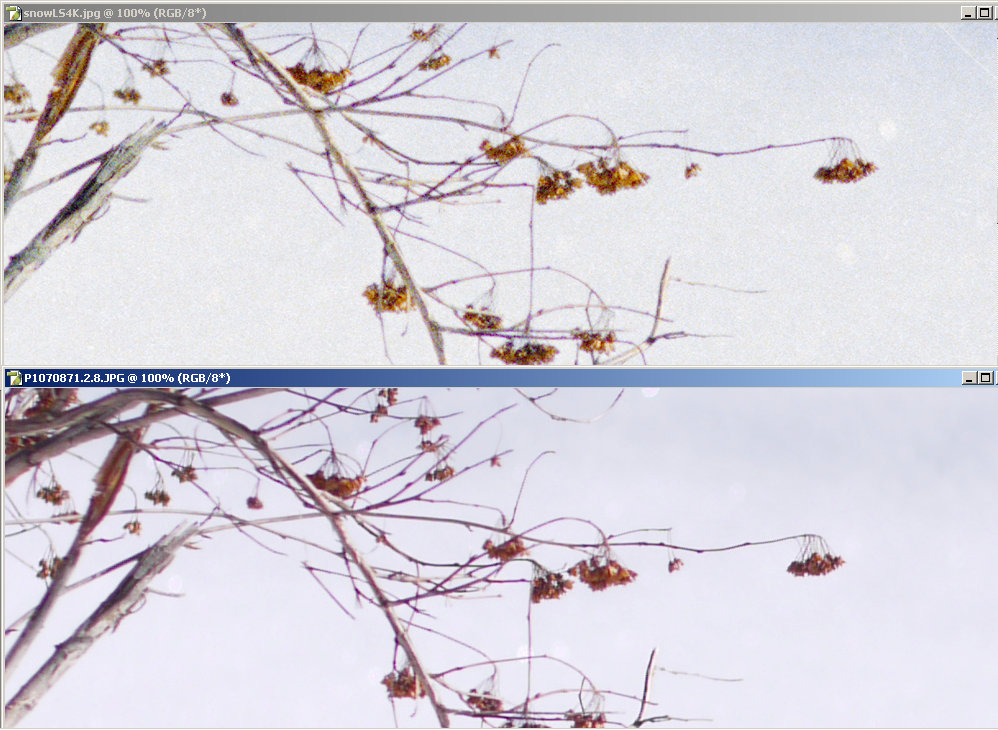
I happened to be comparing my G1 (with a 1/2 focal length lens) and noticed that I got this level of detail


and that top LS4K image was scaled back from 3657 pixels high to 3000 pixels high to make the comparison with the G1 easier.

gosh I like negative for capture
 
Last edited by a moderator:
Photrio.com contains affiliate links to products. We may receive a commission for purchases made through these links.
To read our full affiliate disclosure statement please click Here.

PHOTRIO PARTNERS EQUALLY FUNDING OUR COMMUNITY:


Ilford ADOX Freestyle Photographic Stearman Press Weldon Color Lab Blue Moon Camera & Machine
Top Bottom