• Welcome to Photrio!
    Registration is fast and free. Join today to unlock search, see fewer ads, and access all forum features.
    Click here to sign up

continuously getting poor result

Recent Classifieds

Forum statistics

Threads
201,763
Messages
2,829,718
Members
100,930
Latest member
WBM
Recent bookmarks
1

Man from moon

Member
Allowing Ads
Joined
Jan 9, 2011
Messages
44
Format
35mm
Dears


I am facing a continuously problem with my film

Always my result appear harsh+ poor dynamic range+ lot of noisy grain

I develop my own film using decent films and chemicals

Films: hp5+tri-x+panf50+delta100+delta400 (all both 35mm and 120 size)

Chemicals: developer: DD-x + ilfosol3 + Rodinal

Stop bath: ilford stop bath

Fixer : ilford rapid fixer

Kodak photoflo

Scanner: Epson v600 with original mount and software(I turned off all the extra setting like dust removal and unmask sharp ,,,etc.)

My way to develop films:

- getting the official information about developing time from the manufacture chart

-make fresh developer for each time

- For stop bath and fixer I re-use them , 1ltr= 13-15 rolls

- I am keeping the temp for developer accurate at 20C , for the stop bath and fixer within -2/+2c

After finishing my work I keep the stop bath and fixer in blower bottle with no air and save it in refrigerator

Developing method :

Pour the developer and just agitation without covering the tank (with the stick only) 1 minute continuously for first minute then 10 sec begin of each minute

Stop bath: 1 minute, agitate for first 30 sec then Pour it back on the bottle

On this stage and after I finish the stop bath I just make single wash with tap water

Fixer: 5 minute, agitate for 1 minute then 10 second every begin of minute then pure the fixer back to the bottle

Final wash for 10 minute with tap water within +2/-2c proses temp and after 10 minute I wash the film with distilled water 2 times and put some drop from Kodak photoflo for 2 minute then wipe it with squeegee and hang it to dray for 6-8 hours

Like what you see guys , I am sharp as a knife when it's come to to the process and timing but I am still facing poor result let me think sometimes to give up and sell what I make a huge investment on

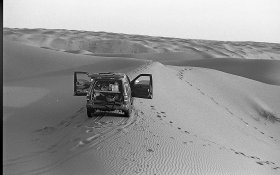
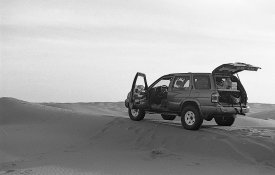
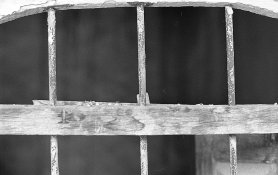
Finally, Attached photos for some of my recently result ( and pay attention that you see a resized image , if i can upload the original size you will see the problem clearly )


Thanks in advance guys
 

Attachments
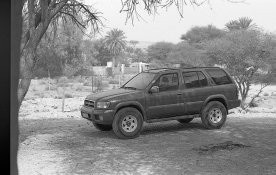
  • img202.jpg
    img202.jpg
    1 MB · Views: 318
  • img205.jpg
    img205.jpg
    1 MB · Views: 300
  • img207.jpg
    img207.jpg
    1,007.2 KB · Views: 301
  • img211.jpg
    img211.jpg
    892.5 KB · Views: 311
  • img214.jpg
    img214.jpg
    978.9 KB · Views: 302
Last edited:

trendland

Member
Allowing Ads
Joined
Mar 16, 2012
Messages
3,398
Format
Medium Format
Dears


I am facing a continuously problem with my film

Always my result appear harsh+ poor dynamic range+ lot of noisy grain

I develop my own film using decent films and chemicals

Films: hp5+tri-x+panf50+delta100+delta400 (all both 35mm and 120 size)

Chemicals: developer: DD-x + ilfosol3 + Rodinal

Stop bath: ilford stop bath

Fixer : ilford rapid fixer

Kodak photoflo

Scanner: Epson v600 with original mount and software(I turned off all the extra setting like dust removal and unmask sharp ,,,etc.)

My way to develop films:

- getting the official information about developing time from the manufacture chart

-make fresh developer for each time

- For stop bath and fixer I re-use them , 1ltr= 13-15 rolls

- I am keeping the temp for developer accurate at 20C , for the stop bath and fixer within -2/+2c

After finishing my work I keep the stop bath and fixer in blower bottle with no air and save it in refrigerator

Developing method :

Pour the developer and just agitation without covering the tank (with the stick only) 1 minute continuously for first minute then 10 sec begin of each minute

Stop bath: 1 minute, agitate for first 30 sec then Pour it back on the bottle

On this stage and after I finish the stop bath I just make single wash with tap water

Fixer: 5 minute, agitate for 1 minute then 10 second every begin of minute then pure the fixer back to the bottle

Final wash for 10 minute with tap water within +2/-2c proses temp and after 10 minute I wash the film with distilled water 2 times and put some drop from Kodak photoflo for 2 minute then wipe it with squeegee and hang it to dray for 6-8 hours

Like what you see guys , I am sharp as a knife when it's come to to the process and timing but I am still facing poor result let me think sometimes to give up and sell what I make a huge investment on

Finally, Attached photos for some of my recently result


Thanks in advance guys


Hey - what's going wrong? Your described workflow looks better that mine ....:redface:

But my results are looking also better
(sometimes:redface:)...?

It has to be your scanning workflow.
I sometimes use a imacon drum scan - superior qualitaty.
But I have to state : I need just some single scans sometimes.
97,9% is without scanning.
with regards

PS : Check final wash temperature again.
+ - 1 - 2 degree should not cause so much grain. Bad thermometer ?
 

trendland

Member
Allowing Ads
Joined
Mar 16, 2012
Messages
3,398
Format
Medium Format
By the way it looks like massive jpeg compression is this the normal (reduced)
setup?

with regards
 

Nodda Duma

Member
Allowing Ads
Joined
Jan 22, 2013
Messages
2,686
Location
Batesville, Arkansas
Format
Multi Format
So checking your developer info: Ilford HP5 shot at ISO 400, developed in DD-X 1:4 for 9 minutes, yes?

How does the grain look on a lightbox with a loupe?

And yes, the jpeg compression is very heavy with what appears to be significant unsharp masking present... both of which will overemphasize grain and create results like what you see.
 
Last edited:

trendland

Member
Allowing Ads
Joined
Mar 16, 2012
Messages
3,398
Format
Medium Format
Looking again at your normal stuff you use - noticed PanF.
My recomandation : Take your midt format camera again - have a last try with PanF 120. The light condition outdoor is good where you live?
It isn't ? - so please use a tripod.
E.I ISO 25 developer : Ilford Perceptol .
Next : take some buck to get a high resolution comercial scan.
I would guess this quality you would need now - for not to give up finaly.
At last recalibrate your Computer scanning workflow. The high resolution comercial scan is your reference then.
.....don't give up it is just your scanning machine wich makes you frustrated.
The films ....MUST.....be good.
So you may scan all your shots again to get nice results.
Bon chance
 

removed account4

Subscriber
Allowing Ads
Joined
Jun 21, 2003
Messages
29,832
Format
Hybrid
how are you exposing your film in-camera?
underexposing and scanner/photoediting software compensation
will make grain, ... like rodinal ...
its probably the way you editing the images.
do you have a straight scan @ like 300dpi target @4x6, no scanner adjustments
no photoshop adjustments ... and just invert it rez it down to 72 and look at it ..
 

ced

Member
Allowing Ads
Joined
Oct 10, 2011
Messages
866
Location
Belgica
Format
Multi Format
Image of the feet on the sand, can't find much wrong with it. The others are way too far manipulated either by scanning or post process.
Try to get them more in line like the "feet image". It would help to see a straight full size image no manips.
 

Wallendo

Subscriber
Allowing Ads
Joined
Mar 23, 2013
Messages
1,419
Location
North Carolina
Format
35mm
My experience is that "straight scans" rarely give the best results - there is a reason scanner software has so many settings.

Although you didn't state this specifically, it sounds like you are using a Paterson tank and agitating with the little handle that comes with it. I tried this a few times and was unhappy with the results, so I changed to a traditional inversion type of agitation (also I lost the little agitation handle).

I suspect the main issue you are having is that the dynamic range of the negatives is greater than the dynamic range of your scanner. I would suggest decreasing your development time in order to reduce negative contrast which might produce better scans.
 

Fixcinater

Member
Allowing Ads
Joined
Dec 11, 2008
Messages
2,500
Location
San Diego, CA
Format
Medium Format
Scanning/post processing issue. Looks like too much sharpening at some step in the process. If you want less grain/noise, you can try the various noise reduction processes for whatever program you use to edit. Having more pixels in your original scan file (you can experiment by scanning just a small section of a negative to find the optimum resolution setting for your scanner) will give you more to work with in terms of noise reduction and better sharpening results.

Saving as a TIFF or JPG? Tiff or uncompressed file would give you more flexibility and better results than the "baked in" settings that are part of converting a file to JPG. JPGs should ideally not be used for anything but final destination, instead using the master scan file to produce those various JPGs as needed.
 

mnemosyne

Member
Allowing Ads
Joined
Jan 19, 2011
Messages
759
Location
Europe
Format
Multi Format
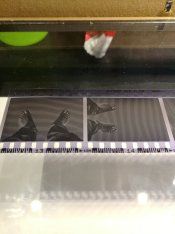
To really have some idea of what is going on here you need to photograph (smart phone is fine) the negatives held up against an illuminated white background so that we can see whether they are underexposed or overdeveloped or both.

Bests,

David.
www.dsallen.de

I agree, please post pictures of the negatives, that helps to determine if the possible problem is related to film processing or scanning/post processing
 

scheimfluger_77

Member
Allowing Ads
Joined
Mar 21, 2006
Messages
839
Location
mid-Missouri
Format
Pinhole
Excessive sharpening in the scan is my initial impression, there may be other issues as well. Agree about photos of the negatives themselves.
 
OP
OP

Man from moon

Member
Allowing Ads
Joined
Jan 9, 2011
Messages
44
Format
35mm
I really want to thank each one of you guys for helping me And do this effort


Ok, I think must of you agree that the developing is ok


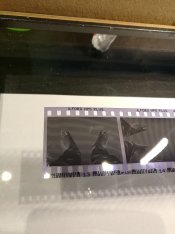
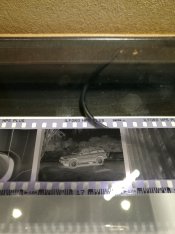
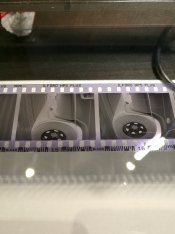
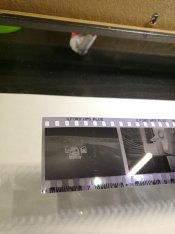
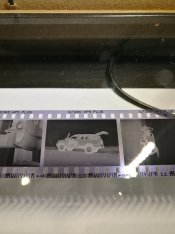
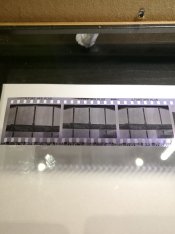
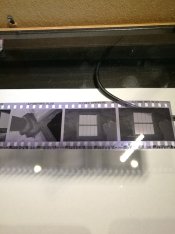
But as per the request, I attached the negatives for the same photos on the thread

And this is the answer for some question I have received on this thread

- Metering : I often use the camera meter + sekonic meter for extra accurate of metering

- About the scanning : I turned of every thing and save it in TIF and work on it with Photoshop ( the photo that I attached without any editing just resized on Photoshop)

- Unfortunately, I don’t have lightbox and loupe , but when I look to the negatives I think its ok for my eyes and small experience with film

- Most of the time using tripods , I have three different tripod in my car I use it with my cameras : mamiya 645 afd + bronica sq-ai 6x6 + Nikon f100, and yes I am sure 100% its sharp when I take the picture


Thanks to all IMG_20180221_214334.jpg IMG_20180221_214538.jpg IMG_20180221_214553.jpg IMG_20180221_214605.jpg IMG_20180221_214739.jpg IMG_20180221_214746.jpg IMG_20180221_214905.jpg IMG_20180221_214913.jpg
 

RalphLambrecht

Subscriber
Allowing Ads
Joined
Sep 19, 2003
Messages
14,917
Location
K,Germany
Format
Medium Format
Dears


I am facing a continuously problem with my film

Always my result appear harsh+ poor dynamic range+ lot of noisy grain

I develop my own film using decent films and chemicals

Films: hp5+tri-x+panf50+delta100+delta400 (all both 35mm and 120 size)

Chemicals: developer: DD-x + ilfosol3 + Rodinal

Stop bath: ilford stop bath

Fixer : ilford rapid fixer

Kodak photoflo

Scanner: Epson v600 with original mount and software(I turned off all the extra setting like dust removal and unmask sharp ,,,etc.)

My way to develop films:

- getting the official information about developing time from the manufacture chart

-make fresh developer for each time

- For stop bath and fixer I re-use them , 1ltr= 13-15 rolls

- I am keeping the temp for developer accurate at 20C , for the stop bath and fixer within -2/+2c

After finishing my work I keep the stop bath and fixer in blower bottle with no air and save it in refrigerator

Developing method :

Pour the developer and just agitation without covering the tank (with the stick only) 1 minute continuously for first minute then 10 sec begin of each minute

Stop bath: 1 minute, agitate for first 30 sec then Pour it back on the bottle

On this stage and after I finish the stop bath I just make single wash with tap water

Fixer: 5 minute, agitate for 1 minute then 10 second every begin of minute then pure the fixer back to the bottle

Final wash for 10 minute with tap water within +2/-2c proses temp and after 10 minute I wash the film with distilled water 2 times and put some drop from Kodak photoflo for 2 minute then wipe it with squeegee and hang it to dray for 6-8 hours

Like what you see guys , I am sharp as a knife when it's come to to the process and timing but I am still facing poor result let me think sometimes to give up and sell what I make a huge investment on

Finally, Attached photos for some of my recently result ( and pay attention that you see a resized image , if i can upload the original size you will see the problem clearly )


Thanks in advance guys
your materials andprocess are OK.You should get good results. Could it be that you are overexposing?
 

Siompa

Member
Allowing Ads
Joined
Jul 7, 2014
Messages
118
Format
35mm
What kind of scanner are you using? I recently had some problems to get the entire dynamic range out of some color negatives with a canon 9000f scanner.

I use vuescan with everything turned off and raw tiff scans. The information is there but the scanner doesn’t seem to be able to handle the highlights or the deep shadows.

This isn’t really an answer but I can relate to the frustration. I decided to just quit the scanning till I figure something out and spend my time in the darkroom instead
 

Patrick Robert James

Member
Allowing Ads
Joined
Jul 31, 2012
Messages
3,417
Format
35mm RF
You just need to learn how to process the scans to get the contrast you want out of them. Flatbed scanners tend to deliver rather flat results.

Your negs look a little overexposed, but that is ok.

In short, you are probably closer to where you want to be than you realize, you just have to learn how to get there.
 

Gerald C Koch

Member
Allowing Ads
Joined
Jul 12, 2010
Messages
8,131
Location
Southern USA
Format
Multi Format
To me the negatives tell the story. They have sufficient contrast and look very nice. So I would guess the problem is with the scanning. The suggestion that someone make a wet print for you is a good one. So many people on APUG have problems with scanning, sigh.
 

Sirius Glass

Subscriber
Joined
Jan 18, 2007
Messages
50,814
Location
Southern California
Format
Multi Format
You can get better results using XTOL or replenished XTOL. See why below:
XTOL.PNG
 

removed account4

Subscriber
Allowing Ads
Joined
Jun 21, 2003
Messages
29,832
Format
Hybrid
You just need to learn how to process the scans to get the contrast you want out of them. Flatbed scanners tend to deliver rather flat results.

Your negs look a little overexposed, but that is ok.

In short, you are probably closer to where you want to be than you realize, you just have to learn how to get there.
+1
 

ic-racer

Member
Joined
Feb 25, 2007
Messages
16,727
Location
USA
Format
Multi Format
You problems have nothing to do with film. Maybe post on another forum.
 

trendland

Member
Allowing Ads
Joined
Mar 16, 2012
Messages
3,398
Format
Medium Format
To me the negatives tell the story. They have sufficient contrast and look very nice. So I would guess the problem is with the scanning. The suggestion that someone make a wet print for you is a good one. So many people on APUG have problems with scanning, sigh.
Indeed - I like to see my own negatives in such good conditions. ..:cry:!
We can't state about the grain of the film obviously but from dynamic range/contrast the film looks very fine.
Perhaps the OP may change to the scanning section now?
with regards
 

trendland

Member
Allowing Ads
Joined
Mar 16, 2012
Messages
3,398
Format
Medium Format
You can get better results using XTOL or replenished XTOL. See why below:

Good recomandation - but the improvement from this would not have such impact that the OP would solve his problem.
In other words : " It wasn't the developer". The remaining issue that can cause total grainy negatives (more than from underexposure/overdevelopement plus Rodinal) would be : " massive wrong final wash temperatures"
At the very beginning I didn't care about because I didn't know. I also expected same temperature from watertap as my developement (20 degree C). But in winter the temperatures are much more less (12 degree C ?) .
But even in such cases I never saw massive grain.......like OP's problem.
The only case I would like to compare with OP's results was a comercial print from a self developed Delta 3200.
It was smal sized and extreme worst.
Later I did remember : "But the film wasn't in 35mm it was 120 film...? - how is it possible to reach such grainy look in smal prints (5" x 7") .....:unsure:..?
The answer is simple : All grain on the print wasn't "GRAIN":surprised:...
That's all coming from digital artefacts.
But to avoid Rodinal could indeed help a little - not from grainy look of Rodinal but from following issue : Grain is producing much much more "information" for digital compression. A white wall in high resolution (and finest grain) isn't a real task for jpg compression. The compression algorithm is "sleeping" from that.:D! A picture from forrest at rainy days is the same - as with (wrong) information bandit:from a grainy negative.
So I never care about "grain" again on smal comercial prints - it is allways from artefacts (caused from compression due to "modern" scanning resolution:mad:) !
with regards
 

mdarnton

Member
Allowing Ads
Joined
Mar 4, 2008
Messages
463
Location
Chicago
Format
35mm RF
I'm thinking a combination of what people have said. First, sharpening scans has to be done carefully if at all, or you sharpen the grain, not the underlying subject. Getting pixel width righ is more important than percentage of sharpening; play around a lot. Second, I think that your film is overdeveloped about 10-15 percent. Developing less will decrease grain and lower contrast, both of which may be helpful towards what you want. Both for printing and scanning I find the manufacturers' developing suggestions to be towards the high end.

Third, are you making any prints? Prints, both silver and digital, will have less apparent grain than screen display. It has also been my experience that different viewers present grain/noise differently, so your software may be enhancing the appearance of grain to you, but not to everyone. I went through this just yesterday doing some quick edits in FastStone rather than Photoshop. The ability to pixel peep at dimensions you will never use to see a whole print at once is a liability, not an advantage.

As Trendland points out, with the scanner you're using you aren't even seeing film grain, by the way. Desktop flattop scanners don't have enough resolution to resolve 35mm film grain. It's noise. Another reason to be careful about sharpening.

Finally, I think you should standardize on one film, one developer. You have far too many variables there to be dealing with. If you expect to develop a reliable appearance for your work it should be by manipulating one thing at a time, not jumping all over the place randomly.
 
Photrio.com contains affiliate links to products. We may receive a commission for purchases made through these links.
To read our full affiliate disclosure statement please click Here.

PHOTRIO PARTNERS EQUALLY FUNDING OUR COMMUNITY:


Ilford ADOX Freestyle Photographic Stearman Press Weldon Color Lab Blue Moon Camera & Machine
Top Bottom