• Welcome to Photrio!
    Registration is fast and free. Join today to unlock search, see fewer ads, and access all forum features.
    Click here to sign up

Color analyser result transfer to enlarger

Recent Classifieds

Forum statistics

Threads
201,265
Messages
2,821,485
Members
100,626
Latest member
davidjames64
Recent bookmarks
0

sidewind

Member
Allowing Ads
Joined
Mar 10, 2012
Messages
30
Location
Copenhagen,
Format
Multi Format
Hi all
I'm a newbee in color work, my first colorfilm I developed this juni, and I am now getting ready to make color pictures.
I have made dryruns using the analyser, and pretty consistent I get this result:

Exposure time 13-14 sec.
Cyan 15
Magenta 8
Yellow 7

Now I just need to figure out how to translate that to settings on my enlargers which are LPL c7700 and Durst M605.

Does anybody have a good explanation, or actual experience ?

Greetings
Soren Hansen
Denmark
 

pentaxuser

Member
Joined
May 9, 2005
Messages
20,257
Location
Daventry, No
Format
35mm
I am surprised that you need any cyan and also surprised at Y and M filtration which is this low. It might be worth developing a print at this setting to see how it turns out

pentaxuser
 
OP
OP
sidewind

sidewind

Member
Allowing Ads
Joined
Mar 10, 2012
Messages
30
Location
Copenhagen,
Format
Multi Format
Hello pentaxuser

As stated I am a complete newbee. What you say is that the Cyan should be 0?

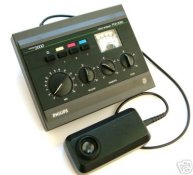
My analyser is a paterson/Philips PDT 2060, and it state that I work from 10 on all three scales, which goes from 0 to 20 when I do the analysing


attachment.php
 

Attachments

  • download.jpg
    download.jpg
    21 KB · Views: 758

pentaxuser

Member
Joined
May 9, 2005
Messages
20,257
Location
Daventry, No
Format
35mm
I take it that you have produced a "perfect" print first i.e. you need to make a print without the analyser from a negative that gives you the correct colours and correct exposure. Try one with skin tones and/or grey in it. These are the colours that you will most easily see if there is a cast. Correct the cast if there is one by the use of Y and M dials on your enlarger. Leave the C filter dial on the enlarger at 0 and leave the cyan dial on the analyser at zero as well. Pretend that cyan doesn't exist. It isn't needed

Once you know the correct filtration on your enlarger you then zero the needle with the Y and M dials and move the exposure dial on the far left until the dial again goes to zero. The analyser is now calibrated for the perfect print i.e. for the original print that you were happy with.

The dials are now left where they are. Each time you use a new negative under the diffuser filter which you swing over the negative you switch on the Y and M buttons in turn and move the enlarger filtration dials of Y and M until the needle goes to 0. The only dial on the analyser that you move is the time dial which is moved until it zeroes the needle. You now have the correct filtration and time for the new negative. you should find that in most negatives that contain a range of colours and were shot under similar lighting that the enlarger filtration for each print will be very similar.

The Paterson analyser is very good but will be fooled if there is a predominance of one colour such as a portrait from the waist upwards of a person with a red jumper on where the red fills say 70% of the picture.

I had not realised when I first read your post that the filtration you quote is the dial settings on the analyser, I think, and not the filtration on your enlarger dials.

Just do it again with the perfect filtration but leave the cyan dial at zero. Do not even press it. For RA4 prints from colour negatives it is not required.


I hope I have managed to make myself clear.

pentaxuser
 

Mainecoonmaniac

Member
Allowing Ads
Joined
Dec 10, 2009
Messages
6,297
Format
Multi Format
In most cases, you'll only use magenta and yellow only. I've never used the cyan printing RA.
 

Photo Engineer

Subscriber
Allowing Ads
Joined
Apr 19, 2005
Messages
29,018
Location
Rochester, NY
Format
Multi Format
You have added an ND to the filtration and this means that the instrument was zeroed incorrectly. Cyan must be set to zero before you read the M and Y values.

A normal filter pack might be 50M and 50Y.

PE
 

ic-racer

Member
Joined
Feb 25, 2007
Messages
16,697
Location
USA
Format
Multi Format
Hi all
I'm a newbee in color work, my first colorfilm I developed this juni, and I am now getting ready to make color pictures.
I have made dryruns using the analyser, and pretty consistent I get this result:

Exposure time 13-14 sec.
Cyan 15
Magenta 8
Yellow 7

Now I just need to figure out how to translate that to settings on my enlargers which are LPL c7700 and Durst M605.

Does anybody have a good explanation, or actual experience ?

Greetings
Soren Hansen
Denmark

You have made a perfect print, right? So the enlarger already has the settings. Now check your manual to see how to calibrate the analyser.
 

pentaxuser

Member
Joined
May 9, 2005
Messages
20,257
Location
Daventry, No
Format
35mm
If I can add that a very good neg to calibrate from in my case was one with my wife's skin tones a range of colours around here and a large patch of grey paving beneath her feet. I was able to notice a colour cast in the grey even when I changed the enlarger dials by as little 2 units of Y and M. I have a Durst which goes from zero to 130 units so 2 units is very little but on an expanse of grey it was enough to detect a change

pentaxuser
 

davedm

Member
Allowing Ads
Joined
Apr 7, 2012
Messages
122
Format
35mm
Exposure time 13-14 sec.
Cyan 15
Magenta 8
Yellow 7
Denmark

Hi Soren,

I have zero experience in b&w and color printing so this is just based on reading.

Since your timer has scales from 0-20 as compared to 0-130 (I assume) on your enlarger.

So you need to change scales e.g. C is 15/20x130=97.5~98. Similarly M 52 and Y45 (45.5)

Of course the catch is that Cyan filter is not really used in color printing. One factor being poor color quality from my reading. And another that you are simply increasing exposure time by creating ND filter value 7 (45.5).

You have two ways you can proceed
1. As others have said, do a series of test print with suitable negative without using analyser and starting at 50M 50Y (as suggested by PE) on your enlarger. After developing and drying, see the print and vary filtration (only M & Y) on enlarger to achieve correct color and use final values to calibrate your analyser.

2. Use your analyser with C set to zero, and arrive at filtration values for M and Y, use that for a test print and see if it gives you correct balance. if not, change filtration based on test print and use final values to calibrate your analyser.

HTH
 
OP
OP
sidewind

sidewind

Member
Allowing Ads
Joined
Mar 10, 2012
Messages
30
Location
Copenhagen,
Format
Multi Format
Thank you all for your answers/suggestions, it is a little overwhelming with this much response :smile:

I'll see if I have this right, No matter what, I need to make a "perfect picture" from scratch by trial and error, without using the cyan filter if possibly.

With the enlarger set on these filterdata, I "program" the analyser, only for magenta and yellow, by zeroing them with their dials while the timer dial are set to the exposure time of the picture, and that will be my "baseline".

Now I take a random negative, put it in my enlarger, put the analyser in place, and adjust the enlargers yellow and/or magenta filters till the analyser reach 0.

The manual says that the cyan have to be at 10 to get a exposure time, and that is the only thing I should use it for, on any future negative?

Is this totally mumbo jumbo, or am I going in the right direction ?

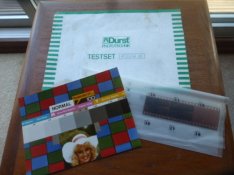
Here are my "perfect negative" I will use to get a "perfect picture" with.

attachment.php
 

Attachments

  • Testset Kodak.JPG
    Testset Kodak.JPG
    29.8 KB · Views: 295

pentaxuser

Member
Joined
May 9, 2005
Messages
20,257
Location
Daventry, No
Format
35mm
sidewind, it has been quite a long time since I used my Paterson but it is the same model as yours. You seem to have everything right and the perfect negative you will use looks fine. However I don't recall the cyan being at 10 for exposure.

I will try to read my manual again tomorrow to see what it says. I was a little confusing to me and English is my native language.

pentaxuser
 

Mick Fagan

Subscriber
Allowing Ads
Joined
Sep 13, 2005
Messages
4,434
Location
Melbourne Au
Format
Multi Format
It would seem that the use of Cyan in the enlarger head is there for density use to control the time of exposure, this is the only reason I can think of it being used.

You are correct with all things, except I am not so sure of how the analyser determines the correct exposure.

One thing to understand with colour printing is that there are three colours you are mixing. You obtain two colours by using filters in your enlarger, the third colour, red, is obtained by exposure. Sometimes you will not see the slight red changes, unless your filtration is correct, or nearly correct

If your print is a little too dark it will be slightly redder, if it is a little too light, it will be slightly more Cyan.

Many industrial enlargers and some amateur ones (Meopta for instance) have a neutral density (ND) filter built into the colour head. The idea is to aid in printing by using a neutral grey to allow you to use more or less exposure without changing your exposure time.

My current enlarger does not have a ND filter, so when enlarging colour (some years past now) I would start with all three dials C, M, Y, having equal amounts of filtration, say 30 units each out of 200 possible.

This meant that if the correct filtration should be 70M 35Y then the enlarger head filtration would read, 30C, 100M, 65Y.

If you have made a successful print with this filtration set, then decide to do a doubling of the print size (a bigger enlargement) you have some options. You can make the exposure longer, or open the aperture wider, or reduce ND to make a print with the same density that is correct for you.

Your calculations may tell you that you require 1 stop more light to keep your correct density, if so, these would be the likely ways of obtaining that extra stop of light. Add one stop of exposure, or open the aperture by one stop, or reduce the ND in the colour head by one stop.

To reduce the colour head filtration you would go from 30C, 100M, 65Y to a setting of 0C, 70M, 35Y. Then after you have focused, you use the same time and aperture setting as used with the smaller print and you should end up with a near identical print colour wise.

I believe this may be the concept behind the use of Cyan in the colour head with regard to density, or time of exposure calculations by your colour analyser.

Mick.

 

MattKing

Moderator
Moderator
Joined
Apr 24, 2005
Messages
54,746
Location
Delta, BC Canada
Format
Medium Format
Cyan was sometimes used for prints from transparencies.
 

mnemosyne

Member
Allowing Ads
Joined
Jan 19, 2011
Messages
759
Location
Europe
Format
Multi Format
Soren,

you maybe don't want to hear this, but I would suggest to put this color analyser back in its box and start balancing color fully manually. Such devices have the same conceptual drawbacks and negative side effects as automated exposure in camera. They make you stop thinking, give you a false feeling of security, limit your creativity and worst, keep you from learning and collecting experience. IMO, you will get a better color printer if you do not rely on these as a beginner, even though the learning curve is a bit steeper in the beginning. IMHO.

As you are writing that you developed your first CN film in June, I would also suggest that you do NOT use home developed film for you first printing sessions, but film that was developed by a quality lab. The reason is that relatively small errors like (slightly) wrong developer temperature can lead to color shifts in the C41 process which might not be as obvious when scanning and manipulating the image on the computer, but are difficult or impossible to filter out perfectly when wet printing. This has the potential to turn your first printing session in a frustrating experience.

Good luck and please report back!
 

pentaxuser

Member
Joined
May 9, 2005
Messages
20,257
Location
Daventry, No
Format
35mm
It would seem that the use of Cyan in the enlarger head is there for density use to control the time of exposure, this is the only reason I can think of it being used.

You are correct with all things, except I am not so sure of how the analyser determines the correct exposure.

Mick.

I had a look at my Paterson instructions yesterday and came to the same conclusion as you, Mick. I had thought that the timer dial had its own switch but it doesn't and relies on the C dial to be pressed for the time. Mick, the C dial which controls time has already been set at the correct exposure time for the perfect print and the needle was zeroed when the C button is pressed so it is calibrated for the correct time and any future change in the new negatives exposure times relies of you pressing the C button then altering the timer dial to zero the needle

If the new negative is exactly the same as the negative on which the prefect print has been made then the same enlarger filtration will zero the needle when pressing the Y and then M buttons and the same exposure when pressing the C button for time.

In practice if the lighting and colour range on the new negative is much as it was on the negative from which the perfect print was made then all three button when pressed will send the needle to zero each time but from my memory the filtration will vary slightly as will the exposure but not by much for each negative

The manual suggests that the C button for exposure is pressed first and then the colour balance buttons of Y and M. Personally I'd be inclined to press Y and M first in case there is a need to alter enlarger filtration which will in turn alter exposure so the C button should be pressed last

However Paterson recommend that all three buttons are pressed again to check that the needle stays at zero so maybe that is why the order of the buttons doesn't matter

I hope this is right and that it makes sense to the OP

pentaxuser
 

Aleksej6

Member
Allowing Ads
Joined
Oct 28, 2014
Messages
34
Location
Ceriale, Lig
Format
35mm
I also suggest not to use the analizer. In effect I have bought one but I am not using (mine has only M and Y dials, not C), because it is more convenient to make a proof per each lightining situation and use it for all the frames similar, it will be easy if you start with a correct filtrated contact sheet. Eventually you can use, for judging the dominant, a filter set of colour compensation (Kodak, Ilford, Agfa) or Cibachrome set.
 

pentaxuser

Member
Joined
May 9, 2005
Messages
20,257
Location
Daventry, No
Format
35mm
sidewind, here's a test you might want to carry out. Print say 10 negatives using the analyser and see how many of those prints vary from the perfect print's exposure and filtration by enough to make a test strip print necessary from each negative, if you didn't own the analyser. Count up the extra time, chemicals, and paper required.

Then decide if you can afford to sell your analyser.

A RH Designs Analyser Pro for B&W costs a lot of money by comparison to what you will have paid for the Paterson so based on doing things in the simple test strip way you might expect most of the users of the RH Designs Analyser to conclude that on balance the analyser isn't worth the money.

I wonder how many of the RH Designs Analyser Pro users want to sell their analysers?

pentaxuser
 

Mainecoonmaniac

Member
Allowing Ads
Joined
Dec 10, 2009
Messages
6,297
Format
Multi Format
There's nothing magical about a color analyzer. You first have to get the "perfect" print first. If you're taking a spot reading like s flesh tone, you'll have to record your settings once you've made the perfect print. Also, you'll have to keep your time and chemical temperature consistent as the same as your reference print. If the temperature changes, your colors will drift. I'm not that great at using a color analyzer and always make test prints. To me, they're not the magic bullet. I've even used Kodak's PVAC analyzer and I'm always off the mark by a few points off. I'm all for test prints.
 
OP
OP
sidewind

sidewind

Member
Allowing Ads
Joined
Mar 10, 2012
Messages
30
Location
Copenhagen,
Format
Multi Format
Hi all

First of all thank you for your time and effort, that I greatly appreciate.
Second, I'm a techie and because of that I just want to know how it works, and if I get things right in my head.
Third, I rely on all my gadgets as much as I do my GPS, they are a helping tool to point me in the right direction, nothing more.

Why I was interested? There are so many more variables in color work than there are in b&w (which I am comfortable with), and
being a newbie, all the crutches I can get (pointing me in the right direction) is appreciated.

Soon I'll come out of the closet :tongue: and announce that I am a color guy too :laugh:

Once again thank you very much everyone
 

sfaber17

Member
Allowing Ads
Joined
Jun 1, 2014
Messages
245
Location
Illinois
Format
35mm
Welcome to color. I also have a test negative that came with a color analyzer, so I was trying to print that first knowing it was trial and error to begin with. Finally I had something that looked close, but not great. That negative was old, though from the 70s, so I then obtained a more recent negative from a professional photographer of a model and printed that as a standard. The filtration was quite different but the result was much better. The picture looked great. The moral of the story is it may not be worth using your test negative.
Another way to zero in on your filtration to start with is to use a chromega or similar filter matrix that you put over your print and use a diffuser under your lens. Then you pick the gray point in the matrix on your print and it will tell you the filter pack offsets needed. Of course on a color head, they are not calibrated in D units, so you could zero the analyzer under the filter point that was grey, and then adjust the color head to match. Then you would be in the ball park assuming the negative averaged color was grey. The last time I tried that, I was almost on the money anyway, so once you get experience you don't need the gadgets so much. The analyzer is useful in finding exposure times after you change the enlarger height.
 

markbarendt

Member
Allowing Ads
Joined
May 18, 2008
Messages
9,422
Location
Beaverton, OR
Format
Multi Format
I use a Beseler but I believe the process is the same.

The first thing I needed to understand was that once the analyzer is programed the analyzer is "a proxy for the paper". Adjust the enlarger so that the analyzer tells you it sees the right light and the paper will print nicely.

The second thing I needed to get was that the program is keyed to the negative you made your perfect print from. Using that negative in concert with the analyzer program to setup the enlarger, starting with the exact same head height, f-stop, ...; you will normally get you a great baseline setup that prints many if not most shots just right. Once that baseline color balance set then you can vary the head height and aperture and time as you please and simply adjust exposure to match.

The third thing I needed to learn was that if I did a good setup, exposure would be the most common fix to any color problem.
 

Mainecoonmaniac

Member
Allowing Ads
Joined
Dec 10, 2009
Messages
6,297
Format
Multi Format
It's been a while printing RA, but to change print density, it's better to use the aperture on the lens instead of changing the time. Changing time can result in color shift. Correct me if I'm wrong.
 

Photo Engineer

Subscriber
Allowing Ads
Joined
Apr 19, 2005
Messages
29,018
Location
Rochester, NY
Format
Multi Format
An analyzer can work two ways.

One

1. Pick a color, any color and make one good print that reproduces that color from the negative. It should be a common color like flesh, green plants, blue sky or similar.

2. Use the analyzer to set the dials and then select another negative. Read the same color (say blue sky) and then set the analyzer to the previous settings using the CC filters. This should reproduce the original color.

3. Problem(s): Not all blue sky is blue and not all flesh tones are flesh tones. Errors creep in.

Two

1. Set the analyzer to the entire negative area on-easel and take readings from the full frame negative. This assumes that the full frame is equal to the average negative.

2. Change negatives and adjust filters to match previous negative.

3. Problem(s): Not all negatives are equal to the average negative.

So, there is no fool proof method. HOWEVER, I have negatives back to the '50s and can print them all with the same or nearly the same filter pack, just varying f stop and/or exposure time. Yes, negatives are as stable for speed as reversal, being unchanged over the years for the most part. In fact, negatives, even good ones, can fool a color analyzer across products manufactured by different companies or in different years, but just leaving the pack alone you can turn out a nearly perfect print first time. After a while, you can 'read' a negative by eye and make a good print first time.

PE
 

Mainecoonmaniac

Member
Allowing Ads
Joined
Dec 10, 2009
Messages
6,297
Format
Multi Format
After a while, you can 'read' a negative by eye and make a good print first time.

PE

I'd like to be that good :smile:

But I find some analyzers get "cosine error" I think it's called. An error where if I make a recording of a color on the center of the easel then make the reading towards the edge for the same color and density and it ends up is wrong. :confused:
 
Photrio.com contains affiliate links to products. We may receive a commission for purchases made through these links.
To read our full affiliate disclosure statement please click Here.

PHOTRIO PARTNERS EQUALLY FUNDING OUR COMMUNITY:


Ilford ADOX Freestyle Photographic Stearman Press Weldon Color Lab Blue Moon Camera & Machine
Top Bottom