• Welcome to Photrio!
    Registration is fast and free. Join today to unlock search, see fewer ads, and access all forum features.
    Click here to sign up

Cleaning Mamiya sekor 50mm f1.4

MIT. 25:35

MIT. 25:35

  • 0
  • 0
  • 0
Lutheran Cemetery Angel

H
Lutheran Cemetery Angel

  • 0
  • 0
  • 28

Recent Classifieds

Forum statistics

Threads
202,945
Messages
2,847,963
Members
101,550
Latest member
Paris-Belle
Recent bookmarks
0

darkosaric

Member
Joined
Apr 15, 2008
Messages
4,567
Location
Hamburg, DE
Format
Multi Format
Hi all,

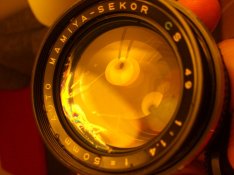
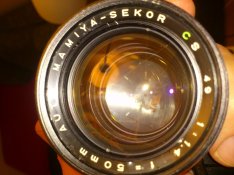
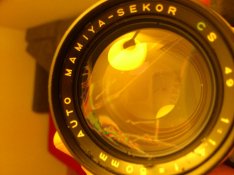
Today I got beautiful gift: mamiya NC1000s with nice 28mm f2.8 lens and dirty 50mm f1.4.
Please see the pictures - can you say if this can be repaired? I think this is oil. Difficult to clean? When I mount the lens I see it is very very fogy.
Thanks.


p.s. 28mm sekor lens is a beauty.
 

Attachments

  • DSC_1709.JPG
    DSC_1709.JPG
    93.2 KB · Views: 181
  • DSC_1710.JPG
    DSC_1710.JPG
    118.3 KB · Views: 181
  • DSC_1711.JPG
    DSC_1711.JPG
    95.7 KB · Views: 180
the name ring on the front *I think* is the way into this lens; try turning it with a toothpick using the engraving as leverage.
 
Do you think I could get the 'name ring' off a 35mm f3.5 Sc Canon breechlock lens like that -- I will have to find such a store here in my Town of Brentwood England.
 
A rubber bath plug of the right size can work well. Interposing a bit of rubber glove between turning implement and lens ring helps if there isn't enough friction
 
Can't help with lens repair but you have a great camera with some nice lens. Use to have one, give it to one of my grandsons.

David
 
Before you do anything, put a hood on the lens and shoot some some test shots. Take pictures both at f1.4 indoors and at smaller stops outdoors. You may find that you cannot tell from the negs that there is anything wrong with the lens.
 
When I am looking through the lens - it is very dim and fogy, so for sure it is not performing the best. I did test wide open in indoors and it is not bad, better than Holga shoot :smile:, but not excellent. I got PM from one member with detailed description and with those posts extra - I know how to proceed :smile:. Tnx.
 
From the pictures (which were not all that clear) I would say that you must remove all elements and clean them individually. Remember one thing about preventing dust from entering the elements when you put them back into the body: you MUST use a glass cleaner with a little bit of soap so that the static electricity is reduced. Otherwise, static will cause dust particles to cling, tenaciously, to the glass.

You must first turn the logo ring and remove it from the lens body. That will allow you to begin removing the individual elements. Remember both the order and the direction, although with 50mm lenses this is not difficult. You might be able to unscrew the rear element set. Perhaps, the rear element set does not have to have all of its elements cleaned, only the one next to the aperture blades. If those blades are also oily, use a bit of lighter fluid on a very clean tissue and carefully clean the blades, slowly and carefully, adjusting aperture size as you clean (to prevent oil from entering underneath the blades).

To remove the logo ring I am very 'low tech': I place a couple layers of pieces of duct tape about 180 degrees apart on the ring. Then, I carefully take a scissors and place a blade on each bit of duct tape, hold down firmly, then turn the scissors counterclockwise. It usually works! - David Lyga

 
Photrio.com contains affiliate links to products. We may receive a commission for purchases made through these links.
To read our full affiliate disclosure statement please click Here.

PHOTRIO PARTNERS EQUALLY FUNDING OUR COMMUNITY:


Ilford ADOX Freestyle Photographic Stearman Press Weldon Color Lab Blue Moon Camera & Machine
Top Bottom