

• Welcome to Photrio!
    Registration is fast and free. Join today to unlock search, see fewer ads, and access all forum features.
    Click here to sign up

Can AI do this for me? - Separate layers

Forum statistics

Threads
203,314
Messages
2,852,847
Members
101,777
Latest member
fizzplop
Recent bookmarks
0

SDunne999

Member
Allowing Ads
Joined
Jun 3, 2025
Messages
1
Location
Ireland
Format
Digital
Hi All,
I'm a very amateur photo editor so I have a basic question for you!
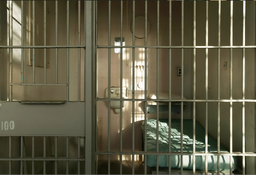
I want to separate the layers of a jail cell photo to include the jail bars section to be fully transparent.
Then I can place the outline of a 3rd layer (person) between the two layers therefore giving the impression that the person is now inside the jail cell.

Attached is an example of the image I need edited.
is there any AI tools (paid or free) that will do this for me?
I have tried a few such sites but the results are really bad.

Thanks for your help!

S
 

Attachments

  • cellhd.png
    cellhd.png
    876.3 KB · Views: 113
Welcome to Photrio!

I have tried a few such sites but the results are really bad.

I think there's your answer. I expect that at this moment Ai retouching is not yet up to the level for what you want it to do, at least if it needs to be entirely automated.

A possibility that is certainly technically feasible, but more work, is to simply put in the picture of the person and mask away the areas that you don't want to show up. Here's a very crude example that took me a few minutes to do in GIMP:
1748945563739.png

It's just the orange man pasted into a new layer, then adding a layer mask and using the marquee selection tool to create holes in the mask where the bars are.
 
Or if you need real accuracy, use one of the versions of the quick selection tool (keyboard command W to load it, used to be the magic wand tool) to select the same areas. The tool will select by color with great accuracy if you finesse the settings.
 
Why not create the image of the jail cell with a solid color
backdrop inside, maybe tech green or something, then, in post, make the green transparent with a select color and replace? Basically, yes , I am describing chromakey in the video world….
 
... but why does the inmate have 5 fingers instead of 6?
 
Photrio.com contains affiliate links to products. We may receive a commission for purchases made through these links.
To read our full affiliate disclosure statement please click Here.

PHOTRIO PARTNERS EQUALLY FUNDING OUR COMMUNITY:


Ilford ADOX Freestyle Photographic Stearman Press Weldon Color Lab Blue Moon Camera & Machine
Top Bottom
