
• Welcome to Photrio!
    Registration is fast and free. Join today to unlock search, see fewer ads, and access all forum features.
    Click here to sign up

Camera scanning

Viaduct.jpg

A
Viaduct.jpg

  • 3
  • 1
  • 45
Durham walk.jpg

A
Durham walk.jpg

  • 0
  • 0
  • 32

Recent Classifieds

Forum statistics

Threads
202,539
Messages
2,842,070
Members
101,369
Latest member
hluvmiku
Recent bookmarks
0

John Wiegerink

Subscriber
Allowing Ads
Joined
May 29, 2009
Messages
4,253
Location
Lake Station, MI
Format
Multi Format
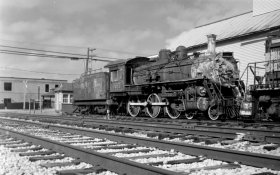
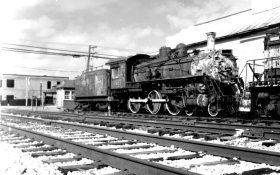
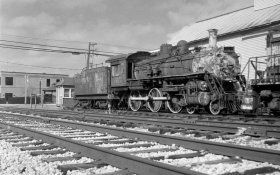
My scanner is up north at the cottage, and I'm down here, darn it. I had just run a roll of Delta 400 120 through my Kodak Medalist II and wanted to see what it looked like. I thought, what the heck, and dug out my light table, Vivitar +4 close-up filter and a manual focus Fuji X 55mm f1.6 lens. I stuck those on the Sony A7RII, put the negative on the light table and went to work. After I shot a few frames,
DSC05251.JPG
DSC05254.JPG
DSC05252.JPG
DSC05254.JPG
DSC05251.JPG
DSC05251.JPG DSC05254.JPG DSC05252.JPG DSC05251.JPG DSC05254.JPG DSC05252.JPG I imported them in to an old version of Pacasa and tweaked them a little. They made for a good preview, but certainly don't compare to scans from the Nikon LS 8000 that's for sure.
 
With an A7RII and 120 film, you’re only getting an equivalent 2000-2400 dpi, and that’s assuming your lens choice is actually resolving that across the entire frame. An ls8000 is what, 4000 dpi? I’d hope it’s better.
 
With an A7RII and 120 film, you’re only getting an equivalent 2000-2400 dpi, and that’s assuming your lens choice is actually resolving that across the entire frame. An ls8000 is what, 4000 dpi? I’d hope it’s better.
Adrian,
I wasn't expecting much and only did this, because I didn't have a scanner handy where I'm at. The Medalist II lens is really very good, and the Fujinon on the Sony is also very sharp. The biggest letdown is the +4 Vivitar closeup filter. I don't have a macro lens and had to use the +4 filter. This setup actually served its purpose in giving me a quick view. It's pretty hard to beat the Nikon scanner, but I wasn't really trying to. JohnW
 
Nitpicking:
Not only this thread but I am bothered by the use of the term "Scan" or "Scanning" while the process has nothing to do with scanning. If one use a scanner then the scanner does actually scan the film by digitizing row by row. With the camera it's not scanning.
 
Nitpicking:
Not only this thread but I am bothered by the use of the term "Scan" or "Scanning" while the process has nothing to do with scanning. If one use a scanner then the scanner does actually scan the film by digitizing row by row. With the camera it's not scanning.
You are correct, of course. Johnw
 
Nitpicking:
Not only this thread but I am bothered by the use of the term "Scan" or "Scanning" while the process has nothing to do with scanning. If one use a scanner then the scanner does actually scan the film by digitizing row by row. With the camera it's not scanning.
I agree that "scanning" by itself, is not technically correct. But we must call the process of "copying a negative with a digital camera" something - and I'm not going to type all that out every time.

So, what do you suggest we call it?

Personally, I am good with "camera scanning" but I might go a step farther and hyphenate it: "camera-scanning" as a verb, and "camera-scan" as a noun. But I am open to any term which is clear without explaination and which does not require a lot of typing. And when I say "typing" - of course, I mean keyboarding. ;-)
 
Last edited:
I'd vote for "digitizing film using a digital camera", but even that is too long.
 
Nitpicking:
Not only this thread but I am bothered by the use of the term "Scan" or "Scanning" while the process has nothing to do with scanning. If one use a scanner then the scanner does actually scan the film by digitizing row by row. With the camera it's not scanning.

technically, you’re digitizing the film. You can either use a piece of equipment explicitly designed for that (I.e. what we call a film scanner), or you can use a digital camera. Neither one is really invalid, just different.
 
The "scans" look a bit soft to my eye...Maybe it's just this dinky laptop?
Andy,
No, it's not your dinky laptop. It does have a glowy-softness to it. My setup for this little test is not what you would call precision. The negative had a slight bow to it and nothing was tight or secure. I thought about laying a piece of class on the negative, but since this was just a trial shot, I passed on that. The main goal was accomplished, and that was to see what the negative looked like as a positive. Andy, I can assure you that the negative itself is very sharp with good contrast. The five element Heliar design 100mm Ektar lens has always been a top-notch performer and as good as anything modern. When I get back to my cottage, I'll scan the same negative on the Nikon ls 8000 for a comparison. JohnW
 
Hmmm -- one could argue that the sensor in a digi-cam is "scanned," as the hardware surely doesn't dump out 15, 20, 50 megapixels worth of data in one shot. But the phrase "digitized with Socanikon XZ-M3" does have a nice ring to it. :whistling:
 
Hmmm -- one could argue that the sensor in a digi-cam is "scanned," as the hardware surely doesn't dump out 15, 20, 50 megapixels worth of data in one shot. But the phrase "digitized with Socanikon XZ-M3" does have a nice ring to it. :whistling:
Dave,
The way these old hands shake back and forth, up and down anything handheld with a digicam is considered a scan. JohnW
 
I stitch my 120 together. That would be a scan technically.

Who cares? I scan with a camera. If that bothers people I'll misuse other words. When learning 4x5 I made the deathly error of calling roll film holders 'film backs' and the goosesteppers came for me and set me right.

Plus-X Aero, Yashica A, scanned with a Canon 550D and a 100mm 2.8, inverted in lightroom with negative lab pro
Crf6pKU.jpg
 
For a while I was using an Epson V700 to scan my 120 negatives and a Fuji X-E2 on a BEOON copy stand with a 50/2.8 Elmar to digitize my 35mm negatives. Over time my process evolved to digitizing both 120 and 35mm negatives with a Fuji X-T20 on the BEOON copy stand with a Schneider 50/2.8 Componon enlarging lens. The 35mm files are single shots. The 120 files are six shots stitched with Panorama Stitcher. True 4000 dpi (or more properly 4000 ppl) files for both formats.
 
I find the scanner workflow a nicer rhythm but there's no denying the results of stitching digital shot / scans
 
I think a proper macro/micro lens is important for truly great results, but you've made a good start. I think a dedicated macro lens would allow you to stop down a bit more than a standard lens without getting diffraction or distortion and improve sharpness across the image. With my 60mm micro Nikkor I'm using f/18 as a standard setting and pay a lot of attention squaring up the camera and negative with spirit levels and to getting the negative perfectly flat using ANR glass.

As for the accuracy of using the term 'scan' I think it's covered in the definition itself because while it did mean 'traversing' in a dedicated film scanner it also means 'to look at'. And with so many cameras nowadays being able to pixel shift for even greater information gathering what else is the sensor doing if not 'scanning'?
 
I think a proper macro/micro lens is important for truly great results, but you've made a good start. I think a dedicated macro lens would allow you to stop down a bit more than a standard lens without getting diffraction or distortion and improve sharpness across the image. With my 60mm micro Nikkor I'm using f/18 as a standard setting and pay a lot of attention squaring up the camera and negative with spirit levels and to getting the negative perfectly flat using ANR glass.

As for the accuracy of using the term 'scan' I think it's covered in the definition itself because while it did mean 'traversing' in a dedicated film scanner it also means 'to look at'. And with so many cameras nowadays being able to pixel shift for even greater information gathering what else is the sensor doing if not 'scanning'?
Yes, I know a dedicated Macro lens would have yielded better results than a close-up lens. Unfortunately, my macro lenses were in the same place my scanner was and that's at my cottage. I have a bellows with dedicated lens and slide copier for 35mm and a very nice Sigma 70mm Macro for the Sony. Also, an older Tamron manual focus 90mm that is tack sharp. Any of those would have been better, but just weren't available. If I get a chance I will try this again and see what I come up with, but for the meantime it's the Nikon LS 8000. JohnW
 
I find the scanner workflow a nicer rhythm but there's no denying the results of stitching digital shot / scans

I do enjoy shooting for the purposes of stitching the final results. This one of the Las Vegas Terminal D using 9 frames of 35mm Kodak Ektar 100 scanned with the Coolscan 5000 and stitched using Microsoft ICE . . .

Kodak Ektar 100_31-16to24_stitch C by Les DMess, on Flickr
 
Yes, I know a dedicated Macro lens would have yielded better results than a close-up lens. Unfortunately, my macro lenses were in the same place my scanner was and that's at my cottage. I have a bellows with dedicated lens and slide copier for 35mm and a very nice Sigma 70mm Macro for the Sony. Also, an older Tamron manual focus 90mm that is tack sharp. Any of those would have been better, but just weren't available. If I get a chance I will try this again and see what I come up with, but for the meantime it's the Nikon LS 8000. JohnW

i use the newer 70mm Sigma Macro Art with my setup and it is excellent. It renders way more resolution than I can capture with my current camera. For a short time I was using a Canon 90D (APS-C, 6900x4600 pixels), and at 1:1, which would require pan and stitch of pretty much everything with the APS-C sensor, it was still putting down excellent resolution. At 1:1, the 90D sensor is ~7800dpi and the lens was laying down waaay north of 5000dpi. There’s a thread on here I posted the testing I did with it with a glass USAF test target.

anyway, the 90D at normal 35mm capture sizes was still laying down 4800+ dpi with that lens. I’ve since switched over to the Canon EOS R5 so I can render a bit over 2400 dpi with medium format, and still bring a solid 3600dpi for 35mm in 1.6x crop mode (the vast majority of my clients ask for my small and medium size scans which are less resolution than that), and if I need to, pop back to full sensor size and move the camera down get to 1:1 and deliver a solid 5700+ dpi for 35mm film.

I'm hoping Canon releases a full frame sensor camera that has the same pixel density as the 90D in the not too distant future.
 
Yes, I know a dedicated Macro lens would have yielded better results than a close-up lens. Unfortunately, my macro lenses were in the same place my scanner was and that's at my cottage. I have a bellows with dedicated lens and slide copier for 35mm and a very nice Sigma 70mm Macro for the Sony. Also, an older Tamron manual focus 90mm that is tack sharp. Any of those would have been better, but just weren't available. If I get a chance I will try this again and see what I come up with, but for the meantime it's the Nikon LS 8000. JohnW

I was just making the point a dedicated micro lens is fully corrected for close up work and (hopefully) with no distortion and less diffraction. Not that the lens you have isn't tack sharp, but sharpness and diffraction becomes yet another variable when a 'normal' lens is asked to perform unexpected challenges.
 
i use the newer 70mm Sigma Macro Art with my setup and it is excellent. It renders way more resolution than I can capture with my current camera. For a short time I was using a Canon 90D (APS-C, 6900x4600 pixels), and at 1:1, which would require pan and stitch of pretty much everything with the APS-C sensor, it was still putting down excellent resolution. At 1:1, the 90D sensor is ~7800dpi and the lens was laying down waaay north of 5000dpi. There’s a thread on here I posted the testing I did with it with a glass USAF test target.

anyway, the 90D at normal 35mm capture sizes was still laying down 4800+ dpi with that lens. I’ve since switched over to the Canon EOS R5 so I can render a bit over 2400 dpi with medium format, and still bring a solid 3600dpi for 35mm in 1.6x crop mode (the vast majority of my clients ask for my small and medium size scans which are less resolution than that), and if I need to, pop back to full sensor size and move the camera down get to 1:1 and deliver a solid 5700+ dpi for 35mm film.

I'm hoping Canon releases a full frame sensor camera that has the same pixel density as the 90D in the not too distant future.
My 70mm Sigma Macro is the older version, but it’s still damn sharp. I tried the new version at a local camera store when it came out, but just couldn’t see enough difference in the two to justify shelling out the extra cash. I’m sure this lens and the Sony on a copy stand would get pretty close to the Nikon. JohnW
 
My 70mm Sigma Macro is the older version, but it’s still damn sharp. I tried the new version at a local camera store when it came out, but just couldn’t see enough difference in the two to justify shelling out the extra cash. I’m sure this lens and the Sony on a copy stand would get pretty close to the Nikon. JohnW

My Pre AI Nikkor 50mm 3.5 Macro with fungus in the elements is still sharper than my EF 100 2.8 macro.

I use the 100mm because the difference is negligible and the 100 is far easier to use.
 
Photrio.com contains affiliate links to products. We may receive a commission for purchases made through these links.
To read our full affiliate disclosure statement please click Here.

PHOTRIO PARTNERS EQUALLY FUNDING OUR COMMUNITY:


Ilford ADOX Freestyle Photographic Stearman Press Weldon Color Lab Blue Moon Camera & Machine
Top Bottom