
• Welcome to Photrio!
    Registration is fast and free. Join today to unlock search, see fewer ads, and access all forum features.
    Click here to sign up

Camera or Development Issue?

PenStocks

A
PenStocks

  • 7
  • 2
  • 100
Landed Here

H
Landed Here

  • 4
  • 6
  • 87

Recent Classifieds

Forum statistics

Threads
201,844
Messages
2,831,030
Members
100,982
Latest member
RivenDell99
Recent bookmarks
0

mooseontheloose

Moderator
Allowing Ads
Joined
Sep 20, 2007
Messages
4,110
Location
Kyoto, Japan
Format
Multi Format
I've recently started developing with Finol, which I really like. It produces beautiful negs, and seems to help with the (there was a url link here which no longer exists) I've shot on my trip to Europe. That said, a couple of rolls feature some streaking, but I can't really tell if it's a development problem or a camera problem.

First off, I've developed about 20 rolls so far in Finol, a mixture of Acros and Tri-X (mostly Tri-X). About half of the rolls were from my European trip, the other half from a recent trip to the Sea of Japan coast. None of the rolls from the European trip (shot with a Mamiya 6) exhibit any problems. None of the Acros exhibits this problem, and none of the other negs developed in other developers (D-76 and Xtol) but shot with the Autocord exhibit this problem. In short, it's three rolls of Tri-X developed in Finol and shot with my Minolta Autocord.

I bought the Autocord last year, it had a CLA from the guy who sold it, and I haven't had any problems with it until this most recent trip, where I noticed that the 1sec shutter speed was a bit slow and sticky (but other speeds seemed fine). However, I didn't shoot anything at that slow a speed, every speed I shot at was handholdable.

Anyway, I'm posting some examples - one is of two adjacent images (neg scan), the other is of the entire strip (contact print scan). The images I'm showing you here exhibit this problem to some degree in 8 of the 12 images on the roll. On the other roll it's 4 out of 12, and on the third roll it's one image in the middle of the roll. My first thought was bromide drag, but it should be in the other direction (based on other negatives I have that have that problem). If it's a shutter issue, wouldn't the streaks be more linear and less wavy, and in the same place? Maybe it's a light leak issue?

Note: the contact print scan shows uneven black edges next to the images, but that's a scanner issue, it's not on the negs.
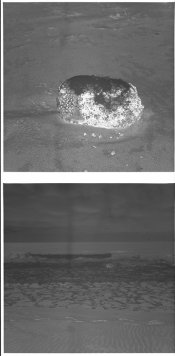
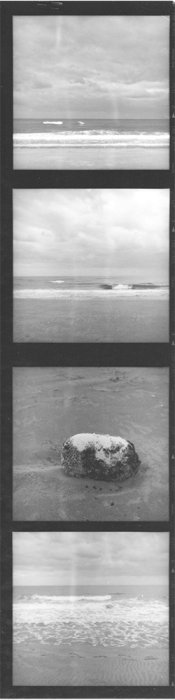
Problem scan_neg1b copy.jpgProblem_scan.1.jpg
 

zanxion72

Member
Allowing Ads
Joined
Oct 18, 2013
Messages
658
Location
Athens
Format
Multi Format
That's strange. I was to say that it was development, but these traces do not pass through the margins of the frames. It could be damaged emulsion. It does not look like a light leak and it stops sharply at the edges of the frames.
 

antmar

Member
Allowing Ads
Joined
Dec 13, 2011
Messages
174
Location
Athens Greece
Format
Multi Format
It looks like water or Photoflo stamps to me, made on the film when it was hanging to dry. Check the margins among the poses from an angle and they probably be there. You can try to wipe it carefully and see if you can remove them.
 
Last edited by a moderator:
OP
OP
mooseontheloose

mooseontheloose

Moderator
Allowing Ads
Joined
Sep 20, 2007
Messages
4,110
Location
Kyoto, Japan
Format
Multi Format
It looks like water or Photoflo stamps to me, made on the film when it was hanging to dry. Check the margins among the poses from an angle and they probably be there. You can try to wipe it carefully and see if you can remove them.

I've checked and there's nothing there. It's definitely within the image itself.
 

bdial

Subscriber
Joined
Jan 2, 2005
Messages
7,516
Location
North East U.S.
Format
Multi Format
Very odd looking.

Are these rotary processed?
How much time in the developer, and what kind of stop are you using (water or acid)?

Usually pressure marks or scratches caused by the camera are very straight.
Given that the marks are high-density, it could be a light leak, albeit a very weird light-leak. Anything loose at the front of the camera, or around the shutter/lens? Maybe a shutter blade is out of place? Reflections in the film chamber can cause weird patterns too.
 

Xmas

Member
Allowing Ads
Joined
Sep 4, 2006
Messages
6,398
Location
UK
Format
35mm RF
Very odd looking.

Are these rotary processed?
How much time in the developer, and what kind of stop are you using (water or acid)?

Usually pressure marks or scratches caused by the camera are very straight.
Given that the marks are high-density, it could be a light leak, albeit a very weird light-leak. Anything loose at the front of the camera, or around the shutter/lens? Maybe a shutter blade is out of place? Reflections in the film chamber can cause weird patterns too.

Open back and move the camera left to right and up and down in front of intense light source looking from behind for leak.

You might need to shoot half a roll with black tape over front and sides of camera.

Or ask vendor...
 
OP
OP
mooseontheloose

mooseontheloose

Moderator
Allowing Ads
Joined
Sep 20, 2007
Messages
4,110
Location
Kyoto, Japan
Format
Multi Format
Very odd looking.

Are these rotary processed?
How much time in the developer, and what kind of stop are you using (water or acid)?

No. I use stainless steel reels and tanks, regular inversion technique. I have to amend my original description, this roll was Acros, not Tri-X, developed in Finol 1+1+100 for 14 minutes at 22C. Two inversions every 30s, as recommended. Water stop and alkaline fix. Out of 20 rolls developed, only 3 exhibit this problem (1 Acros, 2 Tri-X).

Edit: Taking a look at notes this roll and the other problematic one, both had a water stop (most of the other rolls had a weak stop bath stop). The other roll that only has a single image with this problem had a weak stop bath. Two other rolls had a water stop but don't exhibit this problem. That said, maybe the water stop is what affected the rolls? I still don't understand how it would cause that pattern, but perhaps that's it?

"It looks like water or Photoflo stamps to me" +1, very likely, from my experience! Or what ever product you are using after final water wash

Do you mean drying marks? That's definitely not it. I've had those before (never like this, usually as drops), but these negs are clean, clean, clean - from all angles. I use distilled water and Drywel (Fuji's equivalent of Photoflo) on all negs. If you mean the photoflo or water could effect the density of the neg in some other way, please explain.
 
Last edited by a moderator:

gorbas

Subscriber
Allowing Ads
Joined
Dec 9, 2007
Messages
1,304
Location
Vancouver, Canada
Format
35mm Pan
It's hard & complicated to explain it for ESL (English second language) guy as me.
Sometimes you can have similar marks on negative when one part of film already started to dry and other part receives additional water, drops of water or water with final wash aid (sorry proper name for this processing step is escapes mi in the moment) Im using Agfa Agepon for this step and when I used Kodak Photo flow I have seen way more of them.
So, I have seen similar marks before, rarely, but I have seen them on 5x7', 4x5, 120 and 35mm films
If you look your whole 2nd picture I can clearly see vertical water path from the top to the bottom, with bright defining left and right line. Hard to get it on the film in horizontal position on the reel in the tank?
I can be wrong but....
 

MattKing

Moderator
Moderator
Allowing Ads
Joined
Apr 24, 2005
Messages
55,196
Location
Delta, BC Canada
Format
Medium Format
Do you pre-soak?

Could this be due to there being some residual water in your reels or tank when you loaded the film?
 

Kirks518

Member
Allowing Ads
Joined
Oct 5, 2013
Messages
1,494
Location
Flori-DUH
Format
Multi Format
Could it possibly be due to x-ray scanners at the airport(s)? Maybe the Tri-X is more susceptible to the x-rays. Just throwing that out there.
 
Joined
Sep 10, 2002
Messages
3,676
Location
Eugene, Oregon
Format
4x5 Format
Definitely a drip... Could be pre- or post-development, but I'm not sure which; getting the film wet in one spot before developing, too-short a presoak, etc. could cause areas of increased density like you show. However, uneven drying often can cause areas of increased density too and the longitudinal stripes point to this. Check that you're loading into totally dry reels and pre-soaking long enough (if you're pre-soaking) and that you are using the right dilution and long enough immersion times in your final wetting-agent/distilled water bath.

Good luck finding you're problem.

Doremus
 

Xmas

Member
Allowing Ads
Joined
Sep 4, 2006
Messages
6,398
Location
UK
Format
35mm RF
I've checked and there's nothing there. It's definitely within the image itself.

If it is not in the gaps between frames it is not a processing issue, is it in gaps my phone is not good enough to tell.
 
OP
OP
mooseontheloose

mooseontheloose

Moderator
Allowing Ads
Joined
Sep 20, 2007
Messages
4,110
Location
Kyoto, Japan
Format
Multi Format
I do not pre-soak, and the tank and reels are bone dry when I load film (I always use a blowdryer on everything to make sure, even after I've wiped the reels down). I develop two films in two-reel tanks.

I've just had a look at the negs under a different light source and there is an extremely faint line that continues through the gaps from one image to the other. It's really hard to see: IMG_3163.jpg

I've also been staring at the contact sheet from a different angle, and its clear that the center part of the image (for all 12 photos) is darker than the outer edges. It's equally so, by that I mean the darker centre takes up about half the image, and the lighter bits on the side 25% each.
 

drpsilver

Subscriber
Allowing Ads
Joined
Oct 31, 2005
Messages
702
Location
Los Altos, CA
Format
Multi Format
I do not pre-soak, and the tank and reels are bone dry when I load film (I always use a blowdryer on everything to make sure, even after I've wiped the reels down). I develop two films in two-reel tanks.

I've just had a look at the negs under a different light source and there is an extremely faint line that continues through the gaps from one image to the other. It's really hard to see: View attachment 120092

I've also been staring at the contact sheet from a different angle, and its clear that the center part of the image (for all 12 photos) is darker than the outer edges. It's equally so, by that I mean the darker centre takes up about half the image, and the lighter bits on the side 25% each.

20 Nov 2015

Rachelle:

Is there a difference is image sharpness between the center and edge of the negatives? This is beginning to sound like a pressure plate problem in the camera. All the negative you have shown look nicely developed.

Regards,
Darwin
 

Xmas

Member
Allowing Ads
Joined
Sep 4, 2006
Messages
6,398
Location
UK
Format
35mm RF
I do not pre-soak, and the tank and reels are bone dry when I load film (I always use a blowdryer on everything to make sure, even after I've wiped the reels down). I develop two films in two-reel tanks.

I've just had a look at the negs under a different light source and there is an extremely faint line that continues through the gaps from one image to the other. It's really hard to see: View attachment 120092

I've also been staring at the contact sheet from a different angle, and its clear that the center part of the image (for all 12 photos) is darker than the outer edges. It's equally so, by that I mean the darker centre takes up about half the image, and the lighter bits on the side 25% each.

A light leak through the lens shutter or focus mechanism could leave you with witness silver as you wind on do you case the camera or use a cap?

I'd email your vendor...
 
Joined
Sep 10, 2002
Messages
3,676
Location
Eugene, Oregon
Format
4x5 Format
If it is not in the gaps between frames it is not a processing issue, is it in gaps my phone is not good enough to tell.

Not necessarily. If whatever it was is accelerating development, then you wouldn't see much in the unexposed areas of the film. Maybe there is a bit of barely-detectable density increase there but it could also be undetectable.

...
I've just had a look at the negs under a different light source and there is an extremely faint line that continues through the gaps from one image to the other. It's really hard to see: View attachment 120092

I've also been staring at the contact sheet from a different angle, and its clear that the center part of the image (for all 12 photos) is darker than the outer edges. It's equally so, by that I mean the darker centre takes up about half the image, and the lighter bits on the side 25% each.

Oops, I see that I'm right...

@moose... As far-fetched as it seems, you could be dealing with an agitation issue for at least part of your problem. I know I had areas of increased density on the edges of 120 film when I was shooting it that could only be eliminated by a completely different agitation scheme than I had used for 35mm film. I spent an afternoon unspooling 120 film in the darkroom, exposing it to get an even overall fog and then developing it with a different agitation. I ended up adjusting both the volume I used and the vigor of the agitations; I was using Nikor SS tanks and reels then (haven't developed any roll film in years though).

I'm still betting on a drip, probably post-processing now, for the dark streaks on your negs, however. If the problem persists try a final rinse in wetting agent and distilled water for 2-3 minutes and then (contrary to the advice of many, but what I always do) squeegee your film between two clean fingers to get rid of the excess fluid before hanging to dry. Uneven drying will cause areas of increased density as well.

Best,

Doremus
 
OP
OP
mooseontheloose

mooseontheloose

Moderator
Allowing Ads
Joined
Sep 20, 2007
Messages
4,110
Location
Kyoto, Japan
Format
Multi Format
Ah, the mystery continues...

Well, I guess the first thing to do is rewash and dry the offending negs and see if that makes a difference.
However, I don't think this is the issue, it really does look like the streaks are part of the negative, but are too squiggly and random to be a camera issue, so it's probably something that happened at the development stage.

So, to sum up, if it's not a camera issue it could be:

1. a pre-soak/no pre-soak issue
2. an agitation issue
3. a stop bath issue
4. a final rinse/photoflo issue

If it is a camera issue, it could be:

1. the shutter (I do not put the lens cap on while I'm shooting - I'm afraid of losing it since they fall off so easily)
2. some other part of the camera leaking light
3. the pressure plate (for the density issue)

I bought the camera over a year ago so sending it back to the vendor is probably not a possibility, but I will contact him about it.

Even if I can discover exactly what the problem is, it does not solve the question as to why three films (out of 20) exhibit this problem, while one also has the density problem. My agitation scheme was identical for all, the temperatures were within 1-2 degrees of each other, the only variable was whether or not I used a full water stop or an acidic stop. Different films exhibit this problem, so film is not likely to be the culprit. If it is agitation, I would think that the streaks would be in the opposite direction, but I've been wrong before.

I think my next course of action will be to contact Wolfgang Moersch himself. I didn't want to bother him before trying to figure out this problem here first, but perhaps, if it is a development issue, he might recognize what the problem is. It is the first time I've used a staining developer, so maybe there's something I'm missing.
 

Andrew O'Neill

Moderator
Moderator
Joined
Jan 16, 2004
Messages
12,936
Location
Coquitlam,BC Canada
Format
Multi Format
Very odd. I doubt it's from x-ray damage, as I have had film damaged by x-ray and it doesn't look at all like that. I doubt it's bromide drag, as it usually starts at a point of high density and follows gravity...and the film has to sit for a while between agitation cycles... quite common with stand development. With roll film, it would run the other direction.
I would run another roll of film through the camera in question. Don't make any changes in how you process.
 
OP
OP
mooseontheloose

mooseontheloose

Moderator
Allowing Ads
Joined
Sep 20, 2007
Messages
4,110
Location
Kyoto, Japan
Format
Multi Format
I've got a roll in there now, I'm going to go finish it off today if my back will allow it (I've been suffering from a very painful herniated disc for the past week and a half).
 

markbarendt

Member
Allowing Ads
Joined
May 18, 2008
Messages
9,422
Location
Beaverton, OR
Format
Multi Format
Had to think about this a while.

Maybe it was a little bit of left over water from the previous run "prewetting" those streak areas before getting the developer in.

If I get in a hurry when tank developing prints I somewhat regularly don't get the tank truly dry and get very similar marks.
 

Xmas

Member
Allowing Ads
Joined
Sep 4, 2006
Messages
6,398
Location
UK
Format
35mm RF
I've got a roll in there now, I'm going to go finish it off today if my back will allow it (I've been suffering from a very painful herniated disc for the past week and a half).

Hope your disc better soon.
Could easily be a camera problem.
If you have not seen the problem from another camera I'd address the processing backlog.
Still worry about processing check each strip for this thread's artifice and backing paper transfer.
A vestigial leak could cause this problem, if there is not artifice in the edge rebates it is through the shutter or focus mechanism, but looks like the lens shutter has a problem.
 
Photrio.com contains affiliate links to products. We may receive a commission for purchases made through these links.
To read our full affiliate disclosure statement please click Here.

PHOTRIO PARTNERS EQUALLY FUNDING OUR COMMUNITY:


Ilford ADOX Freestyle Photographic Stearman Press Weldon Color Lab Blue Moon Camera & Machine
Top Bottom