• Welcome to Photrio!
    Registration is fast and free. Join today to unlock search, see fewer ads, and access all forum features.
    Click here to sign up

Calibrating Microtek F1(M1) under SilverFast with IT8 targets

A long time ago...

A
A long time ago...

  • 0
  • 0
  • 17
Boy and teddy, 1920's.jpg

A
Boy and teddy, 1920's.jpg

  • 1
  • 2
  • 39

Recent Classifieds

Forum statistics

Threads
201,202
Messages
2,820,388
Members
100,582
Latest member
v1photos
Recent bookmarks
0

Matus Kalisky

Member
Allowing Ads
Joined
Sep 29, 2006
Messages
630
Location
Aalen, Germa
Format
Multi Format
Hello,

after longer time - but with still the same problem. Namely - what I try to scan slides I get problem with strong color casts (towards red/magenta in shadows) and often reds going beyond the color gamut.

A bit on what I have done until now:

1)
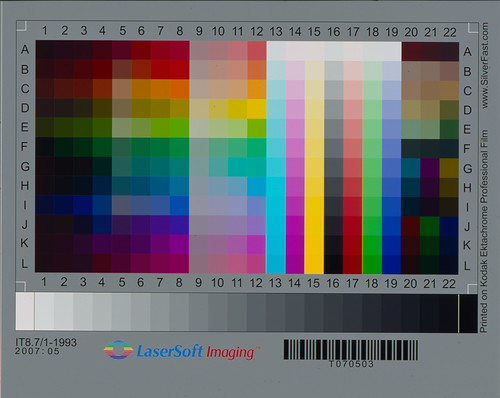
First I had only Ektachrome IT8 target that came with the SilverFast Studio version I have. The calibration process is simple and after calibration the scan of the calibration slide looks fine:

(the below example is the Ektachrome calibration slide)

2)
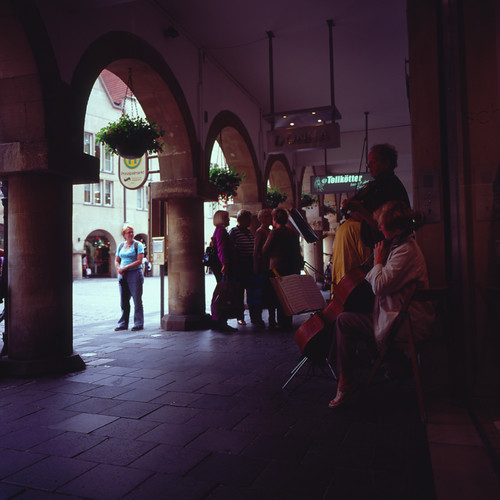
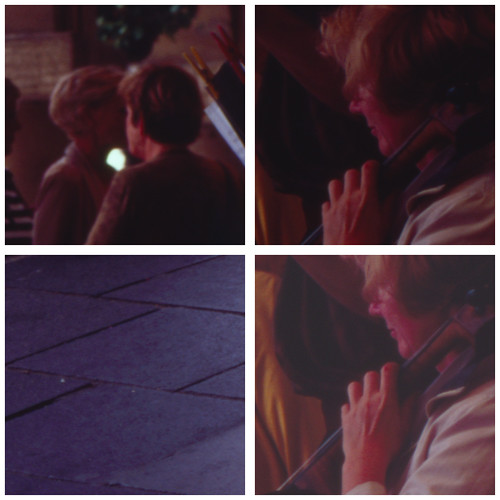
However - using the produced calibration profile with Fuji slide films (which I use nearly exclusively) produced scans that had very strong Magenta casts in shadows and blown-away reds (when strong)

(scan of Velvia100, ektachrome IT8 target used for calibration)

(few crops from the scan above)

3)
After some discussions over at LFF I understood that to scan Fuji slides with calibration made with Ektachrome is not a good idea as the base has different color. So I got a set of calibration IT8 targets from Wolf Faust - together with the data files.

4)
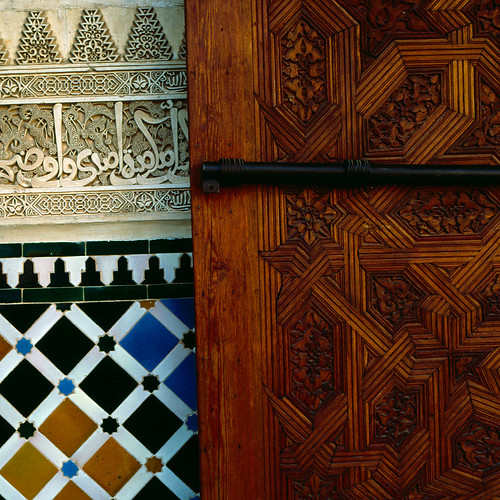
I calibrated the scanner againts all IT8 targets (4) to have calibration for practically any Fuji slide films. For testing I chose a less dramatic slide - one with neither too strong shadows or highlights or color saturation - to first see whether the "easy" scans will come out properly (or close to that). Below is a crop from a 6x6 slide - Provia 400X taken in shade in Alhambra, Spain.

I did try to scan the slide shown above - the overall magenta cast is much less, but the problem with red color remained.
So some success is there, but it is not the whole story yet. Back to "easy slide" now.

Please note that apart from calibration I did not apply any corrections with the scanner software. Also note that the preview looked the same as the final scan - I should have no miss-mach of profiles here (hopefully).

Scan without any adjustments (slightly brightened with Levels)
- notice the greenish cast in the upper left
- strong reddish cast to the wooden door (FAR from what the slide shows)

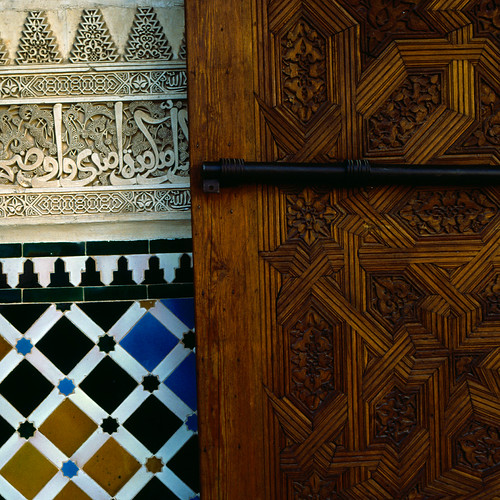
After following adjustments the scan is closer to reality (the wood is a bit too yellow):
Selective color::Reds
-- Cyan +28%
-- Magenta -22%
-- Yellow +27%

Selective color::Yellows
-- Cyan +18%
-- Magenta: +14%

Color Balance::Midtones
-- Yellow/Blue +10
(Preserve Luminosity ON)

Bottomline:
- I am still far from good scans. As soon as I take more demanding slide with higher contrast the situation is even worse, especially with colors that contain some red (read warm) - in particular faces, red sofas. Mild red gets turned to blown away red.
- I am looking for ideas what possibly could be wrong. Direct experience would be very valuable.

I rally hope to find some help here.
 

MaxMad

Member
Allowing Ads
Joined
Nov 10, 2010
Messages
2
Dear Matus,

There are few things you should consider.

-The IT8 calibration is performed using an IT8 target (which is standard compliant) and a reference file with values for every color patch in your target.

It means the scanner is calibrating by comparing the values of the color patches to the values found in the reference file. Given this, it is irrelevant if you calibrate using a Fuji or a Kodak target because you are not calibrating the specific type of emulsion (Be ware this does not apply to Kodachromes which have different characteristics than the rest of reversal films).

This targets age with time and should be replaced about every two or three years depending on many factors (temp, humidity, light, etc..)

From the picture you have posted of the target, I could not see any over-saturated red or magenta.

You mentioned a second calibration using another set of new targets but the results did not change much.

You also said there wasn't a difference between preview and endscan.

This indicates the calibration is performed correctly by the scanner.
It also indicates that your slides might have this magenta cast.

You can let this slide be scanned by a professional scan service without corrections to see if the slide does present this color tonality.

You might also make sure you calibrate your monitor to make sure colors are displayed closely to what the scanner sees.

I have two different monitors and your pictures look quite different on both, especially the one detail with the door and the tiles, your corrected picture look more unnatural to me than the one uncorrected.

Best

MaxMad
 
Last edited by a moderator:

Diapositivo

Subscriber
Allowing Ads
Joined
Nov 1, 2009
Messages
3,257
Location
Rome, Italy
Format
35mm
Matus, it is not clear from your post if you profiled your scanner before profiling the film.

In VueScan (and I do believe also in Silverfast) there are two different procedures.

You first use a IT8 target to profile your scanner. This creates a profile of how the scanner "responds" to film colour.

Only then, and using a different procedure, you calibrate your film. This is a profile of how the film "responds" to light.

If you profile your film without profiling your scanner first, you are going to have unsatisfactory results.

If you profile your scanner only, in theory you should have the typical character of the film rendered by the scanner. If Velvia has a "bluish green", bluer than "real green", you should obtain a scan with "Velvia greens" rather than "real greens".

After you profile for your film, let's say Velvia, you obtain a scan of a Velvia slide which shows "real greens" rather than "Velvia greens".

Your scanner profile aims at obtaining scans which are "true to your slide", and your film profile (when used with a profiled scanner) aims at obtaining scans which are "true to life".

In VueScan you can scan an "Image" if you want a scan "true to your slide" and a "Slide film" if you want a scan "true to life". Scanning an "Image" will only make use of a scanner profile. Scanning a "Slide film" will also make use of a film profile.

In VueScan, if you generate a raw file, scanning for "Image", when seen in Lightroom, will give a different image than scanning for "Slide film" with a film profile. I suppose it is not the raw data which is different, but the profiles which are different, and are rendered by Lightroom.

In theory, scanner profiling can be performed with ANY IT8 target. Any transparent IT8 target from Faust will correctly profile a film scanner.

In theory, film profiling (whether slide or negative) is performed by taking pictures, under certain lighting conditions, of an opaque target and then using the obtained film (slide or negative) to obtain a film profile which is valid under those same light conditions.

In practice, I see that Faust gives different IT8 profiles for different kind of emulsions.

In practice, people seem to make slide film profiles by using Faust's IT8 profiles, rather than taking pictures of opaque targets.

I am trying to understand how valid would be film profiles obtained by using Faust IT8 targets rather than opaque targets.

Fabrizio
 
Last edited by a moderator:

Diapositivo

Subscriber
Allowing Ads
Joined
Nov 1, 2009
Messages
3,257
Location
Rome, Italy
Format
35mm
I also would like like to add that, if I understand correctly the fuzzy VueScan instruction and if what I wrote above is correct, the common saying that there are no film targets for negative films, while there would be for slide film, is just plain wrong.

The common transparent (slide) IT8 targets, like Faust's ones, are target for scanner profiling, not for film profiling.

They work on the principle that each colour patch is "known" and described on the text file accompanying each target. By confronting what the colour patch "is" and what the scanner "sees" you can derive a scanner profile.

In order to have a film profile, I understand that one cannot escape taking pictures of an opaque target and then profiling the obtained pictures. The procedure is basically the same for slides and negatives. So there are no IT8 targets for slide films just like there are not for negatives. You have to make them yourself in your working environment and they are valid for those light conditions only.

One cannot "legitimately" use an IT8 target for making a film profile. There is no way the target, and the target description file, can tell you how the film responds to light.

What happens in real life is probably that profiling only the scanner gives already good results with slides, but leaves you in the dark with negatives.

On the other hand, using transparent IT8 targets to create a "film profile", however "wrong" the procedure is, does not create weird looking colours, so people think this is the right procedure to create film profiles.

This leads to the common place that targets for slide profiling exist while targets for negative don't exist. In fact, IT8 slides are for scanner profiling only.

Beware, this is what I am gathering, I am not stating this as if it was certainly true, and I am open to corrections.

Fabrizio
 
OP
OP

Matus Kalisky

Member
Allowing Ads
Joined
Sep 29, 2006
Messages
630
Location
Aalen, Germa
Format
Multi Format
Thank you for you detailed answers and points raised. Please keep your ideas coming and also keep questioning my approach. I am far from experienced scanner operator.

I will try to clarify what I have done:

First of all - I am not after a film profiles. I want (and did) calibrate the scanner with few IT8 targets from Wolf. To my understanding one either uses scanner profile during scanning OR film profile applied in post processing to RAW scan (RAW means here no particular scanner profile was used). I may be wrong, but that is what how I understand it now.

I want from the scanner:
- to scan the image
- to apply the scanner profile
- save it as a TIFF
=> this 3 steps should deliver image without any significant color casts or gamut troubles.
I do not want to use ANY additional color adjustments by the scanner itself as I have more control in Photoshop.

Second - Vuescan is completely out of game - I considered it, but just got reply from Ed that Vuescan does not support either AF nor MF with Microtek F1/M1 what yields into soft scans. From now on everything will happen with SilverFast.

Third - single scanner calibration made with a particular IT8 target (positive slide - Ektachrome, or some Fuji) is NOT going to give color correct scans with all positive films - the reason is that different films have different film base what means have a global (systematical) offset in some direction color-wise. Still the situation is not so bad - with 3 or 4 IT8 targets one covers practically all current slide films.

Fourth - the calibration target are brand new. I use color calibrated (with Spyder 3) monitor (NEC 2170NX S-IPS LCD panel) which proved more than good enough.

Fifth - I speak only about positive slides. I keep the negatives aside completely here.

The scanner calibration:
Of course - I first calibrated the scanner before I would scan the slides. During the calibration the scanner scans the target, overlays it with a grid (position can be adjusted by hand - sometimes necessary) and asks for calibration data. Then it produces a profile.

Positive film scanning
Depending on the film type one chooses the correct scanner calibration file which will be used internally to convert the data. The scan is at the end converted to Adobe 1998 RGB and saved as a TIFF file.

-> The scan of the IT8 target
I agree - there is no sign of color cast. It looks exactly the way it should, as the a scanner profile made with this very same target was used. If I would change the scanner profile to different one the target would gain a cast. So I agree that the calibration should be actually OK.

However - as soon as I scan something else than the target - I get the before mentioned troubles.

- Diapositivo -
I agree with you on the usage of IT8 profiles.

- MaxMad -
When I scan some particular slide several times while changing the scanner profile the final image does indeed change, but even with the correct scanner profile it does not look correct.

I will make more detailed systematical study over next few days and hope to find some pattern. I will be happy to implement your ideas of course.
 

Diapositivo

Subscriber
Allowing Ads
Joined
Nov 1, 2009
Messages
3,257
Location
Rome, Italy
Format
35mm
Third - single scanner calibration made with a particular IT8 target (positive slide - Ektachrome, or some Fuji) is NOT going to give color correct scans with all positive films - the reason is that different films have different film base what means have a global (systematical) offset in some direction color-wise. Still the situation is not so bad - with 3 or 4 IT8 targets one covers practically all current slide films.

This is one of the problems I have with the theory, and I would be glad if anybody could clarify.

In theory, scanner calibration should not and cannot be dependent on the target support. Whatever the systematical offset of the film base, the data attached to the target allow the analysis of the difference between what the scanner "sees" and what the film base "is". The different offset of different film bases should, in principle, only concern film response to light and should be dealt with film profiling.

This does not fit with the practice, i.e. that Faust produces several IT8 targets.

Unless any of those targets is fit for scanner calibration, and each target is fit for calibration of its own family of film.

Maybe - just an hypothesis - your problem is the moment of the definition of the colour space. If you scan with a different scanner setting of colour profile (let's say sRGB) and then only after you obtain the TIFF you apply the colour space AdobeRGB, let's say in Photoshop, the software is going to recalculate all values from sRGB to AdobeRGB and this will - I guess - increase saturation and a side effect could be that some slightly off-neutral parts of the picture will have an enhanced colour cast, such as the magenta cast in the cobbles.

You should verify that Silverfast is set so as to produce a file in the AdobeRGB colour space. That means that the scanner software will calculate the colour value in the AdobeRGB colour space.

I know you use Silverfast, I only have VueScan so I use VueScan terminology so that you can find the equivalent term, option, setting in Silverfast.

In VueScan I have those different settings:

Scanner color space, scanner ICC profile, scanner IT8 data, those are for scanner profiling;

[we overlook for the moment the film profile settings]

Output color space: this we should set to AdobeRGB because we ultimately want to create images described in the AdobeRGB colour space and we don't want to have colour space conversions in our workflow.

Monitor color space: if you load your monitor profile at startup, this configuration option should be set to sRGB and NOT to your monitor colour profile, although you have that possibility. When you load your monitor profile at startup at system level, every application will be "colour managed" for your monitor. So if you pass a second time a monitor profile to any program you are profiling "twice" and certainly obtaining wrong colours, and maybe this can explain the colour shifts you are experiencing.

Neither your scanning software nor your editing software should do anything to load your monitor profile, if you load it at startup.

Fabrizio
 
OP
OP

Matus Kalisky

Member
Allowing Ads
Joined
Sep 29, 2006
Messages
630
Location
Aalen, Germa
Format
Multi Format
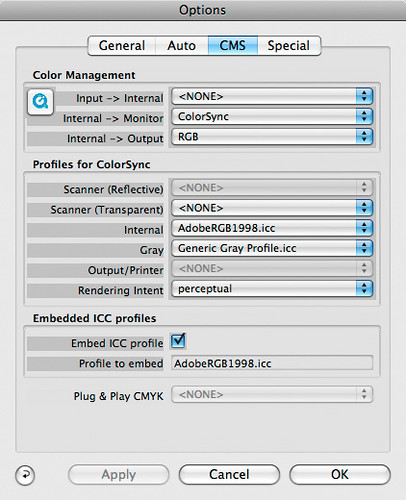
Just a small update for today - here are the SilverFast Color settings I used to produce a RAW scan of an IT8 target - that is a scan without ANY scanner profile used. This scan will be used by the "Lprof" to produce a scanner profile for this particular target.

I use similar settings for the scanner calibration with SilverFast - the only difference is that the field "Scanner (Transparent)" does not have to be set to <NONE> as the newly created profile is not dependent on existing profiles. Also, once this field is set to some particular profile the "Input -> Internal" field is set to ColorSync instead of <NONE>.


Anybody having experience with SilverFast has any idea what could be worng here (or somewhere else) ?

Today I have tried to change the Gamma setting (from 1.8 to 2.4). As the value of 2.4 was suggested on Lprof webpage. Of course I had to recreate the profile for this new gamma. However the behavior remained: After calibrating the scanner with a particular target I scanned the target - all looks fine. However scanning a film produced again results with heavy cast as before ... :surprised:
 

Diapositivo

Subscriber
Allowing Ads
Joined
Nov 1, 2009
Messages
3,257
Location
Rome, Italy
Format
35mm
Considering that this is the scan that you are producing in order to calibrate your scanner, I would scan without any profile of any kind applied.

So I would scan with all the options set to <NONE> and I would not embed any ICC profile (bottom of configuration window).

After you have created your scanner profile you want to embed this to every raw scan so that, down the line, the raw interpreter "tweaks" the rendering to compensate for the "deviations" of your scanner.

I don't know Silverfast and I am not "fluent" in the color management of MacOS but I would say that you don't have to load an ICC profile for your monitor if you load it (as likely) at system startup time.

So, after you created your scanner profile, my guess is that for creating subsquent scans in the AdobeRGB space your options, from above to bottom, should be:

<NONE>
<NONE>
AdobeRGB (this should instruct scanner to describe colour in the AdobeRGB space)

<NONE>
<NONE>
<NONE>
<NONE>
<NONE>
perceptual (anyway your scanner should in principle never perform any color space conversion)

Embed ICC profile (ticked)
Profile to embed: MyScannerProfile.icc (this instruct the scanner to attach a scanner profile to any scan so that, if you scan raw, the raw developer can compensate for your scanner behaviour).

I would not swear on what above though

Fabrizio
 

Diapositivo

Subscriber
Allowing Ads
Joined
Nov 1, 2009
Messages
3,257
Location
Rome, Italy
Format
35mm
Matus

I am reading this interesting text about how to obtain a TIFF file to use with a scanner profiling program:

http://www.jingai.com/scanningguide/profiling slides.html

The text refers to VueScan and Scarse (a scanner profiling program), but its general considerations should be valid for any scanning software and any scanner profiling software.

What I am noticing is that the author instructs to:

- Lock exposure and use the same exposure for the normal scans
- No problem in preparing the TIFF for profile with the Multiexposure option, if one uses it for normal scans;
- Adopting "Output color space" as DeviceRGB. This has a broader gamut than AdobeRGB. If I leave Output color space as AdobeRGB I see some pixels of the scan will be "out of gamut". Adopting DeviceRGB cures the problem.
- Attaching a profile to the TIFF instructing Photoshop etc. that the colour space is the "scanner colour space" and not AdobeRGB.

The TIFF so obtained will be passed to a scanner profiling program. I suppose that it would work with scarse, Argyll, Lprof and others in the same way.

What I have to understand now is what should I do in scanner profiling, considering that the images I produce must be saved in the AdobeRGB colour space.

When scanning directly in TIFF probably the best option would be to scan every scan in the DeviceRGB colour space, generate a tagged file, and have Photoshop generate a TIFF in the AdobeRGB colour space converting using the perceptual method. This would make every scan consistent with the scan adopting during scanner profile creation.

When the scan generates a raw file, this being a raw file should not have any "gamut" associated. I a quite confused here about what happens when I change the "output colour space" with a raw scan. I shall have to make some experiments.

Fabrizio
 

jeffreyg

Subscriber
Allowing Ads
Joined
Jun 12, 2008
Messages
2,756
Location
florida
Format
Medium Format
I don't scan color but I do scan b&w with an Epson 4870 and SilverFast Studio with excellent results. When something doesn't seem to be right I go to the tool icon and delete the preferences. Since you have been trying different approaches, perhaps deleting the preferences and starting over with your new settings will work.

http;//www.jeffreyglasser.com/
 

Zygomorph

Member
Allowing Ads
Joined
Jan 12, 2011
Messages
41
Location
Brooklyn NY
Format
Med. Format RF
I know this is a super-old thread, but I think it's kind of a crusade of mine to encourage everybody writing on the topic of input calibration to read the ICC's FAQ: ICC Frequently asked questions

In particular, it should be noted that, in principle, the function of calibration targets when used as input profiles for devices like scanners is totally independent of the film stock that it's printed on. I.e., it is unnecessary to have an IT8 target printed on Fujichrome in order to scan Fujichrome slides, e.g. (Which is why, incidentally, I use my scanner profile when working with C41 negs. It makes color correction much, much easier, and much, much better, since any color casts that the scanner is imparting will be amplified by the contrast curves required to "print" the negatives.)

I would make sure that your workflow is properly tagging your scans with your scanner profile, and optionally, whether it is converting it to a standard workspace of your choice (e.g. Adobe1998 or whatever floats your boat).

If your scans don't resemble what you see on your slides, you have to consider the conditions under which you are viewing your slides. That is, if your screen is calibrated to a temperature of D65, then you need to view your slides with that color light in order for them to look the same.

Consider also that slides DO age and may have shifted, and that some of them start out with very funny color casts to begin with (e.g. Kodachrome, or Velvia... ;-) AND that the issue of color correction is totally unrelated to device profiling.
 
Photrio.com contains affiliate links to products. We may receive a commission for purchases made through these links.
To read our full affiliate disclosure statement please click Here.

PHOTRIO PARTNERS EQUALLY FUNDING OUR COMMUNITY:


Ilford ADOX Freestyle Photographic Stearman Press Weldon Color Lab Blue Moon Camera & Machine
Top Bottom